



Filter by
System of Measurement
Output Current
Output Voltage

Output Power
Mounting Location
Voltage
Electrical Phase
Output Voltage Type
Maximum Output Noise Peak-to-Peak
Input Plug Connection

Output Current Type
Input Current @ Voltage
Input Number of Blades
Number of Output Power Connections
Certification
Electrical Connection
Power
U.S.–Mexico–Canada Agreement (USMCA) Qualifying
DFARS Specialty Metals
Number of Mounting Holes
Rack-Mount Power Supplies
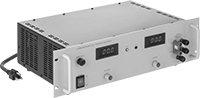 |
With Digital Display |
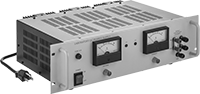 |
With Analog Display |
Mount these power supplies into standard 19”-wide electronics racks, which can hold multiple electronic devices and keep your benchtop clear. These power supplies change AC voltage to DC voltage to power highly sensitive audio, measuring, and testing devices while keeping electronic interference—known as output or ripple noise—from passing on to the device. The lower the output noise value, the less interference the power supplies will create.
Designed with linear voltage regulation, these power supplies produce the same voltage regardless of changes in the input voltage or the amount of current being drawn. They are also known as linear power supplies. As they send power to a device, they use remote voltage sensing to check for any drops in the voltage. If the voltage dips, they can compensate with extra power, so connected devices always receive the correct voltage.
If you exceed the maximum current or load, these power supplies will shut down to protect both the power supply and the connected device.
View the output on a digital or analog display.
Digital Display—Digital displays are often easier to read than analog displays, so you can quickly see if you need to make adjustments.
Analog Display—Analog displays are better than digital displays for monitoring fast output changes, such as dips and spikes.
Output | Mounting | ||||||||||||||||||||||||||||||||||||||||||||||||||||||||||||||||||||||||||||||||||||||||||||||||||
|---|---|---|---|---|---|---|---|---|---|---|---|---|---|---|---|---|---|---|---|---|---|---|---|---|---|---|---|---|---|---|---|---|---|---|---|---|---|---|---|---|---|---|---|---|---|---|---|---|---|---|---|---|---|---|---|---|---|---|---|---|---|---|---|---|---|---|---|---|---|---|---|---|---|---|---|---|---|---|---|---|---|---|---|---|---|---|---|---|---|---|---|---|---|---|---|---|---|---|---|
Display Type | No. of Power Connections | Connection | Voltage | Current | Power | Max. Noise Peak-to-Peak | Ht. | Wd. | Dp. | Electrical Protection Type | Output Connection Location | Output Features | Fasteners Included | Number of Holes | Each | ||||||||||||||||||||||||||||||||||||||||||||||||||||||||||||||||||||||||||||||||||||
Single Phase—120, 240V AC Input Voltage | |||||||||||||||||||||||||||||||||||||||||||||||||||||||||||||||||||||||||||||||||||||||||||||||||||
| Digital | 1 | Standard Banana Socket | 0V DC to 20V DC | 0 amp to 25 amp | 0 W to 500 W | 8 mV DC | 5.8" | 19" | 12.8" | Overcurrent, Overload | Front | Constant Current, Constant Voltage, Remote Voltage Sensing | No | 4 | 7686K41 | 0000000 | |||||||||||||||||||||||||||||||||||||||||||||||||||||||||||||||||||||||||||||||||||
| Analog | 1 | Standard Banana Socket | 0V DC to 30V DC | 0 amp to 12 amp | 0 W to 360 W | 8 mV DC | 5.8" | 19" | 13.5" | Overcurrent, Overload | Front | Constant Current, Constant Voltage, Remote Voltage Sensing | No | 4 | 7686K28 | 000000 | |||||||||||||||||||||||||||||||||||||||||||||||||||||||||||||||||||||||||||||||||||
Device-Prioritizing Rack-Mount Ethernet Switches
Ethernet Switches with Power over Ethernet (PoE) Type 2
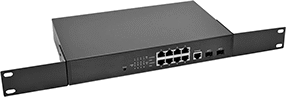 | 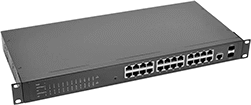 |
8 Ethernet Sockets with 2 SFP Sockets | 24 Ethernet Sockets with 2 SFP Sockets |
Ethernet | Mounting | ||||||||||||||||||
|---|---|---|---|---|---|---|---|---|---|---|---|---|---|---|---|---|---|---|---|
No. of Sockets | Connection | Power Over Ethernet Type | No. of SFP Sockets | Transmission Speed | Ht. | Wd. | Dp. | Housing Material | Output Power, W | Voltage, V AC | Fasteners Included | Hole Lg. x Wd. | Electrical Connection | IEC Connector Type | Power Cord Lg., ft. | Specs. Met | Each | ||
| 8 | RJ45 | Active | 2 | 10 Mbit/s, 100 Mbit/s, 1 Gbit/s | 1 3/4" | 11" | 7 1/16" | Metal | 30 | 100 to 240 | No | 0.35" × 0.24" | Straight Blade | C14 | 5 | IEEE 802.1q | 9507N12 | 0000000 | |
| 24 | RJ45 | Active | 2 | 10 Mbit/s, 100 Mbit/s, 1 Gbit/s | 1 3/4" | 17 5/16" | 8 3/16" | Metal | 30 | 100 to 240 | No | 0.47" × 0.28" | Straight Blade | C14 | 5 | IEEE 802.1q | 9507N11 | 000000 | |
Rack-Mount Ethernet Switches
Ethernet Switches with Power Over Ethernet (PoE) Type 2
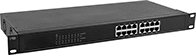 |
16 Sockets |
Switches with Power over Ethernet (PoE) can send both data and electricity through a single cord to PoE-compatible devices, so you won’t have to run a separate power cord. If a device doesn’t support PoE, the switch only sends data to prevent damage. Their 30W output is often used to power advanced surveillance systems, wireless access points, and lighting.
Ethernet | Mounting | ||||||||||||||||||
|---|---|---|---|---|---|---|---|---|---|---|---|---|---|---|---|---|---|---|---|
No. of Sockets | Power Over Ethernet Type | Connection | Transmission Speed | Ht. | Wd. | Dp. | Housing Material | Output Power, W | Voltage, V AC | Fasteners Included | Hole Lg. x Wd. | Electrical Connection | IEC Connector Type | Power Cord Lg., ft. | Certification | Each | |||
| 16 | Active | RJ45 | 10 Mbit/s, 100 Mbit/s, 1 Gbit/s | 1 3/4" | 17 3/8" | 8 1/8" | Metal | 30 | 100 to 240 | No | 0.47" × 0.26" | Straight Blade | C14 | 5 | CE Marked | 9293N112 | 0000000 | ||
