











Filter by
Manufacturer Series
Manufacturer Model Number
Microcontroller Model Number
System of Measurement
Connects To

Electrical Connection

Development Board Type

Operating Voltage
Compartment Type


Thickness
Clock Speed
Header Gender

Color

U.S.–Mexico–Canada Agreement (USMCA) Qualifying
DFARS Specialty Metals
Development Boards
Single Core Arduino Boards
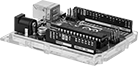 |
Development Board With Headers—Boards with headers are good for making quick connections. Plug them in directly to breadboards, or connect them using jumper wire.
No. of Configurable Inputs/Output | Development Board With Headers | ||||||||||
|---|---|---|---|---|---|---|---|---|---|---|---|
Mfr. Model No. | Operating Voltage, V DC | Electrical Connection | Total | Digital (Input/Output) | PWM (Output) | Analog (Input) | Lg. | Wd. | Each | ||
| Mega 2560 Rev3 | 5 | USB-B | 54 | 54/54 | 15 | 16 | 4" | 2 1/8" | 1387N16 | 000000 | |
Development Board Holders
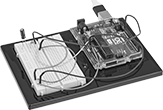 |  |
Shown with Development Boards Installed (Not Included) |
Keep a development board and a breadboard in one handy spot for prototyping. With multiple standoffs, these holders are for use with a development board that has Arduino mounting hole patterns. They can easily hold a breadboard with 400 contact points.
Breadboard Compartment | Development Board Compartment | Overall | ||||||||||||||
|---|---|---|---|---|---|---|---|---|---|---|---|---|---|---|---|---|
For Manufacturer | For Manufacturer Series | No. of Compartments | Compartment Type | Lg. | Wd. | Lg. | Wd. | Lg. | Wd. | Thk. | Material | Color | Mounting Fasteners Included | Each | ||
| Arduino | Due, Leonardo, Mega, Uno, Zero | 2 | Breadboard, Development Board | 3 3/8" | 2 1/4" | 2 13/16" | 2 3/16" | 4 1/4" | 6" | 1/4" | ABS | Black | Yes | 5495N111 | 00000 | |
DIN Rail Mounting Adapters for Development Boards
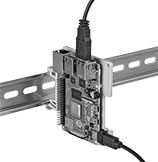 | 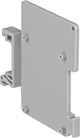 |
Protect development boards from dust, water, and debris by mounting them to DIN rails inside control cabinets. These adapters have an open-air design to keep boards cool and prevent them from overheating. They attach perpendicularly to DIN rails, taking up less space in your setup. Use the included cable ties to secure your cords to the mount and keep connections free from strain.
For DIN Rail | |||||||||||
|---|---|---|---|---|---|---|---|---|---|---|---|
For Mfr. Series | Ht. | Wd. | Dp. | Ht, mm | Trade Size | Material | Mounting Fasteners Included | Includes | Each | ||
| Arduino Uno, Mega | 4 7/8" | 3 1/2" | 7/16" | 35 | 3 | Nylon 6/6 | Yes | Cable Ties | 7411N13 | 00000 | |
