













Filter by
Communication Protocol

Electrical Connection


Signal Converter Type

U.S.–Mexico–Canada Agreement (USMCA) Qualifying
Export Control Classification Number (ECCN)
DFARS Specialty Metals
Certification
IO Link Connectors
 |
Components Sold Separately |
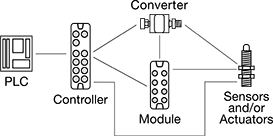
Create a system of sensors and actuators that you can remotely update, view measurements from, and receive error messages in real time. IO Link systems minimize downtime by locating issues such as cut cables or dirty sensors quickly. They send only digital signals to your PLC, regardless of whether your sensors and actuators send digital or analog signals. Because these systems send digital signals, they’re more reliable and less prone to data error and signal loss than analog signals. It also means you don't have to use expensive shielded cables since they resist EMI.
When retrofitting an existing system, you'll need to make sure your PLC can incorporate IO Link. Check with your PLC manufacturer—most have hardware that allows you to upgrade your PLC to run IO Link.
Note: Sockets may have extra holes on their face that are not used.
Controllers
 |  |
Surface Mount | DIN-Rail Mount |
Controllers communicate between your sensors and actuators and your PLC. They are required. Setting memory automatically stores your settings and restores them once your device is back online. This eliminates needing to program a device again when you replace or fix it.
Surface Mount—Surface mount controllers let you mount controllers on equipment such as tanks and conveyors. By mounting them on your equipment, you save space in your control cabinet. They use M12 connectors.
DIN-Rail Mount—DIN-rail mount controllers are designed to mount inside your control cabinet, so you can access all your process control devices in a central location. They include RJ45 Ethernet ports to support JSON and MQTT IoT (Internet of Things) protocols, allowing you to link the system directly to your web server to upload information to the Cloud. Connect these ports with RJ45 cords.
IP66 Enclosure Rating—IP66 rated components withstand washdowns.
IP67 Enclosure Rating—IP67 rated components can be temporarily submerged in water.
IP69K Enclosure Rating—IP69K rated components hold up to high-pressure and high-temperature washdowns.
Enclosure Rating—IP rated components block out dust and withstand some water, so they do not require an enclosure. Ports that are unused must be capped to maintain their rating.
Input | Output | ||||||||||||||||||||||||||||||||||||||||||||||||||||||||||||||||||||||||||||||||||||||||||||||||||
|---|---|---|---|---|---|---|---|---|---|---|---|---|---|---|---|---|---|---|---|---|---|---|---|---|---|---|---|---|---|---|---|---|---|---|---|---|---|---|---|---|---|---|---|---|---|---|---|---|---|---|---|---|---|---|---|---|---|---|---|---|---|---|---|---|---|---|---|---|---|---|---|---|---|---|---|---|---|---|---|---|---|---|---|---|---|---|---|---|---|---|---|---|---|---|---|---|---|---|---|
Communication Protocol | No. of Device Ports | Total No. of RJ45 Connections | Total No. of M12 Connections | Type | Signal | Voltage, V DC | No. of | Type | Signal | Voltage, V DC | Current, mA | No. of | Operating Voltage, V DC | Certification | Each | ||||||||||||||||||||||||||||||||||||||||||||||||||||||||||||||||||||||||||||||||||||
Surface Mount | |||||||||||||||||||||||||||||||||||||||||||||||||||||||||||||||||||||||||||||||||||||||||||||||||||
IP66, IP67 | |||||||||||||||||||||||||||||||||||||||||||||||||||||||||||||||||||||||||||||||||||||||||||||||||||
| IO Link, Ethernet/IP | 4 | — | 7 | Digital | PNP | 0 to 30 | 8 | Digital | PNP | 30 | 0.3 amp | 4 | 20 to 30 | UL Listed, C-UL Listed, CE Marked | 7585N13 | 0000000 | |||||||||||||||||||||||||||||||||||||||||||||||||||||||||||||||||||||||||||||||||||
| IO Link, Ethernet/IP | 8 | — | 11 | Digital | PNP | 0 to 30 | 16 | Digital | PNP | 30 | 0.3 amp | 8 | 20 to 30 | UL Listed, C-UL Listed, CE Marked | 7585N14 | 000000 | |||||||||||||||||||||||||||||||||||||||||||||||||||||||||||||||||||||||||||||||||||
| IO Link, Profinet | 4 | — | 7 | Digital | PNP | 0 to 30 | 8 | Digital | PNP | 30 | 0.3 amp | 4 | 20 to 30 | UL Listed, C-UL Listed, CE Marked | 7585N11 | 000000 | |||||||||||||||||||||||||||||||||||||||||||||||||||||||||||||||||||||||||||||||||||
| IO Link, Profinet | 8 | — | 11 | Digital | PNP | 0 to 30 | 16 | Digital | PNP | 30 | 0.3 amp | 8 | 20 to 30 | UL Listed, C-UL Listed, CE Marked | 7585N12 | 000000 | |||||||||||||||||||||||||||||||||||||||||||||||||||||||||||||||||||||||||||||||||||
IP66, IP67, IP69K | |||||||||||||||||||||||||||||||||||||||||||||||||||||||||||||||||||||||||||||||||||||||||||||||||||
| IO Link, Ethernet/IP | 4 | — | 7 | Digital | PNP | 0 to 30 | 8 | Digital | PNP | 30 | 0.3 amp | 4 | 20 to 30 | UL Listed, C-UL Listed, CE Marked | 7585N19 | 000000 | |||||||||||||||||||||||||||||||||||||||||||||||||||||||||||||||||||||||||||||||||||
| IO Link, Ethernet/IP | 8 | — | 11 | Digital | PNP | 0 to 30 | 16 | Digital | PNP | 30 | 0.3 amp | 8 | 20 to 30 | UL Listed, C-UL Listed, CE Marked | 7585N21 | 000000 | |||||||||||||||||||||||||||||||||||||||||||||||||||||||||||||||||||||||||||||||||||
| IO Link, Profinet | 4 | — | 7 | Digital | PNP | 0 to 30 | 8 | Digital | PNP | 30 | 0.3 amp | 4 | 20 to 30 | UL Listed, C-UL Listed, CE Marked | 7585N17 | 000000 | |||||||||||||||||||||||||||||||||||||||||||||||||||||||||||||||||||||||||||||||||||
| IO Link, Profinet | 8 | — | 11 | Digital | PNP | 0 to 30 | 16 | Digital | PNP | 30 | 0.3 amp | 8 | 20 to 30 | UL Listed, C-UL Listed, CE Marked | 7585N18 | 000000 | |||||||||||||||||||||||||||||||||||||||||||||||||||||||||||||||||||||||||||||||||||
DIN-Rail Mount | |||||||||||||||||||||||||||||||||||||||||||||||||||||||||||||||||||||||||||||||||||||||||||||||||||
IP20 | |||||||||||||||||||||||||||||||||||||||||||||||||||||||||||||||||||||||||||||||||||||||||||||||||||
| IO Link, Ethernet/IP | 8 | 3 | — | Digital | PNP | 0 to 30 | 8 | Digital | PNP | 30 | 0.3 amp | 8 | 20 to 30 | UL Listed, C-UL Listed, CE Marked | 7585N15 | 000000 | |||||||||||||||||||||||||||||||||||||||||||||||||||||||||||||||||||||||||||||||||||
| IO Link, Profinet | 8 | 3 | — | Digital | PNP | 0 to 30 | 8 | Digital | PNP | 30 | 0.3 amp | 8 | 20 to 30 | UL Listed, C-UL Listed, CE Marked | 7585N16 | 000000 | |||||||||||||||||||||||||||||||||||||||||||||||||||||||||||||||||||||||||||||||||||
 |
For Plugs |
 |
For Sockets |
Expansion Modules
 |
Expansion modules increase the number of inputs and outputs in your IO Link system, so you can add more sensors and actuators to your network. Connect multiple devices to each expansion module using M12 connectors, without needing to wire your devices inside a control cabinet. They transmit signals from multiple devices with a single cord. Expansion modules are optional, but when used, they must connect to a controller. Mount them on your equipment to save space in your control cabinet.
IP65 Enclosure Rating—IP65 rated components can be rinsed.
IP67 Enclosure Rating—IP67 rated components can be temporarily submerged in water.
IP69K Enclosure Rating—IP69K rated components hold up to high-pressure and high-temperature washdowns.
Enclosure Rating—IP rated components block out dust and withstand some water, so they do not require an enclosure. Ports that are unused must be capped to maintain their rating.
Input | Output | ||||||||||||||||||||||||||||||||||||||||||||||||||||||||||||||||||||||||||||||||||||||||||||||||||
|---|---|---|---|---|---|---|---|---|---|---|---|---|---|---|---|---|---|---|---|---|---|---|---|---|---|---|---|---|---|---|---|---|---|---|---|---|---|---|---|---|---|---|---|---|---|---|---|---|---|---|---|---|---|---|---|---|---|---|---|---|---|---|---|---|---|---|---|---|---|---|---|---|---|---|---|---|---|---|---|---|---|---|---|---|---|---|---|---|---|---|---|---|---|---|---|---|---|---|---|
Expansion Module Type | Communication Protocol | No. of Device Ports | Total No. of M12 Connections | Type | Signal | Voltage, V DC | No. of | Type | Signal | Current, mA | No. of | Operating Voltage, V DC | Certification | Each | |||||||||||||||||||||||||||||||||||||||||||||||||||||||||||||||||||||||||||||||||||||
Surface Mount | |||||||||||||||||||||||||||||||||||||||||||||||||||||||||||||||||||||||||||||||||||||||||||||||||||
IP65, IP67 | |||||||||||||||||||||||||||||||||||||||||||||||||||||||||||||||||||||||||||||||||||||||||||||||||||
| Input | IO Link | 6 | 7 | Digital | PNP | 16 to 30 | 12 | — | — | — | — | 18 to 30 | UL Listed, C-UL Listed, CE Marked | 7603N11 | 0000000 | ||||||||||||||||||||||||||||||||||||||||||||||||||||||||||||||||||||||||||||||||||||
| Input | IO Link | 10 | 11 | Digital | PNP | 16 to 30 | 20 | — | — | — | — | 18 to 30 | UL Listed, C-UL Listed, CE Marked | 7603N12 | 000000 | ||||||||||||||||||||||||||||||||||||||||||||||||||||||||||||||||||||||||||||||||||||
| Input, Output | IO Link | 8 | 10 | Digital | PNP | 18 to 30 | 16 | Digital | PNP | 3.6 amp | 16 | 18 to 30 | CE Marked | 7603N15 | 000000 | ||||||||||||||||||||||||||||||||||||||||||||||||||||||||||||||||||||||||||||||||||||
| Output | IO Link | 6 | 8 | — | — | — | — | Digital | PNP | 3.6 amp | 12 | 18 to 30 | UL Listed, C-UL Listed, CE Marked | 7603N13 | 000000 | ||||||||||||||||||||||||||||||||||||||||||||||||||||||||||||||||||||||||||||||||||||
| Output | IO Link | 10 | 12 | — | — | — | — | Digital | PNP | 3.6 amp | 20 | 18 to 30 | UL Listed, C-UL Listed, CE Marked | 7603N14 | 000000 | ||||||||||||||||||||||||||||||||||||||||||||||||||||||||||||||||||||||||||||||||||||
IP65, IP67, IP69K | |||||||||||||||||||||||||||||||||||||||||||||||||||||||||||||||||||||||||||||||||||||||||||||||||||
| Input | IO Link | 6 | 7 | Digital | PNP | 16 to 30 | 12 | — | — | — | — | 18 to 30 | UL Listed, C-UL Listed, CE Marked | 7603N16 | 000000 | ||||||||||||||||||||||||||||||||||||||||||||||||||||||||||||||||||||||||||||||||||||
| Input | IO Link | 10 | 11 | Digital | PNP | 16 to 30 | 20 | — | — | — | — | 18 to 30 | UL Listed, C-UL Listed, CE Marked | 7603N17 | 000000 | ||||||||||||||||||||||||||||||||||||||||||||||||||||||||||||||||||||||||||||||||||||
| Input, Output | IO Link | 8 | 10 | Digital | PNP | 18 to 30 | 16 | Digital | PNP | 3.6 amp | 16 | 18 to 30 | CE Marked | 7603N21 | 000000 | ||||||||||||||||||||||||||||||||||||||||||||||||||||||||||||||||||||||||||||||||||||
| Output | IO Link | 6 | 8 | — | — | — | — | Digital | PNP | 3.6 amp | 12 | 18 to 30 | UL Listed, C-UL Listed, CE Marked | 7603N18 | 000000 | ||||||||||||||||||||||||||||||||||||||||||||||||||||||||||||||||||||||||||||||||||||
| Output | IO Link | 10 | 12 | — | — | — | — | Digital | PNP | 3.6 amp | 20 | 18 to 30 | UL Listed, C-UL Listed, CE Marked | 7603N19 | 000000 | ||||||||||||||||||||||||||||||||||||||||||||||||||||||||||||||||||||||||||||||||||||
|
For Plugs |
|
For Sockets |
Converters
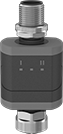 |
Converters translate analog signals to digital signals, making sensors and actuators IO-Link compatible. They are required to connect analog components to controllers and modules.
IP67—IP67 rated components can be temporarily submerged in water.
Enclosure Rating—IP rated components block out dust and withstand some water, so they do not require an enclosure. Ports that are unused must be capped to maintain their rating.
Input | Output | ||||||||||||||||||||||||||||||||||||||||||||||||||||||||||||||||||||||||||||||||||||||||||||||||||
|---|---|---|---|---|---|---|---|---|---|---|---|---|---|---|---|---|---|---|---|---|---|---|---|---|---|---|---|---|---|---|---|---|---|---|---|---|---|---|---|---|---|---|---|---|---|---|---|---|---|---|---|---|---|---|---|---|---|---|---|---|---|---|---|---|---|---|---|---|---|---|---|---|---|---|---|---|---|---|---|---|---|---|---|---|---|---|---|---|---|---|---|---|---|---|---|---|---|---|---|
Signal Converter Type | Communication Protocol | Total No. of M12 Connections | Type | Signal | Voltage, V DC | Current, mA | No. of | Type | Digital Output Signal Type | Voltage, V DC | Current, mA | No. of | Operating Voltage, V DC | Certification | Each | ||||||||||||||||||||||||||||||||||||||||||||||||||||||||||||||||||||||||||||||||||||
Plug In | |||||||||||||||||||||||||||||||||||||||||||||||||||||||||||||||||||||||||||||||||||||||||||||||||||
IP67 | |||||||||||||||||||||||||||||||||||||||||||||||||||||||||||||||||||||||||||||||||||||||||||||||||||
| Analog to Digital | IO Link | 2 | Analog | — | 0 to 10 | — | 2 | Digital | PNP | — | — | 1 | 18 to 30 | UL Listed, C-UL Listed, CE Marked | 7603N52 | 0000000 | |||||||||||||||||||||||||||||||||||||||||||||||||||||||||||||||||||||||||||||||||||
| Analog to Digital to Analog | IO Link | 2 | Analog | — | — | 4 to 20 | 1 | Digital, Analog | PNP | — | 4 to 20 | 2 | 18 to 30 | UL Listed, C-UL Listed, CE Marked | 7603N51 | 000000 | |||||||||||||||||||||||||||||||||||||||||||||||||||||||||||||||||||||||||||||||||||
| Digital to Analog | IO Link | 2 | Digital | PNP | — | — | 1 | Analog | — | — | 4 to 20 | 2 | 18 to 30 | UL Listed, C-UL Listed, CE Marked | 7603N54 | 000000 | |||||||||||||||||||||||||||||||||||||||||||||||||||||||||||||||||||||||||||||||||||
| Digital to Analog | IO Link | 2 | Digital | PNP | — | — | 1 | Analog | — | 0 to 10 | — | 2 | 18 to 30 | UL Listed, C-UL Listed, CE Marked | 7603N53 | 000000 | |||||||||||||||||||||||||||||||||||||||||||||||||||||||||||||||||||||||||||||||||||
Handheld IO Link Programmers
 |
 |
3-Pole M8 |
 |
4-Pole M8 |
 |
5-Pole M12 |
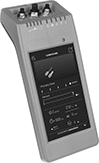
Configure any of your IO Link devices—from sensors to switches—without a PC, outlet, or separate software. Use these programmers to set parameters, check the quality of runs, clone settings for other devices, and more. Whether you’re setting up a device for the first time or adjusting settings, the easy-to-use touchscreen makes for a smooth experience. Since these programmers are powered by a battery and small enough to carry, you can bring them wherever you need.
As soon as you connect your device, these programmers download its IO Device Description (IODD) file. This means you won’t need to manually input device details, saving you time to jump right into programming. Internal storage keeps IODD files and custom settings on hand for you. If you need extra space, insert a microSD card (not included) into these programmers before turning on the connected device.
Plug devices with M8 or M12 connections directly into the sockets on these programmers. If your device has wire leads, use the included adapter.
Connection Type | Internal Memory Size, GB | Data Connection | Features | Enclosure Rating | Battery Type | Includes | Certification | Each | ||
|---|---|---|---|---|---|---|---|---|---|---|
| A-Code, 3-Pole M8 Plug In A-Code, 4 -Pole M8 Plug In A-Code, 5-Pole M12 Plug In | 16 | Wi-Fi microSD Card | LED Status Indicator | IP30 | Rechargeable | M12 to 4 Hook Adapter (1 1/2 ft. Lg) USB Charging Cord (1 1/2 ft. Lg) | CE Marked | 6457N11 | 000000000 |
Voltage-Monitoring Relays
Monitoring Relays with IO Link
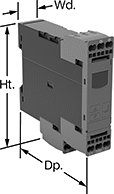 |
Relays with IO link can be programmed, monitored and reset remotely by connecting them to a programmable logic controller (PLC), human-machine interface (HMI), or computer. If you want to program them locally, they have a keypad.
With Spring-Clamp Terminals—Relays with spring-clamp terminals connect and disconnect to wire without screws. Because there’s no screw, these connections are less likely to loosen over time, even in high-vibration environments.
No. of Terminals | Input Voltage, V DC | Trip Voltage | Trip Time, sec. | Reset Type | Switching Current @ Voltage | Max. Switching Voltage | Adjustment Mechanism | Ht. | Wd. | Dp. | Digital Display Type | Features | Each | ||||||||||||||||||||||||||||||||||||||||||||||||||||||||||||||||||||||||||||||||||||||
|---|---|---|---|---|---|---|---|---|---|---|---|---|---|---|---|---|---|---|---|---|---|---|---|---|---|---|---|---|---|---|---|---|---|---|---|---|---|---|---|---|---|---|---|---|---|---|---|---|---|---|---|---|---|---|---|---|---|---|---|---|---|---|---|---|---|---|---|---|---|---|---|---|---|---|---|---|---|---|---|---|---|---|---|---|---|---|---|---|---|---|---|---|---|---|---|---|---|---|---|
1 Circuit Controlled with 1 Off or 1 On—SPDT | |||||||||||||||||||||||||||||||||||||||||||||||||||||||||||||||||||||||||||||||||||||||||||||||||||
With Screw Terminals | |||||||||||||||||||||||||||||||||||||||||||||||||||||||||||||||||||||||||||||||||||||||||||||||||||
| 9 | 24 | 10V AC to 600V AC, 10V DC to 600V DC | 0 to 999 | Automatic | 3 amp @ 240V AC 1 amp @ 24V DC | 400V AC 250V DC | External Controller, Keypad | 3.6" | 0.9" | 3.6" | LCD | Remote Reset | 8446N105 | 0000000 | |||||||||||||||||||||||||||||||||||||||||||||||||||||||||||||||||||||||||||||||||||||
With Spring-Clamp Terminals | |||||||||||||||||||||||||||||||||||||||||||||||||||||||||||||||||||||||||||||||||||||||||||||||||||
| 9 | 24 | 10V AC to 600V AC, 10V DC to 600V DC | 0 to 999 | Automatic | 3 amp @ 240V AC 1 amp @ 24V DC | 400V AC 250V DC | External Controller, Keypad | 3.8" | 0.9" | 3.6" | LCD | Remote Reset | 8446N106 | 000000 | |||||||||||||||||||||||||||||||||||||||||||||||||||||||||||||||||||||||||||||||||||||
Current-Monitoring Relays
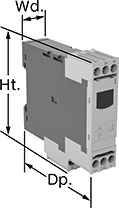 | 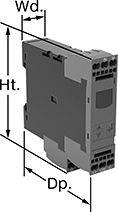 |
Screw Terminals with IO Link, Keypad Adjustment | Spring-Clamp Terminals with IO Link, Keypad Adjustment |
Protect electrical equipment from overcurrent and undercurrent damage—these relays continuously monitor current flow. When current is outside a set range, they trip and cut power to prevent overheating, fire hazards, and stalling. Rated IP20, these relays have recessed terminals that keep fingers and other objects from touching live circuits. Mount them on a 35 mm DIN rail (also known as DIN 3 rail) for fast installation.
Spring-Clamp-Terminal Wire Connection—Relays with spring-clamp terminals connect and disconnect to wire without screws. Because there’s no screw, these connections are less likely to loosen over time, even in high-vibration environments.
IO Link Communication Protocol—Relays with IO link can be programmed, monitored, and reset remotely by connecting them to a programmable logic controller (PLC), human-machine interface (HMI), or computer. If you want to program them locally, they have a keypad.
No. of Terminals | Input Voltage, V DC | Trip Current, amp | Trip Time, sec. | Reset Type | Switching Current @ Voltage | Max. Switching Voltage | Adjustment Mechanism | Ht. | Wd. | Dp. | Digital Display Type | Each | |||||||||||||||||||||||||||||||||||||||||||||||||||||||||||||||||||||||||||||||||||||||
|---|---|---|---|---|---|---|---|---|---|---|---|---|---|---|---|---|---|---|---|---|---|---|---|---|---|---|---|---|---|---|---|---|---|---|---|---|---|---|---|---|---|---|---|---|---|---|---|---|---|---|---|---|---|---|---|---|---|---|---|---|---|---|---|---|---|---|---|---|---|---|---|---|---|---|---|---|---|---|---|---|---|---|---|---|---|---|---|---|---|---|---|---|---|---|---|---|---|---|---|
Screw Terminals with IO Link | |||||||||||||||||||||||||||||||||||||||||||||||||||||||||||||||||||||||||||||||||||||||||||||||||||
1 Circuit Controlled with 1 Off or 1 On—SPDT | |||||||||||||||||||||||||||||||||||||||||||||||||||||||||||||||||||||||||||||||||||||||||||||||||||
| 9 | 24 | 0.05 to 10 | 0 to 999 | Automatic | 3 amp @ 240V AC 1 amp @ 24V DC | 400V AC 250V DC | External Controller, Keypad | 3.6" | 0.9" | 3.4" | LCD | 8123N11 | 0000000 | ||||||||||||||||||||||||||||||||||||||||||||||||||||||||||||||||||||||||||||||||||||||
Spring-Clamp Terminals with IO Link | |||||||||||||||||||||||||||||||||||||||||||||||||||||||||||||||||||||||||||||||||||||||||||||||||||
1 Circuit Controlled with 1 Off or 1 On—SPDT | |||||||||||||||||||||||||||||||||||||||||||||||||||||||||||||||||||||||||||||||||||||||||||||||||||
| 9 | 24 | 0.05 to 10 | 0 to 999 | Automatic | 3 amp @ 240V AC 1 amp @ 24V DC | 400V AC 250V DC | External Controller, Keypad | 3.8" | 0.9" | 3.4" | LCD | 8123N12 | 000000 | ||||||||||||||||||||||||||||||||||||||||||||||||||||||||||||||||||||||||||||||||||||||
Ground-Fault Monitoring Relays
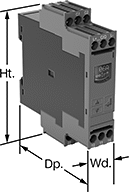 |  |
Screw Terminals with IO Link | Spring-Clamp Terminals with IO Link |
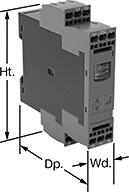
Detect and mitigate ground faults to prevent harm to equipment, circuits, and people. These relays monitor the differential between incoming and outgoing current, also known as residual current. When the balance is off, they trip and cut power to the circuit. These relays are highly sensitive, so you can trust them to de-energize faulty circuits before a minor issue becomes a major one. Rated IP20, they have recessed terminals that keep fingers and other objects from touching live circuits. Mount them on 35 mm DIN rail (also known as DIN 3 rail) for fast installation.
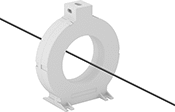
These relays require a current-indicating ring (sold separately) to operate. Choose a ring that is large enough for your lines to pass through. Feed the lines of the circuit through the center of the ring and connect the indicating ring output to the relay.
Spring-Clamp-Terminal Wire Connection—Relays with spring-clamp terminals connect and disconnect to wire without screws. Because they don’t have screws, there’s less of a risk that they will loosen over time, even when they’re under vibration.
IO Link Communication Protocol—Relays with IO link can be programmed, monitored, and reset remotely by connecting them to a programmable logic controller (PLC), human-machine interface (HMI), or computer. If you want to program them locally, they have a keypad.
No. of Terminals | Input Voltage, V DC | Trip Current, amp | Trip Time, sec. | Switching Current @ Voltage | Max. Switching Voltage | Adjustment Mechanism | Ht. | Wd. | Dp. | Features | Each | ||||||||||||||||||||||||||||||||||||||||||||||||||||||||||||||||||||||||||||||||||||||||
|---|---|---|---|---|---|---|---|---|---|---|---|---|---|---|---|---|---|---|---|---|---|---|---|---|---|---|---|---|---|---|---|---|---|---|---|---|---|---|---|---|---|---|---|---|---|---|---|---|---|---|---|---|---|---|---|---|---|---|---|---|---|---|---|---|---|---|---|---|---|---|---|---|---|---|---|---|---|---|---|---|---|---|---|---|---|---|---|---|---|---|---|---|---|---|---|---|---|---|---|
Screw Terminals with IO Link | |||||||||||||||||||||||||||||||||||||||||||||||||||||||||||||||||||||||||||||||||||||||||||||||||||
2 Circuits Controlled with 2 Off or 2 On—DPDT | |||||||||||||||||||||||||||||||||||||||||||||||||||||||||||||||||||||||||||||||||||||||||||||||||||
| 12 | 24 | 0.03 to 40 | 0 to 999 | 3 amp @ 240V AC 1 amp @ 24V DC | 400V AC 250V DC | External Controller, Keypad | 4" | 0.9" | 3.6" | Remote Reset | 8121N109 | 0000000 | |||||||||||||||||||||||||||||||||||||||||||||||||||||||||||||||||||||||||||||||||||||||
Spring-Clamp Terminals with IO Link | |||||||||||||||||||||||||||||||||||||||||||||||||||||||||||||||||||||||||||||||||||||||||||||||||||
2 Circuits Controlled with 2 Off or 2 On—DPDT | |||||||||||||||||||||||||||||||||||||||||||||||||||||||||||||||||||||||||||||||||||||||||||||||||||
| 12 | 24 | 0.03 to 40 | 0 to 999 | 3 amp @ 240V AC 1 amp @ 24V DC | 400V AC 250V DC | External Controller, Keypad | 4.1" | 0.9" | 3.6" | Remote Reset | 8121N111 | 000000 | |||||||||||||||||||||||||||||||||||||||||||||||||||||||||||||||||||||||||||||||||||||||
Multifunction Monitoring Relays
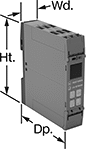 |
Monitor phase, voltage, and frequency at the same time to protect motors, generators, and other three-phase circuits from burning out or overheating. They'll switch the circuit off if they detect voltage or frequencies outside of the set range or phase loss, imbalance, or reversal. Rated IP20, they have recessed terminals that keep fingers and other objects from touching live circuits. Mount them on a 35 mm DIN rail (also known as DIN 3 rail) for fast installation.
These relays use IO Link, so they can be programmed, monitored, and reset remotely by connecting them to a programmable logic controller (PLC), human-machine interface (HMI), or computer. If you want to program them locally, they have a keypad.
Spring-Clamp-Terminal Wire Connection—Relays with spring-clamp terminals connect and disconnect to wire without screws. Because there’s no screw, these connections are less likely to loosen over time, even in high-vibration environments.
No. of Terminals | Input Voltage, V DC | Trip Voltage, V AC | Input Freq., Hz | Trip Freq., Hz | Trip Time, sec. | Reset Type | Switching Current @ Voltage | Max. Switching Voltage | Adjustment Mechanism | Ht. | Wd. | Dp. | Each | ||||||||||||||||||||||||||||||||||||||||||||||||||||||||||||||||||||||||||||||||||||||
|---|---|---|---|---|---|---|---|---|---|---|---|---|---|---|---|---|---|---|---|---|---|---|---|---|---|---|---|---|---|---|---|---|---|---|---|---|---|---|---|---|---|---|---|---|---|---|---|---|---|---|---|---|---|---|---|---|---|---|---|---|---|---|---|---|---|---|---|---|---|---|---|---|---|---|---|---|---|---|---|---|---|---|---|---|---|---|---|---|---|---|---|---|---|---|---|---|---|---|---|
1 Circuit Controlled with 1 Off or 1 On—SPDT | |||||||||||||||||||||||||||||||||||||||||||||||||||||||||||||||||||||||||||||||||||||||||||||||||||
Screw Terminals with IO Link | |||||||||||||||||||||||||||||||||||||||||||||||||||||||||||||||||||||||||||||||||||||||||||||||||||
| 12 | 24 | 90 to 760 | 50, 60 | 15 to 70 | 0.1 to 30 | Automatic | 3 amp @ 240V AC 1 amp @ 24V DC | 400V AC 250V DC | External Controller, Keypad | 3.9" | 0.9" | 3.6" | 8449N12 | 0000000 | |||||||||||||||||||||||||||||||||||||||||||||||||||||||||||||||||||||||||||||||||||||
Spring-Clamp Terminals with IO Link | |||||||||||||||||||||||||||||||||||||||||||||||||||||||||||||||||||||||||||||||||||||||||||||||||||
| 12 | 24 | 90 to 760 | 50, 60 | 15 to 70 | 0.1 to 30 | Automatic | 3 amp @ 240V AC 1 amp @ 24V DC | 400V AC 250V DC | External Controller, Keypad | 3.9" | 0.9" | 3.6" | 8449N11 | 000000 | |||||||||||||||||||||||||||||||||||||||||||||||||||||||||||||||||||||||||||||||||||||
