











Filter by
Diagonal Screen Size
Base Mount Type
Mounting Location
Projection
Display Height
Export Control Classification Number (ECCN)


U.S.–Mexico–Canada Agreement (USMCA) Qualifying
Adjustment Movement
DFARS Specialty Metals
For Device Thickness
Finish
Electrical Connection


Clamping Distance
Tablet Mounts
Clamp-On Bench Mount
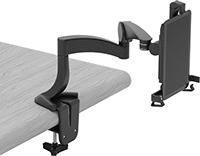 | 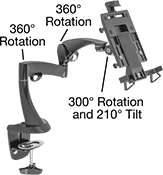 |
Shown Installed |
Projection | Base | ||||||||||||||||||||||||||||||||||||||||||||||||||||||||||||||||||||||||||||||||||||||||||||||||||
|---|---|---|---|---|---|---|---|---|---|---|---|---|---|---|---|---|---|---|---|---|---|---|---|---|---|---|---|---|---|---|---|---|---|---|---|---|---|---|---|---|---|---|---|---|---|---|---|---|---|---|---|---|---|---|---|---|---|---|---|---|---|---|---|---|---|---|---|---|---|---|---|---|---|---|---|---|---|---|---|---|---|---|---|---|---|---|---|---|---|---|---|---|---|---|---|---|---|---|---|
For Diag. Screen Size | Display Ht. | Clamping Distance Range | Min. | Max. | For Max. Mounting Surface Thk. | Max. Load Cap., lb. | Material | Color | Lg. | Wd. | Max. Range of Motion | Each | |||||||||||||||||||||||||||||||||||||||||||||||||||||||||||||||||||||||||||||||||||||||
Rotate, Tilt, Side to Side, Up and Down, In and Out | |||||||||||||||||||||||||||||||||||||||||||||||||||||||||||||||||||||||||||||||||||||||||||||||||||
| 8.7" to 10" | 8" to 17" | 0" to 1 3/4" | 8" | 19" | 1 13/16" | 2 | Plastic | Black | 5" | 4 1/2" | 360° | 3796T12 | 0000000 | ||||||||||||||||||||||||||||||||||||||||||||||||||||||||||||||||||||||||||||||||||||||
Clamp-On Rectangular-Bar Mount
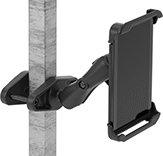 | 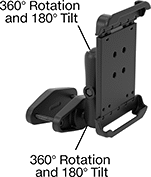 |
Shown Installed |
Projection | Base | Attaching End | |||||||||||||||||||||||||||||||||||||||||||||||||||||||||||||||||||||||||||||||||||||||||||||||||
|---|---|---|---|---|---|---|---|---|---|---|---|---|---|---|---|---|---|---|---|---|---|---|---|---|---|---|---|---|---|---|---|---|---|---|---|---|---|---|---|---|---|---|---|---|---|---|---|---|---|---|---|---|---|---|---|---|---|---|---|---|---|---|---|---|---|---|---|---|---|---|---|---|---|---|---|---|---|---|---|---|---|---|---|---|---|---|---|---|---|---|---|---|---|---|---|---|---|---|---|
For Diag. Screen Size | Display Ht. | Clamping Distance Range | Min. | Max. | Max. Load Cap., lb. | Material | Color | Lg. | Wd. | Range of Motion | Max. Tilt Range of Motion | Each | |||||||||||||||||||||||||||||||||||||||||||||||||||||||||||||||||||||||||||||||||||||||
Rotate, Tilt, Side to Side, Up and Down, In and Out | |||||||||||||||||||||||||||||||||||||||||||||||||||||||||||||||||||||||||||||||||||||||||||||||||||
| 7" to 8" | 0" to 6 9/16" | 0" to 4" | 2 11/16" | 9 3/16" | 3 | Plastic | Black | 5 5/16" | 2 1/2" | 360° | 180° | 3796T201 | 0000000 | ||||||||||||||||||||||||||||||||||||||||||||||||||||||||||||||||||||||||||||||||||||||
| 9" to 10.5" | 0" to 6 9/16" | 0" to 4" | 2 13/16" | 9 3/8" | 3 | Plastic | Black | 5 5/16" | 2 1/2" | 360° | 180° | 3796T205 | 000000 | ||||||||||||||||||||||||||||||||||||||||||||||||||||||||||||||||||||||||||||||||||||||
Clamp-On Pipe Mount
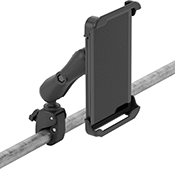 |  |
Shown Installed |
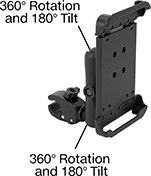
Clamp-on pipe mounts attach to round bars, pipes, and railings using adjustable jaws. They’re commonly used to mount screens to cart handles. Clamp-on pipe mounts have ball-and-socket joints that give them a 360° range of motion. Tilt or rotate them for a better viewing angle and lock the joints in place.
Projection | Base | Attaching End | |||||||||||||||||||||||||||||||||||||||||||||||||||||||||||||||||||||||||||||||||||||||||||||||||
|---|---|---|---|---|---|---|---|---|---|---|---|---|---|---|---|---|---|---|---|---|---|---|---|---|---|---|---|---|---|---|---|---|---|---|---|---|---|---|---|---|---|---|---|---|---|---|---|---|---|---|---|---|---|---|---|---|---|---|---|---|---|---|---|---|---|---|---|---|---|---|---|---|---|---|---|---|---|---|---|---|---|---|---|---|---|---|---|---|---|---|---|---|---|---|---|---|---|---|---|
For Diag. Screen Size | Display Ht. | Clamping Distance Range | Min. | Max. | Max. Load Cap., lb. | Material | Color | Lg. | Wd. | Range of Motion | Max. Tilt Range of Motion | Each | |||||||||||||||||||||||||||||||||||||||||||||||||||||||||||||||||||||||||||||||||||||||
Rotate, Tilt, Side to Side, Up and Down, In and Out | |||||||||||||||||||||||||||||||||||||||||||||||||||||||||||||||||||||||||||||||||||||||||||||||||||
| 7" to 8" | 0" to 8 1/16" | 5/8" to 1 1/8" | 2 11/16" | 10 11/16" | 3 | Plastic | Black | 4 7/8" | 1 7/16" | 360° | 180° | 3796T202 | 0000000 | ||||||||||||||||||||||||||||||||||||||||||||||||||||||||||||||||||||||||||||||||||||||
| 9" to 10.5" | 0" to 8 1/16" | 5/8" to 1 1/8" | 2 13/16" | 10 7/8" | 3 | Plastic | Black | 4 7/8" | 1 7/16" | 360° | 180° | 3796T206 | 000000 | ||||||||||||||||||||||||||||||||||||||||||||||||||||||||||||||||||||||||||||||||||||||
Magnetic Mount
 |  |
Shown Installed |
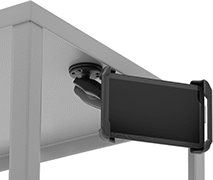
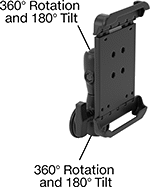
Magnetic mounts cling to magnetic surfaces and have a strong enough hold to be mounted from any orientation, such as on the side of a machine. They’re good for creating a temporary display because they’re easy to move from place to place. Magnetic mounts have ball-and-socket joints that give them a 360° range of motion. Tilt or rotate them for a better viewing angle and lock the joints in place.
Projection | Attaching End | ||||||||||||||||||||||||||||||||||||||||||||||||||||||||||||||||||||||||||||||||||||||||||||||||||
|---|---|---|---|---|---|---|---|---|---|---|---|---|---|---|---|---|---|---|---|---|---|---|---|---|---|---|---|---|---|---|---|---|---|---|---|---|---|---|---|---|---|---|---|---|---|---|---|---|---|---|---|---|---|---|---|---|---|---|---|---|---|---|---|---|---|---|---|---|---|---|---|---|---|---|---|---|---|---|---|---|---|---|---|---|---|---|---|---|---|---|---|---|---|---|---|---|---|---|---|
For Diag. Screen Size | Display Ht. | Min. | Max. | Max. Load Cap., lb. | Material | Color | Base Dia. | Range of Motion | Max. Tilt Range of Motion | Each | |||||||||||||||||||||||||||||||||||||||||||||||||||||||||||||||||||||||||||||||||||||||||
Rotate, Tilt, Side to Side, Up and Down, In and Out | |||||||||||||||||||||||||||||||||||||||||||||||||||||||||||||||||||||||||||||||||||||||||||||||||||
| 7" to 8" | 0" to 6 7/8" | 2 11/16" | 9 1/2" | 3 | Plastic | Black | 2 1/2" | 360° | 180° | 3796T209 | 0000000 | ||||||||||||||||||||||||||||||||||||||||||||||||||||||||||||||||||||||||||||||||||||||||
| 9" to 10.5" | 0" to 6 7/8" | 2 13/16" | 9 11/16" | 3 | Plastic | Black | 2 1/2" | 360° | 180° | 3796T211 | 000000 | ||||||||||||||||||||||||||||||||||||||||||||||||||||||||||||||||||||||||||||||||||||||||
Suction Mount
 |  |
Shown Installed |
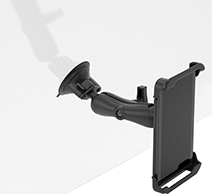
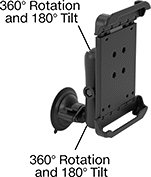
Suction mounts are ideal for mounting tablets onto flat surfaces and windows, such as the windshield of your vehicle. The suction cup base creates a strong hold to keep the mount mounted from any orientation. They’re easy to remove and install, so they’re good for when you want a temporary display. Suction mounts have ball-and-socket joints that give them a 360° range of motion. Tilt or rotate them for a better viewing angle and lock the joints in place.
Projection | Attaching End | ||||||||||||||||||||||||||||||||||||||||||||||||||||||||||||||||||||||||||||||||||||||||||||||||||
|---|---|---|---|---|---|---|---|---|---|---|---|---|---|---|---|---|---|---|---|---|---|---|---|---|---|---|---|---|---|---|---|---|---|---|---|---|---|---|---|---|---|---|---|---|---|---|---|---|---|---|---|---|---|---|---|---|---|---|---|---|---|---|---|---|---|---|---|---|---|---|---|---|---|---|---|---|---|---|---|---|---|---|---|---|---|---|---|---|---|---|---|---|---|---|---|---|---|---|---|
For Diag. Screen Size | Display Ht. | Min. | Max. | Max. Load Cap., lb. | Material | Color | Base Dia. | Range of Motion | Max. Tilt Range of Motion | Each | |||||||||||||||||||||||||||||||||||||||||||||||||||||||||||||||||||||||||||||||||||||||||
Rotate, Tilt, Side to Side, Up and Down, In and Out | |||||||||||||||||||||||||||||||||||||||||||||||||||||||||||||||||||||||||||||||||||||||||||||||||||
| 7" to 8" | 0" to 7 11/16" | 2 11/16" | 10 5/16" | 3 | Plastic | Black | 3 5/16" | 360° | 180° | 3796T203 | 000000 | ||||||||||||||||||||||||||||||||||||||||||||||||||||||||||||||||||||||||||||||||||||||||
| 9" to 10.5" | 0" to 7 11/16" | 2 13/16" | 10 1/2" | 3 | Plastic | Black | 3 5/16" | 360° | 180° | 3796T207 | 000000 | ||||||||||||||||||||||||||||||||||||||||||||||||||||||||||||||||||||||||||||||||||||||||
Threaded-Stud Mount
 |  |
Shown Installed |
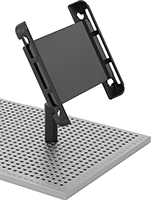
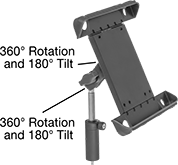
Threaded-stud mounts have a telescopic pole for adjusting the display height. Screw them into tapped holes that have identical thread size. They’re often used to mount tablets on coordinate measuring machine (CMM) fixture tables. Threaded-stud mounts have ball-and-socket joints that give them a 360° range of motion. Tilt or rotate them for a better viewing angle and lock the joints in place.
Projection | Attaching End | ||||||||||||||||||||||||||||||||||||||||||||||||||||||||||||||||||||||||||||||||||||||||||||||||||
|---|---|---|---|---|---|---|---|---|---|---|---|---|---|---|---|---|---|---|---|---|---|---|---|---|---|---|---|---|---|---|---|---|---|---|---|---|---|---|---|---|---|---|---|---|---|---|---|---|---|---|---|---|---|---|---|---|---|---|---|---|---|---|---|---|---|---|---|---|---|---|---|---|---|---|---|---|---|---|---|---|---|---|---|---|---|---|---|---|---|---|---|---|---|---|---|---|---|---|---|
For Diag. Screen Size | Display Ht. | Min. | Max. | Max. Load Cap. | Material | Color | Range of Motion | Max. Tilt Range of Motion | Thread Size | Each | |||||||||||||||||||||||||||||||||||||||||||||||||||||||||||||||||||||||||||||||||||||||||
Rotate, Tilt, Side to Side, Up and Down, In and Out | |||||||||||||||||||||||||||||||||||||||||||||||||||||||||||||||||||||||||||||||||||||||||||||||||||
| 8.7" to 11" | 1" to 3" | 2 1/2" | 4 1/4" | Not Rated | Plastic | Black | 360° | 180° | 1/4"-20 | 3796T13 | 0000000 | ||||||||||||||||||||||||||||||||||||||||||||||||||||||||||||||||||||||||||||||||||||||||
Tablet and Laptop VESA Mounts
 | 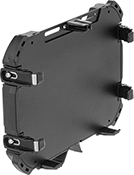 |
Style A | Style B |
Mounting | ||||||||||
|---|---|---|---|---|---|---|---|---|---|---|
Style | For Diag. Screen Size | For Device Thickness | Max. Load Cap., lb. | Material | Pattern Compatibility | Fasteners Included | Lock Type | Each | ||
| A | 7" to 9" | 0" to 13/16" | 1 | Plastic | VESA 75 × 75 | Yes | Keyed | 2005N14 | 0000000 | |
| B | 9" to 11" | 9/16" to 15/16" | 15 | Powder-Coated Aluminum | VESA 75 × 75 | Yes | Keyed | 2005N13 | 000000 | |
| B | 11" to 14" | 11/16" to 1 1/4" | 15 | Powder-Coated Aluminum | VESA 75 × 75 | Yes | Keyed | 6063N11 | 000000 | |
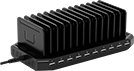
USB Battery Charging Stations
Surface Mount
 |
USB Connections | Compartments | ||||||||||||||
|---|---|---|---|---|---|---|---|---|---|---|---|---|---|---|---|
Type | No. of | USB-A Current, amp | No. of | Wd. | Dp. | Cord Lg., ft. | Input Voltage, V AC | Material | Ht. | Wd. | Dp. | Features | Each | ||
| USB-A | 10 | 2.4 | 13 | 1/2" | 3 3/4" | 6 | 120/230 | Plastic | 3 1/4" | 9 3/8" | 4 3/4" | Removable Dividers | 6318N13 | 0000000 | |
Surface Mount with Keyed Lock
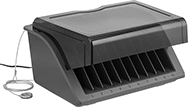 |
Stations with a keyed lock secure devices while charging. They come with two keys. The cable and combination lock can be secured to a desk, cart, or other flat surface.
Cannot Be Sold To—Stations cannot be sold to the listed areas due to energy efficiency regulations.
USB Connections | Compartments | ||||||||||||||||
|---|---|---|---|---|---|---|---|---|---|---|---|---|---|---|---|---|---|
Type | No. of | USB-A Current, amp | No. of | Wd. | Dp. | Cord Lg., ft. | Input Voltage, V AC | Material | Ht. | Wd. | Dp. | Features | Includes | Cannot Be Sold To | Each | ||
| USB-A | 10 | 2.4 | 10 | 1 1/4" | 7 1/2" | 6 | 120 | Plastic | 13 1/2" | 16 1/2" | 8 15/16" | Removable Dividers, Removable Cover | 6 ft. Long Cable with Combination Lock | California, Vermont | 6318N11 | 0000000 | |
Surface Mount/Wall Mount with Keyed Lock
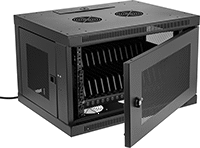 |
Stations with a keyed lock secure devices while charging. They come with two keys.
USB-B Connection—Stations with a USB B port connect to computers with a USB cord (not included). This is useful when pushing software updates, backing up data, or restoring default settings for multiple devices.
Cannot Be Sold To—Stations cannot be sold to the listed areas due to energy efficiency regulations.
USB Connections | Compartments | |||||||||||||||
|---|---|---|---|---|---|---|---|---|---|---|---|---|---|---|---|---|
Type | No. of | USB-A Current, amp | No. of | Wd. | Dp. | Cord Lg., ft. | Input Voltage, V AC | Material | Ht. | Wd. | Dp. | Features | Cannot Be Sold To | Each | ||
| USB-A USB-B | 16 1 | 2.4 | 16 | 3/4" | 8" | 10 | 120/230 | Steel | 17 3/4" | 23 5/8" | 14 1/2" | Removable Dividers | California, Vermont | 6318N12 | 000000000 | |
Vibration-Resistant Tablet Mounts
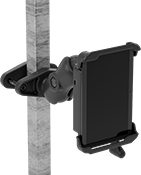
Clamp-On Rectangular-Bar Mount
 |  |
Shown Installed |
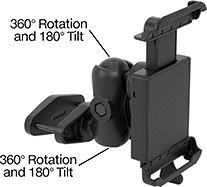
Rectangular-bar mounts fit onto square posts and rails, which are often found in forklift cages.
Projection | Base | Attaching End | |||||||||||||||||||||||||||||||||||||||||||||||||||||||||||||||||||||||||||||||||||||||||||||||||
|---|---|---|---|---|---|---|---|---|---|---|---|---|---|---|---|---|---|---|---|---|---|---|---|---|---|---|---|---|---|---|---|---|---|---|---|---|---|---|---|---|---|---|---|---|---|---|---|---|---|---|---|---|---|---|---|---|---|---|---|---|---|---|---|---|---|---|---|---|---|---|---|---|---|---|---|---|---|---|---|---|---|---|---|---|---|---|---|---|---|---|---|---|---|---|---|---|---|---|---|
For Diag. Screen Size | Display Ht. | Clamping Distance Range | Min. | Max. | Max. Load Cap., lb. | Material | Color | Lg. | Wd. | Range of Motion | Max. Tilt Range of Motion | No. of Locks | Lock Type | No. of Keys Included | Each | ||||||||||||||||||||||||||||||||||||||||||||||||||||||||||||||||||||||||||||||||||||
Rotate, Tilt, Side to Side, Up and Down, In and Out | |||||||||||||||||||||||||||||||||||||||||||||||||||||||||||||||||||||||||||||||||||||||||||||||||||
| 7" to 8" | 0" to 6 1/16" | 0" to 4" | 4 7/8" | 10 15/16" | 5 | Plastic | Black | 6 5/16" | 2 9/16" | 360° | 180° | 1 | Keyed | 2 | 5031T202 | 0000000 | |||||||||||||||||||||||||||||||||||||||||||||||||||||||||||||||||||||||||||||||||||
| 9" to 10.5" | 0" to 6 1/16" | 0" to 4" | 5 1/16" | 11 1/8" | 5 | Plastic | Black | 6 5/16" | 2 9/16" | 360° | 180° | 1 | Keyed | 2 | 5031T204 | 000000 | |||||||||||||||||||||||||||||||||||||||||||||||||||||||||||||||||||||||||||||||||||
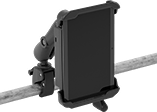
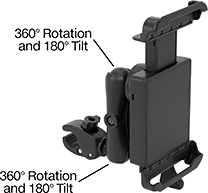
Clamp-On Pipe Mount
 |  |
Shown Installed |
Projection | Base | Attaching End | |||||||||||||||||||||||||||||||||||||||||||||||||||||||||||||||||||||||||||||||||||||||||||||||||
|---|---|---|---|---|---|---|---|---|---|---|---|---|---|---|---|---|---|---|---|---|---|---|---|---|---|---|---|---|---|---|---|---|---|---|---|---|---|---|---|---|---|---|---|---|---|---|---|---|---|---|---|---|---|---|---|---|---|---|---|---|---|---|---|---|---|---|---|---|---|---|---|---|---|---|---|---|---|---|---|---|---|---|---|---|---|---|---|---|---|---|---|---|---|---|---|---|---|---|---|
For Diag. Screen Size | Display Ht. | Clamping Distance Range | Min. | Max. | Max. Load Cap., lb. | Material | Color | Lg. | Wd. | Range of Motion | Max. Tilt Range of Motion | No. of Locks | Lock Type | No. of Keys Included | Each | ||||||||||||||||||||||||||||||||||||||||||||||||||||||||||||||||||||||||||||||||||||
Rotate, Tilt, Side to Side, Up and Down, In and Out | |||||||||||||||||||||||||||||||||||||||||||||||||||||||||||||||||||||||||||||||||||||||||||||||||||
| 7" to 8" | 0" to 8" | 5/8" to 1 1/8" | 4 5/16" | 12 5/16" | 3 | Plastic | Black | 4 13/16" | 1 7/16" | 360° | 180° | 1 | Keyed | 2 | 5031T201 | 0000000 | |||||||||||||||||||||||||||||||||||||||||||||||||||||||||||||||||||||||||||||||||||
| 9" to 10.5" | 0" to 8" | 5/8" to 1 1/8" | 4 7/16" | 12 1/2" | 3 | Plastic | Black | 4 13/16" | 1 7/16" | 360° | 180° | 1 | Keyed | 2 | 5031T203 | 000000 | |||||||||||||||||||||||||||||||||||||||||||||||||||||||||||||||||||||||||||||||||||
Tablet Holders with Emergency-Stop Push-Button Switch
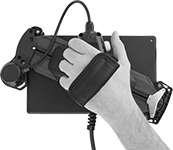 | 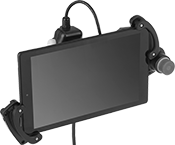 |
Pivoting Handle (Back View) | Holder with Tablet Installed (Not Included) |
 |  |
Holder | Tablet Holder Bracket Kits |
Halt machinery in an instant with these tablet holders. They equip your tablet with safety switches that meet IEC and EN standards, so you can safely move around your equipment while teaching robots or monitoring production lines and conveyor systems.
The emergency stop switch on the front of the holder illuminates when the switch is enabled. There is also a deadman switch on the back of the holder that controls machinery when you lightly press and hold it in the middle position. If the switch is released or pressed down all the way, it stops the machine.
Pivot the handle to hold a tablet vertically or horizontally, while keeping the switches in a comfortable position for either hand. The adjustable mounting bracket secures a variety of tablet sizes. Connect your tablet to the USB port to charge during use.
Tablet Holder Bracket Kits—Tablet holder bracket kits enlarge the bracket to hold tablets with thick covers and protectors.
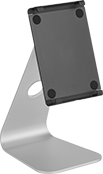
Tablet Stands
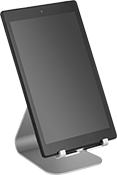 |
Style A, Adjustable Viewing Angle |
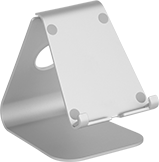 |  |
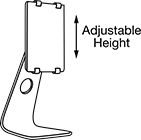
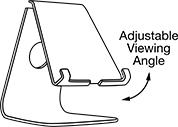
Style A | Style B |
 |
 |
Silver | Gray | |||||||||||
|---|---|---|---|---|---|---|---|---|---|---|---|---|
Style | Wt. Cap., lb. | Height | Wd. | Dp. | Viewing Angle | Material | Features | Each | Each | |||
| A | 15 | 5 1/4" | 4 1/8" | 6" | — | Anodized Aluminum | Cable Routing Hole | ——— | 0 | 4204N15 | 000000 | |
| A | 15 | 5 3/4" | 4 5/8" | 7 1/4" | 10° to 50° | Anodized Aluminum | Adjustable Viewing Angle, Cable Routing Hole | 4204N16 | 000000 | 4204N17 | 00000 | |
| B | 15 | 6 3/4" to 10 5/8" | 5 3/4" | 7 1/8" | 0° to 45° | Anodized Aluminum | Adjustable Height, Adjustable Viewing Angle, Cable Routing Hole | 4204N18 | 00000 | ——— | 0 | |
