




Filter by


Electrical Connection
Material
Export Control Classification Number (ECCN)

DFARS Specialty Metals


For Use With


Outlet and Plug Caps
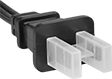
Data Port Plug Assortment
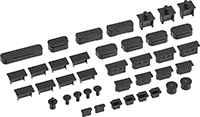 |
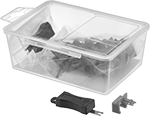
Keep unused computer ports free from dust, debris, and moisture. These assortments have plugs for over a dozen types of ports, from USB to barrel-style DC.
No. of Pieces | Includes | Material | Max. Temp., ° F | Color | Each | ||
|---|---|---|---|---|---|---|---|
| 40 | Eight USB-A Plugs Two USB-C Plugs Four Mini DisplayPort Plugs Four HDMI Plugs Four DisplayPort Plugs Two DVI Plugs One VGA Plug Four 3.5 mm Audio Plugs Three RJ45 Plugs Four COM Plugs Two 6-Pin Mini DIN Plugs One Parallel Plug One Barrel-Style DC Plug | Plastic | 155 | Black | 6802N11 | 000000 |
RJ45 Port Plugs
 |
Head | |||||||||||||||||||||||||||||||||||||||||||||||||||||||||||||||||||||||||||||||||||||||||||||||||||
|---|---|---|---|---|---|---|---|---|---|---|---|---|---|---|---|---|---|---|---|---|---|---|---|---|---|---|---|---|---|---|---|---|---|---|---|---|---|---|---|---|---|---|---|---|---|---|---|---|---|---|---|---|---|---|---|---|---|---|---|---|---|---|---|---|---|---|---|---|---|---|---|---|---|---|---|---|---|---|---|---|---|---|---|---|---|---|---|---|---|---|---|---|---|---|---|---|---|---|---|
Lg. | Wd. | Ht. | Overall Ht. | Max. Temp., ° F | Color | Pkg. Qty. | Pkg. | ||||||||||||||||||||||||||||||||||||||||||||||||||||||||||||||||||||||||||||||||||||||||||||
Silicone Rubber | |||||||||||||||||||||||||||||||||||||||||||||||||||||||||||||||||||||||||||||||||||||||||||||||||||
| 1/2" | 13/32" | 3/32" | 11/32" | 300 | Black | 10 | 7146N15 | 00000 | |||||||||||||||||||||||||||||||||||||||||||||||||||||||||||||||||||||||||||||||||||||||||||
RJ45 Port Locks
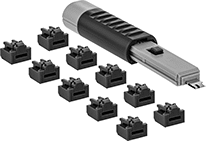 |
Block Ethernet ports from unauthorized use—these plugs lock in place to prevent anyone from connecting to your device. They’re often used to protect sensitive computer and networking equipment. Just push them in to install them. You can only remove them using the key.
USB Port Locks
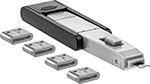 |
Require a key to access your USB port. To install, insert these plugs into your port, just like you would with any USB drive. They're often used to protect sensitive computer and networking equipment.
Data Port Locks | Replacement Keys | Replacement Plugs | |||||||||||||||||||||||||||||||||||||||||||||||||||||||||||||||||||||||||||||||||||||||||||||||||
|---|---|---|---|---|---|---|---|---|---|---|---|---|---|---|---|---|---|---|---|---|---|---|---|---|---|---|---|---|---|---|---|---|---|---|---|---|---|---|---|---|---|---|---|---|---|---|---|---|---|---|---|---|---|---|---|---|---|---|---|---|---|---|---|---|---|---|---|---|---|---|---|---|---|---|---|---|---|---|---|---|---|---|---|---|---|---|---|---|---|---|---|---|---|---|---|---|---|---|---|
For USB Port Type | Lg. | Wd. | Ht. | Max. Temp., ° F | Color | Lock Type | No. of Pieces | Includes | Each | Each | Pkg. Qty. | Pkg. | |||||||||||||||||||||||||||||||||||||||||||||||||||||||||||||||||||||||||||||||||||||||
Polycarbonate | |||||||||||||||||||||||||||||||||||||||||||||||||||||||||||||||||||||||||||||||||||||||||||||||||||
| USB-A | 1/2" | 3/16" | 13/32" | 140 | Black | Keyed | 7 | One Key, Six Plugs | 8076N11 | 000000 | 6855N12 | 000000 | 10 | 8076N12 | 000000 | ||||||||||||||||||||||||||||||||||||||||||||||||||||||||||||||||||||||||||||||||||||
| USB-C | 5/16" | 3/32" | 1/4" | 140 | Gray | Keyed | 5 | One Key, Four Plugs | 8076N15 | 00000 | 8076N13 | 00000 | 10 | 8076N14 | 00000 | ||||||||||||||||||||||||||||||||||||||||||||||||||||||||||||||||||||||||||||||||||||
USB Port Plugs
 |
Head | |||||||||||||||||||||||||||||||||||||||||||||||||||||||||||||||||||||||||||||||||||||||||||||||||||
|---|---|---|---|---|---|---|---|---|---|---|---|---|---|---|---|---|---|---|---|---|---|---|---|---|---|---|---|---|---|---|---|---|---|---|---|---|---|---|---|---|---|---|---|---|---|---|---|---|---|---|---|---|---|---|---|---|---|---|---|---|---|---|---|---|---|---|---|---|---|---|---|---|---|---|---|---|---|---|---|---|---|---|---|---|---|---|---|---|---|---|---|---|---|---|---|---|---|---|---|
For USB Port Type | Lg. | Wd. | Ht. | Overall Ht. | Max. Temp., ° F | Color | Pkg. Qty. | Pkg. | |||||||||||||||||||||||||||||||||||||||||||||||||||||||||||||||||||||||||||||||||||||||||||
Silicone Rubber | |||||||||||||||||||||||||||||||||||||||||||||||||||||||||||||||||||||||||||||||||||||||||||||||||||
| USB-A | 9/16" | 1/4" | 1/4" | 1/2" | 300 | Black | 10 | 5978N11 | 00000 | ||||||||||||||||||||||||||||||||||||||||||||||||||||||||||||||||||||||||||||||||||||||||||
Data-Blocking USB Adapters
Permanent USB Port Locks
 |
For USB Port Type | Lg. | Wd. | Ht. | Max. Temp., ° F | Color | Each | |||||||||||||||||||||||||||||||||||||||||||||||||||||||||||||||||||||||||||||||||||||||||||||
|---|---|---|---|---|---|---|---|---|---|---|---|---|---|---|---|---|---|---|---|---|---|---|---|---|---|---|---|---|---|---|---|---|---|---|---|---|---|---|---|---|---|---|---|---|---|---|---|---|---|---|---|---|---|---|---|---|---|---|---|---|---|---|---|---|---|---|---|---|---|---|---|---|---|---|---|---|---|---|---|---|---|---|---|---|---|---|---|---|---|---|---|---|---|---|---|---|---|---|---|
Polycarbonate | |||||||||||||||||||||||||||||||||||||||||||||||||||||||||||||||||||||||||||||||||||||||||||||||||||
| USB-A | 1/2" | 3/16" | 13/32" | 140 | Red | 5971N11 | 000000 | ||||||||||||||||||||||||||||||||||||||||||||||||||||||||||||||||||||||||||||||||||||||||||||
RJ45 Connector Security Clips
USB Cord Locks
 |
 |
Cord Lock |
 |
Keys |
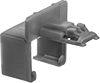
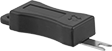
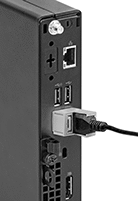
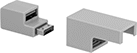
Keep live data transfers and other critical processes or devices from disconnecting—these locks prevent a USB cord from shaking loose or being yanked out. By locking the cord in its port, they also prevent unauthorized removal. To install them, insert your USB cord into the lock, then plug the lock into your computer or other equipment. Press the tab to lock them in the port.
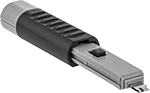
Keys—You can only remove them using the key (sold separately).
