McMaster-Carr logo
    Enter e-mail addresses in the fields below
    Message
    Cancel
    Comments
    E-mail address (if you would like a response)
    2 Products

    Smart Multifunction Monitoring Relays

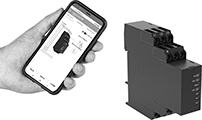
    Image of ProductInUse. Front orientation. Monitoring Relays. Smart Multifunction Monitoring Relays.
    Remotely control these relays through an app on your smartphone—they simultaneously monitor phase, voltage, and frequency. The downloadable app lets you change the tripping range, modify settings, and save programs to apply to multiple relays. Tap your smartphone or tablet to the relays to connect to them. They use NFC (near field communication), so you don’t need to manually pair them like Bluetooth devices.
    You’ll often see these relays used to protect motors, generators, and other three-phase circuits from burning out or overheating. They'll switch the circuit off if they detect voltage or frequencies outside of the set range or phase loss, imbalance, or reversal. You can see that they're wired correctly and when they're actuated based on the LED indicators. Rated IP20, they have recessed terminals that keep fingers and other objects from touching live circuits. Mount them on a 35 mm DIN rail (also known as DIN 3 rail) for fast installation.
    No. of
    Terminals
    Input Voltage, V AC
    Trip Voltage,
    V AC
    Input Freq.,
    Hz
    Trip Freq.,
    Hz
    Trip Time,
    sec.
    Reset
    Type
    Switching Current
    @ Voltage
    Max. Switching
    Voltage, V AC
    Ht.
    Wd.
    Dp.
    Operating System Compatibility
    Each
    2 Circuits Controlled with 2 Off or 2 On—DPDT
     
    With Screw Terminals
    12208, 240, 300, 480208 to 48050, 6045 to 660.1 to 60Automatic8 amp @ 240V AC2503.5"0.9"3.9"Android 7.0 or Later, iOS 14.5 or Later8452N110000000
     

    Smart DIN-Rail Mount Multifunction Timer Relays
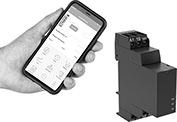
    Image of ProductInUse. Front orientation. Timer Relays. Smart DIN-Rail Mount Multifunction Timer Relays, 2 Circuits Controlled.

    2 Circuits Controlled

    Whether installed in an electrical cabinet or hard-to-reach area, these timer relays are controlled remotely from your smartphone. They connect to your phone via a free downloadable app with NFC (Near Field Communication), so you can set time delay ranges, adjust settings, and save programs. An LED indicator on the relay shows that your switch is on and whether it’s actuated. Mount them directly to 35 mm DIN rail (also known as DIN 3 rail).
    Although these relays have 30 different functions, they all fall into 11 categories. Within these categories, you can select different functions to allow you to add a switch, program a delay, or change how the relay responds to a trigger (turning on or off, pausing, or resetting).
    Delayed Start (Delay on Make) Timer—These functions allow you to set how long it takes for the relay to turn on after input voltage is applied. For example, a drill starts pumping lubricant immediately, but it does not start rotating until the set time has elapsed.
    Delayed Switch Off (Delay on Break) Timer—These functions use a switch instead of input voltage. When the switch is turned off, the relay remains on for a programmed amount of time before turning off. For example, a projector’s light is turned off with a switch, but its cooling fan continues to run for a set time.
    Delayed Switch-On with Delayed Switch-Off Timer—This function uses a switch instead of an input voltage. It allows you to set how long it takes the relay to turn on after a switch is turned on, and how long it will stay on after the switch is turned off. For example, a furnace turns on, but the fan doesn’t start pushing air through the vents until it has been heated. When the furnace turns off, the fan keeps blowing to circulate all the hot air.
    Interval Timer—These functions use input voltage to turn on the relay for a programmed amount of time. For example, when a part moving down a conveyor reaches a certain location, a cleaning spray comes on for a set amount of time.
    Switch on (Single Shot) Timer—These functions require a switch to activate the relay, which stays on for the programmed amount of time. For example, lights in a storage room are turned on with a switch and stay on for a set time before turning off.
    Repeat-Cycle Timer—These functions start with an on cycle and then alternate between an on cycle and off cycle of equal durations until input voltage is removed, such as with a flashing light.
    Asymmetrical-Repeat-Cycle Timer—These functions start with an on-cycle and then have an off-cycle, but these cycles have different durations. The cycles repeat until input voltage is removed. For example, a sprinkler system sprays in short bursts followed by longer rest periods, on and off until input voltage is removed.
    Manual-Switch-Control Timer—Use these functions to turn the relay on and off with a switch.
    Fixed On/Off Timer—The on function keeps the relay on whenever input voltage is applied; it will only turn off if the voltage is removed. The off function keeps the relay in an off state, even if input voltage is applied.
    Star-to-Delta Timer—These functions allow you to set the time delay within the relay's range to switch contacts on a three-phase motor from star to delta configuration. Since star configuration takes less voltage to start than delta, these functions prevent voltage dips that often happen when a motor starts and are gentler on mechanical parts.
    Switch-On Asymmetrical Repeat Cycle Timer—These functions require a switch to activate the timing function. The input voltage is applied the whole time, and when you turn the switch on, the relay begins with an on-cycle followed by an off-cycle. These cycles have different durations, and they repeat until you turn the switch off. They could be used to turn on a motor or other system for a short period and then turn it off for a longer rest period, repeating that pattern until the switch is turned off.
    No. of
    Terminals
    Input Voltage
    Control
    Power, W
    Timer Relay Function
    Overall Timing
    Range
    Switching Current
    @ Voltage
    Max. Switching
    Voltage, V AC
    Ht.
    Wd.
    Dp.
    Operating System Compatibility
    Features
    Each
    2 Circuits Controlled with 2 Off or 2 On—DPDT
    924V AC, 48V AC, 120V AC, 240V AC, 24V DC, 48V DC, 60V DC, 120V DC, 240V DC0.6Manual Switch Control
    Fixed On/Off
    Switch on (Single Shot)
    Delayed Start (Delay on Make)
    Delayed Switch Off (Delay on Break)
    Delayed Switch-On with Delayed Switch-Off
    Interval
    Repeat Cycle
    Asymmetrical Repeat Cycle
    Switch-On Asymmetrical Repeat Cycle
    Star-to-Delta
    0.1 sec. to 999 hr.8 amp @ 240V AC2503.5"0.9"2.9"Android 4.4 or Later, iOS 14.5 or LaterLED Indicator8491N110000000
     
    back to top