








Filter by
Light Color


Volume (Sound) @ Distance

Light Pattern Setting
Color
Electrical Connection


Export Control Classification Number (ECCN)
Sound Pattern
REACH
Certification
U.S.–Mexico–Canada Agreement (USMCA) Qualifying
DFARS Specialty Metals
Ethernet Standard
Specifications Met
Electronic-Alert Stack Lights with Buzzer Alarm
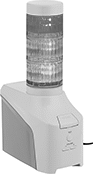 |
Get notified about equipment issues even when you aren't around your machines. These lights connect to your computer via Ethernet, allowing you to set up email alerts when there is a problem with a machine, server, or conveyor. The buzzer can emit both continuous and pulse tones—pulse tones alternate on/off to draw greater attention than continuous tones. Lights have an LED bulb for years of maintenance-free operation.
Lights | |||||||||||||||||||||||||||||||||||||||||||||||||||||||||||||||||||||||||||||||||||||||||||||||||||
|---|---|---|---|---|---|---|---|---|---|---|---|---|---|---|---|---|---|---|---|---|---|---|---|---|---|---|---|---|---|---|---|---|---|---|---|---|---|---|---|---|---|---|---|---|---|---|---|---|---|---|---|---|---|---|---|---|---|---|---|---|---|---|---|---|---|---|---|---|---|---|---|---|---|---|---|---|---|---|---|---|---|---|---|---|---|---|---|---|---|---|---|---|---|---|---|---|---|---|---|
Current @ Voltage | No. of Lights | Color | Pattern Setting | Volume (Sound) @ Distance | Volume Control | Ht. | Dia. | Sound Pattern | Material | Lens Material | Electrical Connection | Cord Lg., ft. | Each | ||||||||||||||||||||||||||||||||||||||||||||||||||||||||||||||||||||||||||||||||||||||
LED with Straight-Blade Connection | |||||||||||||||||||||||||||||||||||||||||||||||||||||||||||||||||||||||||||||||||||||||||||||||||||
100V AC to 240V AC | |||||||||||||||||||||||||||||||||||||||||||||||||||||||||||||||||||||||||||||||||||||||||||||||||||
| 0.23 amp @ 24V DC | 3 | Amber/Green/Red | Continuous, Flashing | 70 dBA to 80 dBA @ 3.3 ft. | Adjustable | 10 5/8" | 2 3/8" | Continuous, Pulse | Plastic | Plastic | Two-Blade Plug | 5 | 1043N13 | 0000000 | |||||||||||||||||||||||||||||||||||||||||||||||||||||||||||||||||||||||||||||||||||||
Programmable Stack Lights with Buzzer Alarm
 |
Use a computer to program colors, lighting patterns, and sounds to communicate a variety of status conditions, material levels, and cycle times—these stack lights have 21 colors and 11 sounds. Since you set up each signal from your computer, you can update them without changing hardware or wiring. These lights let you remotely monitor equipment because they don't need to be installed near the equipment they're monitoring as long as these lights are on the same Ethernet network as the equipment. For widespread communication across your facility, set as many as eight of these lights to mirror the signals of one main light.
Connect these stack lights to your computer with an Ethernet or USB cord. They can either connect to power from their terminal block or, for a simpler setup, use Power over Ethernet (PoE). They have digital inputs, so they can also receive electric signals from your programmable logic controller (PLC) or microcontroller.
Mount them to a flat surface using the included fasteners. Add a base for additional mounting options.
Lights | Ethernet Connection | Terminal Block Connection | ||||||||||||||||
|---|---|---|---|---|---|---|---|---|---|---|---|---|---|---|---|---|---|---|
No. of Lights | No. of Light Colors | Pattern Setting | Ht. | Dia. | No. of Sound Patterns | Sound Pattern | Volume (Sound) @ Distance | Type | Voltage, V DC | Electrical Connection | Voltage, V DC | Material | Fasteners Included | Mounting Screw Thread Size | Enclosure Rating | Each | ||
| 5 | 21 | Continuous, Flashing | 16" | 2 3/8" | 11 | Continuous, Pulse | 85 dB @ 3 ft. | RJ45 | 48 | Spring-Clamp Terminal | 24 | Plastic | Yes | M4 | IP54 | 4479N11 | 0000000 | |