


Filter by


Input Voltage

Electrical Connection
DFARS Specialty Metals
Export Control Classification Number (ECCN)
REACH
Driver Microcontroller Model Number
LED Display Screens
Segment Displays
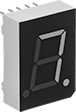 | 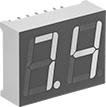 | 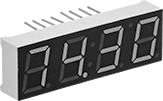 | 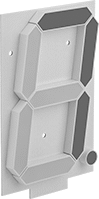 | 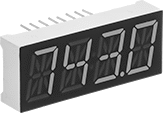 |
7 Segment with 1 Character | 7 Segment with 2 Characters | 7 Segment with 4 Characters | 7 Segment with 1 Character and 1 Decimal | 14 Segment with 4 Characters |
No. of | |||||||||||||||
|---|---|---|---|---|---|---|---|---|---|---|---|---|---|---|---|
Characters | Decimals | Colons | Apostrophes | Color | Character Ht. | No. of LED Segments | No. of Terminals | Input Voltage, V DC | Ht. | Wd. | Thk. | Each | |||
7 Segments per Character—Solder Pin Terminal | |||||||||||||||
| 1 | 2 | — | — | Red | 0.6" | 9 | 10 | 1.8 to 2.2 | 1" | 3/4" | 5/16" | 6287N11 | 00000 | ||
| 2 | 2 | — | — | Red/Green/Blue | 0.6" | 16 | 14 | 2 to 2.95 | 3/4" | 1" | 5/16" | 6287N12 | 0000 | ||
| 4 | 4 | 1 | 1 | Red | 0.4" | 35 | 16 | 2.1 | 1/2" | 1 5/8" | 5/16" | 6287N15 | 0000 | ||
| 4 | 4 | 1 | 1 | Blue | 0.4" | 35 | 16 | 3.4 | 1/2" | 1 5/8" | 5/16" | 6287N13 | 0000 | ||
| 4 | 4 | 1 | 1 | White | 0.4" | 35 | 16 | 1.9 | 1/2" | 1 5/8" | 5/16" | 6287N14 | 0000 | ||
7 Segments per Character—Solder | |||||||||||||||
| 1 | 1 | — | — | Red | 6" | 8 | — | 12 | 6 1/2" | 4 3/8" | 1/2" | 6287N29 | 00000 | ||
14 Segments per Character—Solder Pin Terminal | |||||||||||||||
| 4 | 1 | 1 | — | Red | 0.5" | 59 | 16 | 2.4 | 5/8" | 1 5/8" | 5/16" | 6287N21 | 0000 | ||
| 4 | 1 | 1 | — | Green | 0.5" | 59 | 16 | 3.6 | 5/8" | 1 5/8" | 5/16" | 6287N24 | 0000 | ||
| 4 | 1 | 1 | — | Blue | 0.5" | 59 | 16 | 3.6 | 5/8" | 1 5/8" | 5/16" | 6287N23 | 0000 | ||
| 4 | 1 | 1 | — | White | 0.5" | 59 | 16 | 3.6 | 5/8" | 1 5/8" | 5/16" | 6287N22 | 0000 | ||
Segment Displays with Display Driver
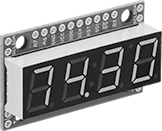 | 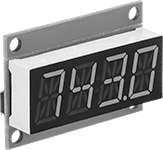 |
7 Segment with 4 Characters | 14 Segment with 4 Characters |
Displays with a driver are quicker to program and wire than those without one, since the driver controls the display with serial communication protocols, such as I2C. Without a driver, each contact must be wired individually and programmed as a separate output from your controller. You’ll also need a resistor to limit the amount of current flowing to the LEDs.
Solder—Displays with solder connections require you to solder wires or headers onto them to connect to electronics.
Qwiic Connection—Displays with Qwiic connections use compatible Qwiic cords to connect to electronics, so they don’t require soldering.
ATmega328P—Drivers with an ATmega328P microcontroller can store and run programs without being connected to a computer.
Number of Segments per Character—When choosing a display, consider the characters and punctuation you'll need. Displays with 14-segment characters create more detailed, legible characters than displays with 7-segment characters. Decimals can show precise readings. Colons are often used to show a clock or timer. Apostrophes can be used for measurements in feet or degrees.
No. of | |||||||||||||||||
|---|---|---|---|---|---|---|---|---|---|---|---|---|---|---|---|---|---|
Characters | Decimals | Colons | Apostrophes | Color | Character Ht. | No. of LED Segments | Driver Microcontroller Model Number | Communication Protocol | Signal Input/Output | Input Voltage, V DC | Ht. | Wd. | Thk. | Each | |||
7 Segments per Character—Solder | |||||||||||||||||
| 4 | 4 | 1 | 1 | Red | 0.4" | 35 | ATmega328P | I²C, SPI | TTL | 3.3 to 5 | 7/8" | 1 5/8" | 5/16" | 6287N17 | 000000 | ||
| 4 | 4 | 1 | 1 | Blue | 0.4" | 35 | ATmega328P | I²C, SPI | TTL | 3.3 to 5 | 7/8" | 1 5/8" | 5/16" | 6287N19 | 00000 | ||
| 4 | 4 | 1 | 1 | White | 0.4" | 35 | ATmega328P | I²C, SPI | TTL | 3.3 to 5 | 7/8" | 1 5/8" | 5/16" | 6287N18 | 00000 | ||
14 Segments per Character—Qwiic | |||||||||||||||||
| 4 | 1 | 1 | — | Red | 0.5" | 59 | VK16K33 | I²C | — | 3.3 | 1 1/8" | 1 5/8" | 5/16" | 6287N28 | 00000 | ||
| 4 | 1 | 1 | — | Green | 0.5" | 59 | VK16K33 | I²C | — | 3.3 | 1 1/8" | 1 5/8" | 5/16" | 6287N27 | 00000 | ||
| 4 | 1 | 1 | — | Blue | 0.5" | 59 | VK16K33 | I²C | — | 3.3 | 1 1/8" | 1 5/8" | 5/16" | 6287N25 | 00000 | ||
| 4 | 1 | 1 | — | White | 0.5" | 59 | VK16K33 | I²C | — | 3.3 | 1 1/8" | 1 5/8" | 5/16" | 6287N26 | 00000 | ||
