

Filter by
System of Measurement
Timer Function


Timing Adjustment Style


Operation Type
Switching Current

Number of Circuits Controlled
Switch Starting Position
Switch Action
Actuator Style

Electrical Connection


Wire Connection


U.S.–Mexico–Canada Agreement (USMCA) Qualifying
DFARS Specialty Metals
Export Control Classification Number (ECCN)
REACH
Enclosure Rating
Power Source

Relay Type

Tablet Holders with Emergency-Stop Push-Button Switch
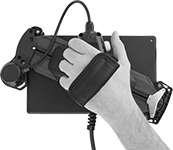 | 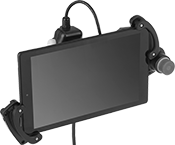 |
Pivoting Handle (Back View) | Holder with Tablet Installed (Not Included) |
 |  |
Holder | Tablet Holder Bracket Kits |
Halt machinery in an instant with these tablet holders. They equip your tablet with safety switches that meet IEC and EN standards, so you can safely move around your equipment while teaching robots or monitoring production lines and conveyor systems.
The emergency stop switch on the front of the holder illuminates when the switch is enabled. There is also a deadman switch on the back of the holder that controls machinery when you lightly press and hold it in the middle position. If the switch is released or pressed down all the way, it stops the machine.
Pivot the handle to hold a tablet vertically or horizontally, while keeping the switches in a comfortable position for either hand. The adjustable mounting bracket secures a variety of tablet sizes. Connect your tablet to the USB port to charge during use.
Tablet Holder Bracket Kits—Tablet holder bracket kits enlarge the bracket to hold tablets with thick covers and protectors.
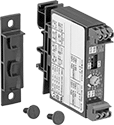
Solid State DIN-Rail Mount Timer Relays
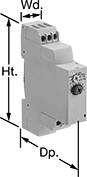 |
Mount these timer relays directly to 35 mm DIN rail (also known as DIN 3 rail) for fast installation. Unlike mechanical relays, they have no moving parts, so they require less maintenance and last longer, are quieter, and switch faster. After selecting a timing range, use the knob to adjust the trip time within the timing range.
Timing Range | |||||||||||||||||||||||||||||||||||||||||||||||||||||||||||||||||||||||||||||||||||||||||||||||||||
|---|---|---|---|---|---|---|---|---|---|---|---|---|---|---|---|---|---|---|---|---|---|---|---|---|---|---|---|---|---|---|---|---|---|---|---|---|---|---|---|---|---|---|---|---|---|---|---|---|---|---|---|---|---|---|---|---|---|---|---|---|---|---|---|---|---|---|---|---|---|---|---|---|---|---|---|---|---|---|---|---|---|---|---|---|---|---|---|---|---|---|---|---|---|---|---|---|---|---|---|
No. of Terminals | Input Voltage | Control Current, mA | No. of | Overall | Switching Current @ Voltage | Max. Switching Voltage, V AC | Ht. | Wd. | Dp. | Each | |||||||||||||||||||||||||||||||||||||||||||||||||||||||||||||||||||||||||||||||||||||||||
Delayed Start (Delay on Make) | |||||||||||||||||||||||||||||||||||||||||||||||||||||||||||||||||||||||||||||||||||||||||||||||||||
1 Circuit Controlled with 1 Off—SPST-NO | |||||||||||||||||||||||||||||||||||||||||||||||||||||||||||||||||||||||||||||||||||||||||||||||||||
| 6 | 24V AC, 48V AC, 120V AC, 240V AC, 24V DC, 48V DC, 60V DC, 120V DC, 240V DC | 7 | 7 | 0.1 sec. to 100 hr. | 0.7 amp @ 240V AC | 250 | 3 1/2" | 0.7" | 2.7" | 7801K51 | 000000 | ||||||||||||||||||||||||||||||||||||||||||||||||||||||||||||||||||||||||||||||||||||||||
Interval | |||||||||||||||||||||||||||||||||||||||||||||||||||||||||||||||||||||||||||||||||||||||||||||||||||
1 Circuit Controlled with 1 Off—SPST-NO | |||||||||||||||||||||||||||||||||||||||||||||||||||||||||||||||||||||||||||||||||||||||||||||||||||
| 6 | 24V AC, 48V AC, 120V AC, 240V AC | 7 | 7 | 0.1 sec. to 100 hr. | 0.7 amp @ 240V AC | 250 | 3 1/2" | 0.7" | 2.7" | 7801K52 | 000000 | ||||||||||||||||||||||||||||||||||||||||||||||||||||||||||||||||||||||||||||||||||||||||
Solid State DIN-Rail Mount Multifunction Timer Relays
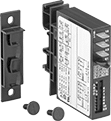 | 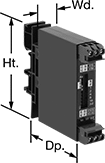 | 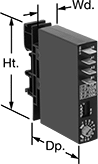 |  |
Relays with 1 Circuit Controlled, DIP Switches, and Quick-Disconnect Terminals | Relays with 1 Circuit Controlled, DIP Switches, and Screw Terminals | Relays with 1 Circuit Controlled, Knob, and Quick-Disconnect Terminals | Relays with 1 Circuit Controlled, Knob, and Screw Terminals |
Timing Range | |||||||||||||||||||||||||||||||||||||||||||||||||||||||||||||||||||||||||||||||||||||||||||||||||||
|---|---|---|---|---|---|---|---|---|---|---|---|---|---|---|---|---|---|---|---|---|---|---|---|---|---|---|---|---|---|---|---|---|---|---|---|---|---|---|---|---|---|---|---|---|---|---|---|---|---|---|---|---|---|---|---|---|---|---|---|---|---|---|---|---|---|---|---|---|---|---|---|---|---|---|---|---|---|---|---|---|---|---|---|---|---|---|---|---|---|---|---|---|---|---|---|---|---|---|---|
No. of Terminals | Input Voltage | Control Current, mA | Timer Relay Function | No. of | Overall | Switching Current @ Voltage | Max. Switching Voltage, V AC | Ht. | Wd. | Dp. | Wire Connection | Each | |||||||||||||||||||||||||||||||||||||||||||||||||||||||||||||||||||||||||||||||||||||||
Timing-Adjustment DIP Switch | |||||||||||||||||||||||||||||||||||||||||||||||||||||||||||||||||||||||||||||||||||||||||||||||||||
1 Circuit Controlled with 1 Off—SPST-NO | |||||||||||||||||||||||||||||||||||||||||||||||||||||||||||||||||||||||||||||||||||||||||||||||||||
| 4 | 24V AC, 48V AC, 120V AC, 240V AC | 8 | Delayed Start (Delay on Make) Interval Switch on (Single Shot) Delayed Switch Off (Delay on Break) Repeat Cycle | 4 | 0.1 sec. to 63 min. | 0.7 amp @ 240V AC | 240 | 3" | 0.7" | 2.4" | Quick-Disconnect Terminal | 7399K25 | 0000000 | ||||||||||||||||||||||||||||||||||||||||||||||||||||||||||||||||||||||||||||||||||||||
| 4 | 9V DC, 12V DC, 24V DC, 48V DC, 60V DC, 110V DC | 8 | Delayed Start (Delay on Make) Interval Switch on (Single Shot) Delayed Switch Off (Delay on Break) Repeat Cycle | 4 | 0.1 sec. to 63 min. | 0.7 amp @ 240V AC | 240 | 3" | 0.7" | 2.4" | Quick-Disconnect Terminal | 7399K26 | 000000 | ||||||||||||||||||||||||||||||||||||||||||||||||||||||||||||||||||||||||||||||||||||||
| 6 | 9V DC, 12V DC, 24V DC, 48V DC, 60V DC, 110V DC | 8 | Delayed Start (Delay on Make) Interval Switch on (Single Shot) Delayed Switch Off (Delay on Break) Repeat Cycle | 4 | 0.1 sec. to 63 min. | 0.7 amp @ 240V AC | 240 | 3" | 0.7" | 2.4" | Screw Terminal | 7399K28 | 000000 | ||||||||||||||||||||||||||||||||||||||||||||||||||||||||||||||||||||||||||||||||||||||
Timing-Adjustment Knob | |||||||||||||||||||||||||||||||||||||||||||||||||||||||||||||||||||||||||||||||||||||||||||||||||||
1 Circuit Controlled with 1 Off—SPST-NO | |||||||||||||||||||||||||||||||||||||||||||||||||||||||||||||||||||||||||||||||||||||||||||||||||||
| 4 | 24V AC, 48V AC, 120V AC, 240V AC | 8 | Delayed Start (Delay on Make) Interval Switch on (Single Shot) Delayed Switch Off (Delay on Break) Repeat Cycle | 4 | 0.1 sec. to 100 min. | 0.7 amp @ 240V AC | 240 | 3" | 0.7" | 2.4" | Quick-Disconnect Terminal | 7399K21 | 000000 | ||||||||||||||||||||||||||||||||||||||||||||||||||||||||||||||||||||||||||||||||||||||
| 4 | 9V DC, 12V DC, 24V DC, 48V DC, 60V DC, 110V DC | 8 | Delayed Start (Delay on Make) Interval Switch on (Single Shot) Delayed Switch Off (Delay on Break) Repeat Cycle | 4 | 0.1 sec. to 100 min. | 0.7 amp @ 240V AC | 240 | 3" | 0.7" | 2.4" | Quick-Disconnect Terminal | 7399K22 | 000000 | ||||||||||||||||||||||||||||||||||||||||||||||||||||||||||||||||||||||||||||||||||||||
| 6 | 24V AC, 48V AC, 120V AC, 240V AC | 8 | Delayed Start (Delay on Make) Interval Switch on (Single Shot) Delayed Switch Off (Delay on Break) Repeat Cycle | 4 | 0.1 sec. to 100 min. | 0.7 amp @ 240V AC | 240 | 3" | 0.7" | 2.4" | Screw Terminal | 7399K23 | 000000 | ||||||||||||||||||||||||||||||||||||||||||||||||||||||||||||||||||||||||||||||||||||||
| 6 | 9V DC, 12V DC, 24V DC, 48V DC, 60V DC, 110V DC | 8 | Delayed Start (Delay on Make) Interval Switch on (Single Shot) Delayed Switch Off (Delay on Break) Repeat Cycle | 4 | 0.1 sec. to 100 min. | 0.7 amp @ 240V AC | 240 | 3" | 0.7" | 2.4" | Screw Terminal | 7399K24 | 000000 | ||||||||||||||||||||||||||||||||||||||||||||||||||||||||||||||||||||||||||||||||||||||
