


Clear All


Timing Adjustment Style Timing Adjustment Style |
|---|
 | Push Button |
Switching Current Switching Current | Show |
|---|
|
Switching Current Switching Current | Hide |
|---|
Set Time Set Time |
|---|
|
Number of Circuits Controlled Number of Circuits Controlled |
|---|
|
Switch Type Switch Type |
|---|
|
Wire Connection Type Wire Connection Type |
|---|
 | Screw Terminals |
With Override With Override |
|---|
|
RoHS (Restriction of Hazardous Substances) RoHS (Restriction ofHazardous Substances) |
|---|
|
DFARS (Defense Acquisition Regulations Supplement) DFARS (Defense AcquisitionRegulations Supplement)  |
|---|
Switch Starting Position Switch Starting Position |
|---|
For Outlet Box Type For Outlet Box Type |
|---|
|
Specifications Met Specifications Met |
|---|
Wall-Mount Timer Switches
Use these switches in place of standard wall switches to automatically turn electrical equipment on or off after a set interval of time. They’re often used with lights.
Switches with override can bypass the automatic shut-off.
Set switches with beep and light signals to alert when the timer is almost done; the signals can also be turned off.
Switches with set time recall retain the last setting; hold the button down to restart the timer with that setting.
Push Button with Countdown LCD, Set Time Recall, and Beep and Light Signals
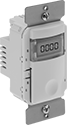
Push-Button with
Countdown LCD
and Set Time Recall
Countdown LCD
and Set Time Recall