
McMaster-Carr logo
    Filter by
    Height
    Width
    Export Control Classification Number (ECCN)
    Industrial Info Snippet
    DFARS Specialty Metals
    U.S.–Mexico–Canada Agreement (USMCA) Qualifying
    Weight Capacity
    Maximum Tilt Range of Motion
    Base Diameter
    Enter e-mail addresses in the fields below
    Message
    Cancel
    Comments
    E-mail address (if you would like a response)
    30 Products

    Laptop Mounts

    Image of ProductInUse. Front orientation. Tablet, Laptop, and Mobile Device Mounts. Laptop Mounts.
    Set up your laptop where you normally couldn't, such as on a cart handle or vehicle. These mounts attach to surfaces to create a secure mounting point for your laptop. Their base is adjustable to fit a variety of laptop sizes.
    Clamp-On Pipe Mount
    Image of Product. Front orientation. Contains Annotated. Tablet, Laptop, and Mobile Device Mounts. Laptop Mounts, Clamp-On Pipe Mount.
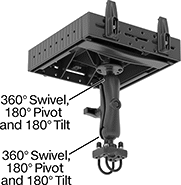
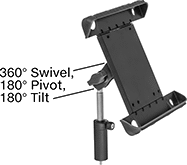
    Clamp-on pipe mounts attach to round bars, pipes, and railings with two adjustable U-bolts. They have two ball-and-socket joints—one below the laptop holder and one above the base. Each joint rotates 360°, so you can move these mounts in any direction and lock them in place.
    Projection
    Base
    Attaching End
    For Diag. Screen
    Size
    Display Ht.
    Clamping Distance
    Range
    Min.
    Max.
    For Device
    Thickness
    Max. Load
    Cap., lb.
    Material
    Color
    Lg.
    Wd.
    Range of
    Motion
    Max. Tilt Range
    of Motion
    Each
    Rotate, Tilt, Side to Side, Up and Down, In and Out
    11" to 17 1/2"5 1/16" to 12 1/8"1" to 1 1/4"10"13 3/16"1/2" to 1 3/4"3PlasticBlack2 1/2"2 1/16"360°180°00000000000000
     
    Screw-On Mount
    Image of Product. Front orientation. Contains Annotated. Tablet, Laptop, and Mobile Device Mounts. Laptop Mounts, Screw-On Mount.
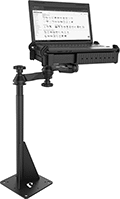
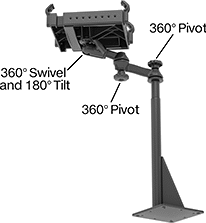
    Screw-on mounts fasten to flat surfaces, such as the floor of your vehicle. These mounts have three pivot points that rotate 360° and lock in position. A ball-and-socket joint connects the mount and the laptop holder, so you can tilt your laptop for a better viewing angle.
    Projection
    Mounting
    Base
    For Diag. Screen
    Size
    Display Ht.
    Min.
    Max.
    For Device
    Thickness
    Max. Load
    Cap., lb.
    Material
    Color
    Fasteners
    Included
    No. of
    Holes
    Hole
    Dia.
    Lg.
    Wd.
    Max. Range
    of Motion
    Each
    Rotate, Tilt, Side to Side, Up and Down, In and Out
    11" to 17 1/2"25 1/8" to 32"10"17"1/2" to 1 3/4"3PlasticBlackNo49/16"8"8"360°00000000000000
     

    Portable Desks

    Image of ProductInUse. Front orientation. Desks. Portable Desks.
    Image of Product. Front orientation. Desks. Portable Desks.
    Image of Product. Back View with Magnets. Back orientation. Desks. Portable Desks.
    Image of Product. Back View with Suction Cups. Back orientation. Desks. Portable Desks.

    Back View with Magnets

    Back View with Suction Cups

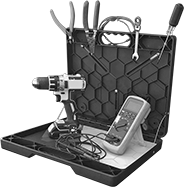
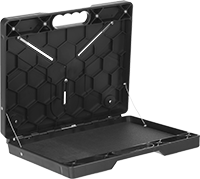
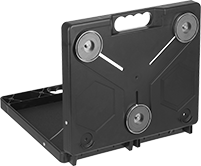
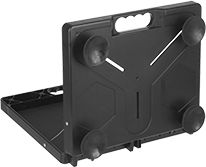
    Mount these workstations on a flat vertical surface to create a steady horizontal surface for writing, typing, or tinkering. They work as a case when closed, with a 2 3/4"-deep interior for carrying a laptop, small tools, and other supplies. When you need a workstation, mount them to a metal surface such as an electrical cabinet with the included magnets, or a nonmetal surface such as a wall with the included suction cups. The magnets and suction cups screw into either exterior side of workstations; leave magnets on one side and suction cups on the other to be ready for quick use. On the interior, workstations have a movable rubber work surface, magnetic strips across the top for holding tools, and wire rope cables to keep workstations open at a 90° angle.
    Inside
    For Min.
    Material Thk.
    Wd.
    Dp.
    Ht.
    Wd.
    Dp.
    Ht.
    Wt. Cap.,
    lb.
    Work Surface
    Style
    Mounting
    Location
    Mount Type
    Mounting Hardware
    Included
    Assembly
    Features
    Includes
    Color
    Each
    Portable
     
    ABS
    1/16"17"2 3/4"14"16 3/4"3/4"11 3/4"40FlatBench Top, WallMagnet, Suction CupYesAssembledMagnetic Strips, Wire Rope CablesRubber PadBlack00000000000000
     

    Tablet and Laptop VESA Mounts

    Image of Product. Front orientation. Tablet, Laptop, and Mobile Device Mounts. Tablet and Laptop VESA Mounts, Style A.
    Image of Product. Front orientation. Tablet, Laptop, and Mobile Device Mounts. Tablet and Laptop VESA Mounts, Style B.

    Style A

    Style B

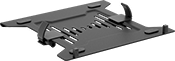
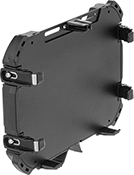
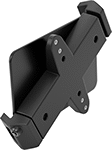
    Snap laptops and tablets into these mounts to attach them to stands and positioning arms. All mounts have a standard Video Electronics Standards Association (VESA) mounting hole pattern, so they'll work with a variety of equipment. To prevent removal, lock your device in place with the included key.
    Mounting
    Style
    For Diag. Screen
    Size
    For Device
    Thickness
    Max. Load
    Cap., lb.
    Material
    Pattern
    Compatibility
    Fasteners
    Included
    Lock
    Type
    Each
    A7" to 9"0" to 13/16"1PlasticVESA 75 × 75YesKeyed00000000000000
    B9" to 11"9/16" to 15/16"15Powder-Coated AluminumVESA 75 × 75YesKeyed0000000000000
    B11" to 14"11/16" to 1 1/4"15Powder-Coated AluminumVESA 75 × 75YesKeyed0000000000000

    Laptop Stands

    Image of ProductInUse. Front orientation. Laptop Stands.
    Image of Product. Front orientation. Laptop Stands.
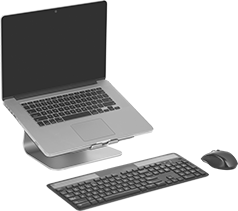
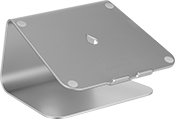
    Elevate your laptop screen to eye level with these stands to improve posture and reduce back and neck strain. Made of a single piece of aluminum, they provide a stable surface for typing. Run charging cables and other cords through the cable cutout to keep them organized and reduce clutter. For the most ergonomic work experience, use these laptop stands with a separate keyboard and mouse.
    Laptop Stands with 360° Swivel—360° swivel stands rotate, so you can turn your laptop to face any direction without lifting the stand.
    Laptop Stands
    Laptop Stands
    with 360° Swivel
    Wt. Cap.,
    lb.
    Ht.
    Wd.
    Dp.
    Color
    Material
    Cable Outlet
    Dia.
    Each
    Each
    306"10"7 1/2"SilverAnodized Aluminum2"0000000000000000000000000000

    Tablet Mounts

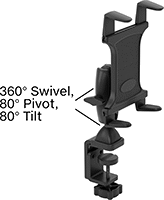
    Position your tablet within view while keeping your hands free to work. These mounts mount to a variety of surfaces while keeping a secure grip on your tablet.
    Clamp-On Bench Mount
    Image of ProductInUse. Shown Installed. Front orientation. Tablet, Laptop, and Mobile Device Mounts. Tablet Mounts, Clamp-On Bench Mount.
    Image of Product. Front orientation. Contains Annotated. Tablet, Laptop, and Mobile Device Mounts. Tablet Mounts, Clamp-On Bench Mount.

    Shown Installed

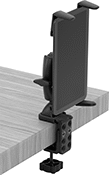
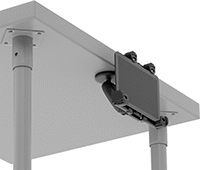
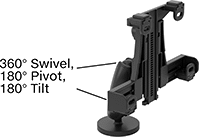
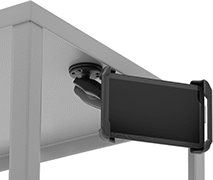
    Clamp-on bench mounts attach to the edge of a workbench or tabletop. They have two pivot points that rotate 360°. The joint behind the tablet holder allows you to rotate the screen and tilt it for a better viewing angle. No need to lock them in place—the pivot points stay in position on their own.
    Projection
    Base
    For Diag. Screen
    Size
    Display
    Ht.
    Clamping Distance
    Range
    Min.
    Max.
    For Max. Mounting
    Surface Thk.
    Max. Load
    Cap., lb.
    Material
    Color
    Lg.
    Wd.
    Max. Range
    of Motion
    Each
    Rotate, Tilt, Side to Side, Up and Down, In and Out
    8.7" to 10"8" to 17"0" to 1 3/4"8"19"1 13/16"2PlasticBlack5"4 1/2"360°00000000000000
     
    Clamp-On Rectangular-Bar Mount
    Image of ProductInUse. Shown Installed. Front orientation. Tablet, Laptop, and Mobile Device Mounts. Tablet Mounts, Clamp-On Rectangular-Bar Mount.
    Image of Product. Front orientation. Contains Annotated. Tablet, Laptop, and Mobile Device Mounts. Tablet Mounts, Clamp-On Rectangular-Bar Mount.

    Shown Installed

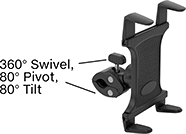
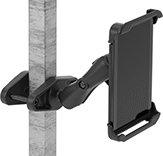
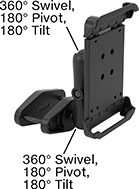
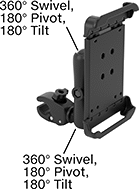
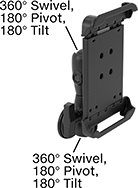
    Clamp-on rectangular-bar mounts have a base that fits around rectangular parts, such as square posts, t-slotted framing, and shelving units. These mounts have ball-and-socket joints that give them a 360° range of motion. Tilt or rotate them for a better viewing angle and lock the joints in place.
    Projection
    Base
    Attaching End
    For Diag. Screen
    Size
    Display Ht.
    Clamping Distance
    Range
    Min.
    Max.
    Max. Load
    Cap., lb.
    Material
    Color
    Lg.
    Wd.
    Range of
    Motion
    Max. Tilt Range
    of Motion
    Each
    Rotate, Tilt, Side to Side, Up and Down, In and Out
    7" to 8"0" to 6 9/16"0" to 4"2 11/16"9 3/16"3PlasticBlack5 5/16"2 1/2"360°180°000000000000000
    9" to 10.5"0" to 6 9/16"0" to 4"2 13/16"9 3/8"3PlasticBlack5 5/16"2 1/2"360°180°00000000000000
     
    Clamp-On Pipe Mount
    Image of ProductInUse. Shown Installed. Front orientation. Tablet, Laptop, and Mobile Device Mounts. Tablet Mounts, Clamp-On Pipe Mount.
    Image of Product. Front orientation. Contains Annotated. Tablet, Laptop, and Mobile Device Mounts. Tablet Mounts, Clamp-On Pipe Mount.

    Shown Installed

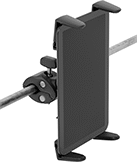
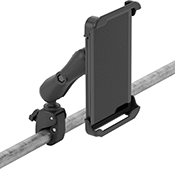
    Clamp-on pipe mounts attach to round bars, pipes, and railings using adjustable jaws. They’re commonly used to mount screens to cart handles. Clamp-on pipe mounts have ball-and-socket joints that give them a 360° range of motion. Tilt or rotate them for a better viewing angle and lock the joints in place.
    Projection
    Base
    Attaching End
    For Diag. Screen
    Size
    Display Ht.
    Clamping Distance
    Range
    Min.
    Max.
    Max. Load
    Cap., lb.
    Material
    Color
    Lg.
    Wd.
    Range of
    Motion
    Max. Tilt Range
    of Motion
    Each
    Rotate, Tilt, Side to Side, Up and Down, In and Out
    7" to 8"0" to 8 1/16"5/8" to 1 1/8"2 11/16"10 11/16"3PlasticBlack4 7/8"1 7/16"360°180°000000000000000
    9" to 10.5"0" to 8 1/16"5/8" to 1 1/8"2 13/16"10 7/8"3PlasticBlack4 7/8"1 7/16"360°180°00000000000000
     
    Magnetic Mount
    Image of ProductInUse. Shown Installed. Front orientation. Tablet, Laptop, and Mobile Device Mounts. Tablet Mounts, Magnetic Mount.
    Image of Product. Front orientation. Contains Annotated. Tablet, Laptop, and Mobile Device Mounts. Tablet Mounts, Magnetic Mount.

    Shown Installed

    Magnetic mounts cling to magnetic surfaces and have a strong enough hold to be mounted from any orientation, such as on the side of a machine. They’re good for creating a temporary display because they’re easy to move from place to place. Magnetic mounts have ball-and-socket joints that give them a 360° range of motion. Tilt or rotate them for a better viewing angle and lock the joints in place.
    Projection
    Attaching End
    For Diag. Screen
    Size
    Display Ht.
    Min.
    Max.
    Max. Load
    Cap., lb.
    Material
    Color
    Base
    Dia.
    Range of
    Motion
    Max. Tilt Range
    of Motion
    Each
    Rotate, Tilt, Side to Side, Up and Down, In and Out
    7" to 8"0" to 6 7/8"2 11/16"9 1/2"3PlasticBlack2 1/2"360°180°000000000000000
    9" to 10.5"0" to 6 7/8"2 13/16"9 11/16"3PlasticBlack2 1/2"360°180°00000000000000
     
    Suction Mount
    Image of ProductInUse. Shown Installed. Front orientation. Tablet, Laptop, and Mobile Device Mounts. Tablet Mounts, Suction Mount.
    Image of Product. Front orientation. Contains Annotated. Tablet, Laptop, and Mobile Device Mounts. Tablet Mounts, Suction Mount.

    Shown Installed

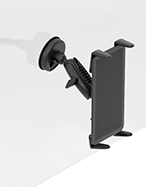
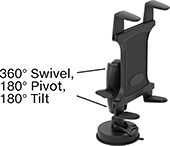
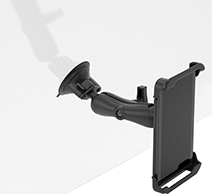
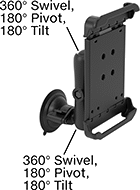
    Suction mounts are ideal for mounting tablets onto flat surfaces and windows, such as the windshield of your vehicle. The suction cup base creates a strong hold to keep the mount mounted from any orientation. They’re easy to remove and install, so they’re good for when you want a temporary display. Suction mounts have ball-and-socket joints that give them a 360° range of motion. Tilt or rotate them for a better viewing angle and lock the joints in place.
    Projection
    Attaching End
    For Diag. Screen
    Size
    Display Ht.
    Min.
    Max.
    Max. Load
    Cap., lb.
    Material
    Color
    Base
    Dia.
    Range of
    Motion
    Max. Tilt Range
    of Motion
    Each
    Rotate, Tilt, Side to Side, Up and Down, In and Out
    7" to 8"0" to 7 11/16"2 11/16"10 5/16"3PlasticBlack3 5/16"360°180°00000000000000
    9" to 10.5"0" to 7 11/16"2 13/16"10 1/2"3PlasticBlack3 5/16"360°180°00000000000000
     
    Threaded-Stud Mount
    Image of ProductInUse. Shown Installed. Front orientation. Tablet, Laptop, and Mobile Device Mounts. Tablet Mounts, Threaded-Stud Mount.
    Image of Product. Front orientation. Contains Annotated. Tablet, Laptop, and Mobile Device Mounts. Tablet Mounts, Threaded-Stud Mount.

    Shown Installed

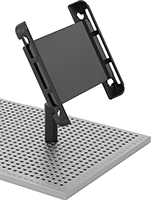
    Threaded-stud mounts have a telescopic pole for adjusting the display height. Screw them into tapped holes that have identical thread size. They’re often used to mount tablets on coordinate measuring machine (CMM) fixture tables. Threaded-stud mounts have ball-and-socket joints that give them a 360° range of motion. Tilt or rotate them for a better viewing angle and lock the joints in place.
    Projection
    Attaching End
    For Diag. Screen
    Size
    Display
    Ht.
    Min.
    Max.
    Max. Load
    Cap.
    Material
    Color
    Range of
    Motion
    Max. Tilt Range
    of Motion
    Thread
    Size
    Each
    Rotate, Tilt, Side to Side, Up and Down, In and Out
    8.7" to 11"1" to 3"2 1/2"4 1/4"Not RatedPlasticBlack360°180°1/4"-20
    00000000000000
     

    Mobile Device Mounts

    Keep smartphones and irregularly-shaped devices, such as radios, in sight and within reach. These mounts mount to a variety of surfaces and have 360° range of motion thanks to their ball-and-socket joints. Tilt or rotate them for a better viewing angle and lock the joints in place.
    For Smartphones—Clamp-On Rectangular-Bar Mount
    Image of ProductInUse. Clamp-On Rectangular-Bar Mount Shown Installed. Front orientation. Tablet, Laptop, and Mobile Device Mounts. Mobile Device Mounts, For Smartphones—Clamp-On Rectangular-Bar Mount.
    Image of Product. Front orientation. Contains Annotated. Tablet, Laptop, and Mobile Device Mounts. Mobile Device Mounts, For Smartphones—Clamp-On Rectangular-Bar Mount.

    Clamp-On Rectangular-Bar

    Mount Shown Installed

    Mounts for smartphones have spring-loaded brackets to grip the outside of your smartphone while leaving the screen visible.
    Clamp-on rectangular-bar mounts have a base that fits around rectangular parts, such as square posts, t-slotted framing, and rails.
    Projection
    Base
    Attaching End
    For Diag. Screen
    Size
    Display Ht.
    Clamping Distance
    Range
    Min.
    Max.
    Max. Load
    Cap., lb.
    Material
    Color
    Lg.
    Wd.
    Range of
    Motion
    Max. Tilt Range
    of Motion
    Each
    Rotate, Tilt, Side to Side, Up and Down, In and Out
    5.5" to 6.9"0" to 11 9/16"0" to 2 1/2"6 3/8"13 3/4"1PlasticBlack4 1/4"1 3/4"360°180°00000000000000
     
    For Smartphones—Clamp-On Pipe Mount
    Image of ProductInUse. Clamp-On Pipe Mount Shown Installed. Front orientation. Tablet, Laptop, and Mobile Device Mounts. Mobile Device Mounts, For Smartphones—Clamp-On Pipe Mount.
    Image of Product. Front orientation. Contains Annotated. Tablet, Laptop, and Mobile Device Mounts. Mobile Device Mounts, For Smartphones—Clamp-On Pipe Mount.

    Clamp-On Pipe Mount

    Shown Installed

    Mounts for smartphones have spring-loaded brackets to grip the outside of your smartphone while leaving the screen visible.
    Clamp-on pipe mounts attach to round bars, pipes, and railings using adjustable jaws. They’re commonly used to mount screens to cart handles.
    Base
    For Diag. Screen
    Size
    Display Ht.
    Clamping Distance
    Range
    Max.
    Projection
    Max. Load
    Cap.
    Material
    Color
    Lg.
    Wd.
    Each
    Rotate, Tilt, Side to Side, Up and Down, In and Out
    5.5" to 6.9"0" to 1 5/8"5/8" to 1 1/8"5"Not RatedPlasticBlack3 9/16"1 1/8"0000000000000
     
    For Smartphones—Magnetic Mount
    Image of ProductInUse. Magnetic Mount Shown Installed. Front orientation. Tablet, Laptop, and Mobile Device Mounts. Mobile Device Mounts, For Smartphones—Magnetic Mount.
    Image of Product. Front orientation. Contains Annotated. Tablet, Laptop, and Mobile Device Mounts. Mobile Device Mounts, For Smartphones—Magnetic Mount.

    Magnetic Mount Shown

    Installed

    Mounts for smartphones have spring-loaded brackets to grip the outside of your smartphone while leaving the screen visible.
    Magnetic mounts cling to magnetic surfaces. They have a strong enough hold to be mounted from any orientation, such as on the side of a machine or overhead on a ceiling.
    Projection
    Attaching End
    For Diag. Screen
    Size
    Display Ht.
    Min.
    Max.
    Max. Load
    Cap., lb.
    Material
    Color
    Base
    Dia.
    Range of
    Motion
    Max. Tilt Range
    of Motion
    Each
    Rotate, Tilt, Side to Side, Up and Down, In and Out
    5.5" to 6.9"5/8" to 5 9/16"3 5/8"6 1/2"0.5PlasticBlack2 1/2"360°180°000000000000000
     
    For Smartphones—Suction Mount
    Image of ProductInUse. Suction Mount Shown Installed. Front orientation. Tablet, Laptop, and Mobile Device Mounts. Mobile Device Mounts, For Smartphones—Suction Mount.
    Image of Product. Front orientation. Contains Annotated. Tablet, Laptop, and Mobile Device Mounts. Mobile Device Mounts, For Smartphones—Suction Mount.

    Suction Mount Shown

    Installed

    Mounts for smartphones have spring-loaded brackets to grip the outside of your smartphone while leaving the screen visible.
    Suction mounts are ideal for mounting devices onto flat surfaces and windows, such as the windshield of your vehicle. The suction cup base is strong enough to keep the mount securely mounted in any orientation.
    Projection
    Attaching End
    For Diag. Screen
    Size
    Display Ht.
    Min.
    Max.
    Max. Load
    Cap., lb.
    Material
    Color
    Base
    Dia.
    Range of
    Motion
    Max. Tilt Range
    of Motion
    Each
    Rotate, Tilt, Side to Side, Up and Down, In and Out
    5.5" to 6.9"3/8" to 7 5/16"6"9 5/16"1PlasticBlack3 5/16"360°180°0000000000000
     
    For Irregularly-Shaped Devices—Clamp-On Rectangular-Bar Mount
    Image of ProductInUse. Clamp-On Rectangular-Bar Mount Shown Installed. Front orientation. Tablet, Laptop, and Mobile Device Mounts. Mobile Device Mounts, For Irregularly-Shaped Devices—Clamp-On Rectangular-Bar Mount.
    Image of Product. Front orientation. Contains Annotated. Tablet, Laptop, and Mobile Device Mounts. Mobile Device Mounts, For Irregularly-Shaped Devices—Clamp-On Rectangular-Bar Mount.

    Clamp-On Rectangular-Bar

    Mount Shown Installed

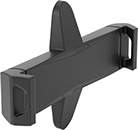
    Mounts for irregularly-shaped devices hold mobile devices that don’t have a uniform shape, such as radios and GPS navigators. They have rubber fingers that adjust to fit around curves, avoid antennas, and grip asymmetrical devices.
    Clamp-on rectangular-bar mounts have a base that fits around rectangular parts, such as square posts, t-slotted framing, and rails.
    Projection
    For
    Device
    Base
    Attaching End
    Display Ht.
    Clamping Distance
    Range
    Min.
    Max.
    Wd.
    Ht.
    Dp.
    Max. Load
    Cap., lb.
    Material
    Color
    Lg.
    Wd.
    Range of
    Motion
    Max. Tilt Range
    of Motion
    Each
    Rotate, Tilt, Side to Side, Up and Down, In and Out
    0" to 5 7/8"0" to 3"5 7/8"11 13/16"1 1/4" to 3 1/2"3 5/8" to 7 1/4"15/16" to 1 1/2"1PlasticBlack4 3/4"1 13/16"360°180°00000000000000
     
    For Irregularly-Shaped Devices—Clamp-On Pipe Mount
    Image of ProductInUse. Clamp-On Pipe Mount Shown Installed. Front orientation. Tablet, Laptop, and Mobile Device Mounts. Mobile Device Mounts, For Irregularly-Shaped Devices—Clamp-On Pipe Mount.
    Image of Product. Front orientation. Contains Annotated. Tablet, Laptop, and Mobile Device Mounts. Mobile Device Mounts, For Irregularly-Shaped Devices—Clamp-On Pipe Mount.

    Clamp-On Pipe Mount

    Shown Installed

    Mounts for irregularly-shaped devices hold mobile devices that don’t have a uniform shape, such as radios and GPS navigators. They have rubber fingers that adjust to fit around curves, avoid antennas, and grip asymmetrical devices.
    Clamp-on pipe mounts attach to round bars, pipes, and railings using adjustable jaws. They’re commonly used to mount screens to cart handles.
    Projection
    For
    Device
    Base
    Attaching End
    Display Ht.
    Clamping Distance
    Range
    Min.
    Max.
    Wd.
    Ht.
    Dp.
    Max. Load
    Cap., lb.
    Material
    Color
    Lg.
    Wd.
    Range of
    Motion
    Max. Tilt Range
    of Motion
    Each
    Rotate, Tilt, Side to Side, Up and Down, In and Out
    0" to 4 3/8"5/8" to 1 1/8"8 1/2"13 3/4"1 1/4" to 3 1/2"3 5/8" to 7 1/4"15/16" to 1 1/2"1PlasticBlack4 3/16"1 7/16"360°180°00000000000000
     
    For Irregularly-Shaped Devices—Magnetic Mount
    Image of ProductInUse. Magnetic Mount Shown Installed. Front orientation. Tablet, Laptop, and Mobile Device Mounts. Mobile Device Mounts, For Irregularly-Shaped Devices—Magnetic Mount.
    Image of Product. Front orientation. Contains Annotated. Tablet, Laptop, and Mobile Device Mounts. Mobile Device Mounts, For Irregularly-Shaped Devices—Magnetic Mount.

    Magnetic Mount Shown

    Installed

    Mounts for irregularly-shaped devices hold mobile devices that don’t have a uniform shape, such as radios and GPS navigators. They have rubber fingers that adjust to fit around curves, avoid antennas, and grip asymmetrical devices.
    Magnetic mounts cling to magnetic surfaces. They have a strong enough hold to be mounted from any orientation, such as on the side of a machine or overhead on a ceiling.
    Projection
    For
    Device
    Attaching End
    Display Ht.
    Min.
    Max.
    Wd.
    Ht.
    Dp.
    Max. Load
    Cap., lb.
    Material
    Color
    Base
    Dia.
    Range of
    Motion
    Max. Tilt Range
    of Motion
    Each
    Rotate, Tilt, Side to Side, Up and Down, In and Out
    0" to 1 3/4"5 1/8"8 1/16"1 1/4" to 3 1/2"3 5/8" to 7 1/4"15/16" to 1 1/2"1PlasticBlack2 1/2"360°180°00000000000000
     
    For Irregularly-Shaped Devices—Suction Mount
    Image of ProductInUse. Suction Mount Shown Installed. Front orientation. Tablet, Laptop, and Mobile Device Mounts. Mobile Device Mounts, For Irregularly-Shaped Devices—Suction Mount.
    Image of Product. Front orientation. Contains Annotated. Tablet, Laptop, and Mobile Device Mounts. Mobile Device Mounts, For Irregularly-Shaped Devices—Suction Mount.

    Suction Mount Shown

    Installed

    Mounts for irregularly-shaped devices hold mobile devices that don’t have a uniform shape, such as radios and GPS navigators. They have rubber fingers that adjust to fit around curves, avoid antennas, and grip asymmetrical devices.
    Suction mounts are ideal for mounting devices onto flat surfaces and windows, such as the windshield of your vehicle. The suction cup base is strong enough to keep the mount securely mounted in any orientation.
    Projection
    For
    Device
    Attaching End
    Display Ht.
    Min.
    Max.
    Wd.
    Ht.
    Dp.
    Max. Load
    Cap., lb.
    Material
    Color
    Base
    Dia.
    Range of
    Motion
    Max. Tilt Range
    of Motion
    Each
    Rotate, Tilt, Side to Side, Up and Down, In and Out
    0" to 6 5/8"6 7/16"9 5/16"1 1/4" to 3 1/2"3 5/8" to 7 1/4"15/16" to 1 1/2"1PlasticBlack3 5/16"360°180°0000000000000
     

    Vibration-Resistant Tablet Mounts

    These mounts lock around the top and bottom edges of tablets to keep them from shaking loose in areas with strong vibrations. They’re often used to mount tablets onto forklifts and other machines. Their ball-and-socket joints rotate 360°, so you can move these mounts in any direction, then lock them in place.
    Clamp-On Rectangular-Bar Mount
    Image of ProductInUse. Shown Installed. Front orientation. Tablet, Laptop, and Mobile Device Mounts. Vibration-Resistant Tablet Mounts, Clamp-On Rectangular-Bar Mount.
    Image of Product. Front orientation. Tablet, Laptop, and Mobile Device Mounts. Vibration-Resistant Tablet Mounts, Clamp-On Rectangular-Bar Mount.

    Shown Installed

    Rectangular-bar mounts fit onto square posts and rails, which are often found in forklift cages.
    Projection
    Base
    Attaching End
    For Diag. Screen
    Size
    Display Ht.
    Clamping Distance
    Range
    Min.
    Max.
    Max. Load
    Cap., lb.
    Material
    Color
    Lg.
    Wd.
    Range of
    Motion
    Max. Tilt Range
    of Motion
    No. of
    Locks
    Lock
    Type
    No. of Keys
    Included
    Each
    Rotate, Tilt, Side to Side, Up and Down, In and Out
    7" to 8"0" to 6 1/16"0" to 4"4 7/8"10 15/16"5PlasticBlack6 5/16"2 9/16"360°180°1Keyed2000000000000000
    9" to 10.5"0" to 6 1/16"0" to 4"5 1/16"11 1/8"5PlasticBlack6 5/16"2 9/16"360°180°1Keyed200000000000000
     
    Clamp-On Pipe Mount
    Image of ProductInUse. Shown Installed. Front orientation. Tablet, Laptop, and Mobile Device Mounts. Vibration-Resistant Tablet Mounts, Clamp-On Pipe Mount.
    Image of Product. Front orientation. Contains Annotated. Tablet, Laptop, and Mobile Device Mounts. Vibration-Resistant Tablet Mounts, Clamp-On Pipe Mount.

    Shown Installed

    Pipe mounts clamp onto cart handles, railings, and other round supports.
    Projection
    Base
    Attaching End
    For Diag. Screen
    Size
    Display
    Ht.
    Clamping Distance
    Range
    Min.
    Max.
    Max. Load
    Cap., lb.
    Material
    Color
    Lg.
    Wd.
    Range of
    Motion
    Max. Tilt Range
    of Motion
    No. of
    Locks
    Lock
    Type
    No. of Keys
    Included
    Each
    Rotate, Tilt, Side to Side, Up and Down, In and Out
    7" to 8"0" to 8"5/8" to 1 1/8"4 5/16"12 5/16"3PlasticBlack4 13/16"1 7/16"360°180°1Keyed2000000000000000
    9" to 10.5"0" to 8"5/8" to 1 1/8"4 7/16"12 1/2"3PlasticBlack4 13/16"1 7/16"360°180°1Keyed200000000000000
     
    back to top