

Filter by
Diagonal Screen Size
Mounting Location


U.S.–Mexico–Canada Agreement (USMCA) Qualifying

Export Control Classification Number (ECCN)
Projection
Display Height
Finish
DFARS Specialty Metals
Electrical Connection


Mounting Pattern Compatibility
Tablet Mounts
Clamp-On Bench Mount
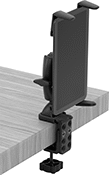 | 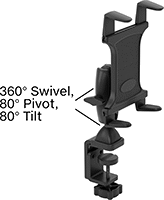 |
Shown Installed |
Projection | Base | ||||||||||||
|---|---|---|---|---|---|---|---|---|---|---|---|---|---|
For Diag. Screen Size | Max. Load Cap., lb. | Min. | Max. | Display Ht. | Material | Color | Clamping Distance | Lg. | Wd. | Each | |||
Pivot, Swivel, Tilt, Extend, Up and Down | |||||||||||||
| 7" to 18.4" | 2 | 1 5/8" | 5" | 0" to 5" | Plastic | Black | 0" to 3" | 2 5/16" | 1 11/16" | 3796T22 | 000000 | ||
| 7.1" to 18.4" | 1 | 3" | 12 3/8" | 5 7/8" to 11 5/8" | Plastic | Black | 0" to 1 3/4" | 5" | 2" | 3796T14 | 000000 | ||
Clamp-On Pipe Mount
 |  |
Shown Installed |
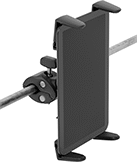
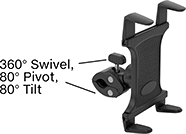
Wrap the adjustable jaws around round bars, pipes, and railings. These mounts are commonly used to secure tablets to cart handles.
Projection | Base | |||||||||||
|---|---|---|---|---|---|---|---|---|---|---|---|---|
For Diag. Screen Size | Max. Load Cap., lb. | Min. | Max. | Material | Color | Clamping Distance | Lg. | Wd. | Each | |||
Pivot, Swivel, Tilt | ||||||||||||
| 7" to 18.4" | 2 | 1 3/8" | 2 3/16" | Plastic | Black | 1/2" to 1 9/16" | 3 3/8" | 1 3/8" | 3796T23 | 000000 | ||
Magnetic Mount
 |  |
Shown Installed |
Projection | Base | |||||||||||
|---|---|---|---|---|---|---|---|---|---|---|---|---|
For Diag. Screen Size | Max. Load Cap., lb. | Min. | Max. | Display Ht. | Material | Color | Max. Pull, lbf | Dia. | Each | |||
Pivot, Swivel, Tilt, Extend, Up and Down | ||||||||||||
| 7" to 10" | 2 | 1 1/16" | 4" | 0" to 4" | Plastic | Black | 20 | 2 9/16" | 3796T24 | 000000 | ||
Suction Mount
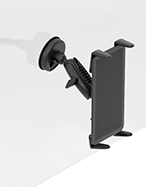 | 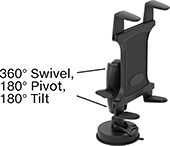 |
Shown Installed |
Projection | |||||||||||
|---|---|---|---|---|---|---|---|---|---|---|---|
For Diag. Screen Size | Max. Load Cap., lb. | Min. | Max. | Display Ht. | Material | Color | Base Dia. | Each | |||
Pivot, Swivel, Tilt, Extend, Up and Down | |||||||||||
| 7" to 18.4" | 2 | 1 3/4" | 6 1/8" | 0" to 4 1/4" | Plastic | Black | 3 1/8" | 3796T25 | 000000 | ||
Screw-On Fixture Table Mount
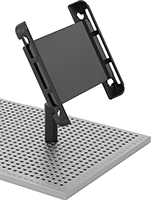 | 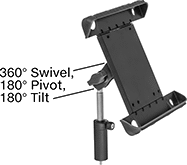 |
Shown Installed |
Projection | |||||||||||
|---|---|---|---|---|---|---|---|---|---|---|---|
For Diag. Screen Size | Max. Load Cap. | Min. | Max. | Display Ht. | Material | Color | Thread Size | Each | |||
Pivot, Swivel, Tilt, Extend, Up and Down | |||||||||||
| 8.7" to 11" | Not Rated | 2 1/2" | 4 1/4" | 1" to 3" | Plastic | Black | 1/4"-20 | 3796T13 | 0000000 | ||
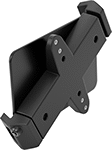
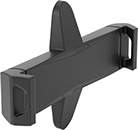
Screw-On VESA Mount
 |  |
Shown Installed |
These mounts have VESA (Video Electronics Standards Association) hole patterns, so they match up with the holes on most monitor mounts.
For Diag. Screen Size | Max. Load Cap., lb. | Max. Projection | Mounting Pattern Compatibility | Material | Lg. | Wd. | Base Mounting Fasteners Included | Lock Type | Each | |||
|---|---|---|---|---|---|---|---|---|---|---|---|---|
Fixed | ||||||||||||
| 8" to 12" | 4 | 1" | VESA 75 × 75, VESA 100 × 100 | Plastic | 13 7/8" | 6 5/16" | Yes | Keyed | 3796T21 | 000000 | ||
Vibration-Resistant Tablet Mounts
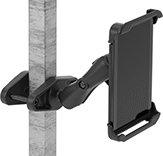
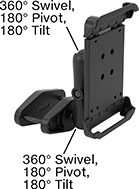
Clamp-On Rectangular-Bar Mount
 |  |
Shown Installed |
Projection | Base | ||||||||||||
|---|---|---|---|---|---|---|---|---|---|---|---|---|---|
For Diag. Screen Size | Max. Load Cap., lb. | Min. | Max. | Display Ht. | Material | Color | Clamping Distance | Lg. | Wd. | Each | |||
Pivot, Swivel, Tilt, Extend, Up and Down | |||||||||||||
| 7" to 8" | 3 | 2 11/16" | 9 3/16" | 0" to 6 9/16" | Powder-Coated Aluminum | Black | 0" to 4" | 5 5/16" | 2 1/2" | 3796T201 | 0000000 | ||
| 9" to 10.5" | 3 | 2 13/16" | 9 3/8" | 0" to 6 9/16" | Powder-Coated Aluminum | Black | 0" to 4" | 5 5/16" | 2 1/2" | 3796T205 | 000000 | ||
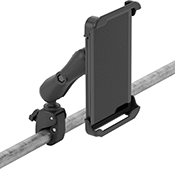
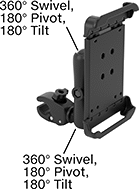
Clamp-On Pipe Mount
 |  |
Shown Installed |
Projection | Base | ||||||||||||
|---|---|---|---|---|---|---|---|---|---|---|---|---|---|
For Diag. Screen Size | Max. Load Cap., lb. | Min. | Max. | Display Ht. | Material | Color | Clamping Distance | Lg. | Wd. | Each | |||
Pivot, Swivel, Tilt, Extend, Up and Down | |||||||||||||
| 7" to 8" | 3 | 2 11/16" | 10 11/16" | 0" to 8 1/16" | Powder-Coated Aluminum | Black | 5/8" to 1 1/8" | 4 7/8" | 1 7/16" | 3796T202 | 0000000 | ||
| 9" to 10.5" | 3 | 2 13/16" | 10 7/8" | 0" to 8 1/16" | Powder-Coated Aluminum | Black | 5/8" to 1 1/8" | 4 7/8" | 1 7/16" | 3796T206 | 000000 | ||
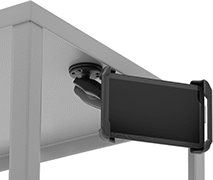
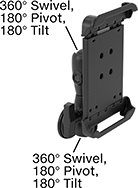
Magnetic Mount
 |  |
Shown Installed |
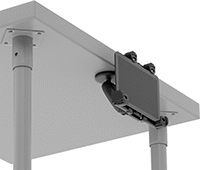
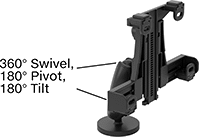
Snap these mounts to magnetic surfaces, such as machines and workbenches. Their hold is strong enough to secure them in any orientation, such as sideways on a post.
Suction Mount
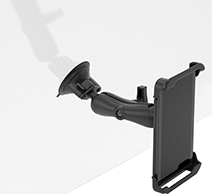 | 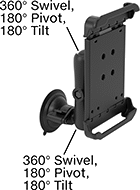 |
Shown Installed |
Attach to flat, smooth surfaces, such as your windshield. The base’s grip is strong enough to keep these mounts securely in place in any orientation.
Projection | |||||||||||
|---|---|---|---|---|---|---|---|---|---|---|---|
For Diag. Screen Size | Max. Load Cap., lb. | Min. | Max. | Display Ht. | Material | Color | Base Dia. | Each | |||
Pivot, Swivel, Tilt, Extend, Up and Down | |||||||||||
| 7" to 8" | 3 | 2 11/16" | 10 5/16" | 0" to 7 11/16" | Powder-Coated Aluminum | Black | 3 5/16" | 3796T203 | 0000000 | ||
| 9" to 10.5" | 3 | 2 13/16" | 10 1/2" | 0" to 7 11/16" | Powder-Coated Aluminum | Black | 3 5/16" | 3796T207 | 000000 | ||
Laptop Mounts
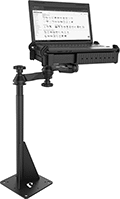 |
Create a secure mounting point for your laptop. These mounts are adjustable to fit a variety of laptop sizes. Position them at your desired viewing angle, then lock them in place.
Screw-On VESA Mount
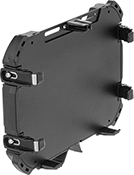 |
8 Grippers |
Convert the monitor mount you already have into a laptop mount. These mounts have VESA (Video Electronics Standards Association) hole patterns, so they match up with the holes on most monitor mounts.
8 Grippers—Extra support keeps your laptop right where you need it, even in moving vehicles.
Keyed Lock—To prevent removal, lock your device in place with the included key.
For Device | |||||||||||||
|---|---|---|---|---|---|---|---|---|---|---|---|---|---|
Wd. | Dp. | Thk. | Max. Load Cap., lb. | Max. Projection | Mounting Pattern Compatibility | Material | Color | Base Mounting Fasteners Included | Lock Type | Each | |||
8 Grippers | |||||||||||||
Fixed | |||||||||||||
| 11 1/2" to 14 3/16" | 9 1/4" to 11" | 11/16" to 1 1/4" | 15 | 11 5/16" | VESA 75 × 75 | Powder-Coated Aluminum | Black | Yes | Keyed | 6063N11 | 0000000 | ||
USB Battery Charging Stations
Surface Mount
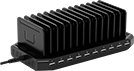 |
USB Connections | Compartments | ||||||||||||||
|---|---|---|---|---|---|---|---|---|---|---|---|---|---|---|---|
Type | No. of | USB-A Current, amp | No. of | Wd. | Dp. | Cord Lg., ft. | Input Voltage, V AC | Material | Ht. | Wd. | Dp. | Features | Each | ||
| USB-A | 10 | 2.4 | 13 | 1/2" | 3 3/4" | 6 | 120/230 | Plastic | 3 1/4" | 9 3/8" | 4 3/4" | Removable Dividers | 6318N13 | 0000000 | |
Surface Mount with Keyed Lock
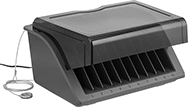 |
Stations with a keyed lock secure devices while charging. They come with two keys. The cable and combination lock can be secured to a desk, cart, or other flat surface.
Cannot Be Sold To—Stations cannot be sold to the listed areas due to energy efficiency regulations.
USB Connections | Compartments | ||||||||||||||||
|---|---|---|---|---|---|---|---|---|---|---|---|---|---|---|---|---|---|
Type | No. of | USB-A Current, amp | No. of | Wd. | Dp. | Cord Lg., ft. | Input Voltage, V AC | Material | Ht. | Wd. | Dp. | Features | Includes | Cannot Be Sold To | Each | ||
| USB-A | 10 | 2.4 | 10 | 1 1/4" | 7 1/2" | 6 | 120 | Plastic | 13 1/2" | 16 1/2" | 8 15/16" | Removable Dividers, Removable Cover | 6 ft. Long Cable with Combination Lock | California, Vermont | 6318N11 | 0000000 | |
Surface Mount/Wall Mount with Keyed Lock
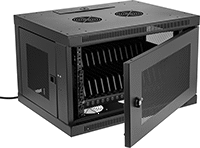 |
Stations with a keyed lock secure devices while charging. They come with two keys.
USB-B Connection—Stations with a USB B port connect to computers with a USB cord (not included). This is useful when pushing software updates, backing up data, or restoring default settings for multiple devices.
Cannot Be Sold To—Stations cannot be sold to the listed areas due to energy efficiency regulations.
USB Connections | Compartments | |||||||||||||||
|---|---|---|---|---|---|---|---|---|---|---|---|---|---|---|---|---|
Type | No. of | USB-A Current, amp | No. of | Wd. | Dp. | Cord Lg., ft. | Input Voltage, V AC | Material | Ht. | Wd. | Dp. | Features | Cannot Be Sold To | Each | ||
| USB-A USB-B | 16 1 | 2.4 | 16 | 3/4" | 8" | 10 | 120/230 | Steel | 17 3/4" | 23 5/8" | 14 1/2" | Removable Dividers | California, Vermont | 6318N12 | 000000000 | |
Tablet Holders with Emergency Stop Switch
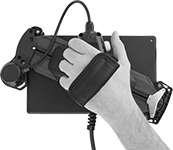 | 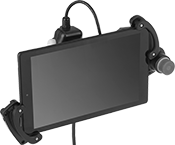 |
Pivoting Handle (Back View) | Holder with Tablet Installed (Not Included) |
 |  |
Holder | Tablet Holder Bracket Kits |
Halt machinery in an instant with these tablet holders. They equip your tablet with safety switches that meet IEC and EN standards, so you can safely move around your equipment while teaching robots or monitoring production lines and conveyor systems.
The emergency stop switch on the front of the holder illuminates when the switch is enabled. There is also a deadman switch on the back of the holder that controls machinery when you lightly press and hold it in the middle position. If the switch is released or pressed down all the way, it stops the machine.
Pivot the handle to hold a tablet vertically or horizontally, while keeping the switches in a comfortable position for either hand. The adjustable mounting bracket secures a variety of tablet sizes. Connect your tablet to the USB port to charge during use.
Tablet Holder Bracket Kits—Tablet holder bracket kits enlarge the bracket to hold tablets with thick covers and protectors.
Tablet Stands
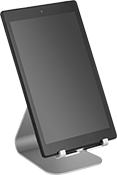 |
Style A, Adjustable Viewing Angle |
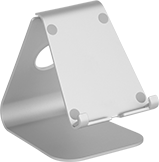 | 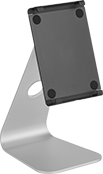 |
Style A | Style B |
 |
 |
Silver | Gray | |||||||||||
|---|---|---|---|---|---|---|---|---|---|---|---|---|
Style | Wt. Cap., lb. | Height | Wd. | Dp. | Viewing Angle | Material | Features | Each | Each | |||
| A | 15 | 5 1/4" | 4 1/8" | 6" | — | Anodized Aluminum | Cable Routing Hole | ——— | 0 | 4204N15 | 000000 | |
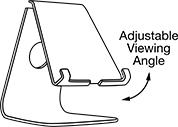
| A | 15 | 5 3/4" | 4 5/8" | 7 1/4" | 10° to 50° | Anodized Aluminum | Adjustable Viewing Angle, Cable Routing Hole | 4204N16 | 000000 | 4204N17 | 00000 | |
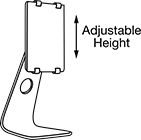
| B | 15 | 6 3/4" to 10 5/8" | 5 3/4" | 7 1/8" | 0° to 45° | Anodized Aluminum | Adjustable Height, Adjustable Viewing Angle, Cable Routing Hole | 4204N18 | 00000 | ——— | 0 | |
