


Filter by
Manufacturer Model Number
Development Board Type


Electrical Connection
System of Measurement
Microcontroller Model Number


Manufacturer
Input Voltage


Connects To


RoHS
DFARS Specialty Metals
Development Boards
Single Core Arduino Boards
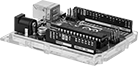 |
Development Board With Headers—Boards with headers are good for making quick connections. Plug them in directly to breadboards, or connect them using jumper wire.
Development Board Without Headers—Boards without headers require making your own soldered connections. Use them for permanent or long-term installations.
No. of Configurable Inputs/Output | Development Board With Headers | Development Board Without Headers | ||||||||||||||
|---|---|---|---|---|---|---|---|---|---|---|---|---|---|---|---|---|
Mfr. Model No. | Operating Voltage, V DC | Electrical Connection | Total | Digital (Input/Output) | PWM (Output) | Analog (Input) | Analog (Output) | Lg. | Wd. | Features | Cannot Be Sold To | Each | Each | |||
| Uno Wi-Fi Rev4 | 5 | USB-C, Bluetooth, Wi-Fi | 20 | 20/20 | 6 | 6 | — | 2 1/8" | 2 3/4" | USB HID Emulation 12 × 8 LED Matrix | — | 1387N302 | 000000 | ——— | 0 | |
| Uno Minima Rev4 | 5 | USB-C | 20 | 20/20 | 6 | 6 | — | 2 1/8" | 2 3/4" | USB HID Emulation | — | 1387N301 | 00000 | ——— | 0 | |
| Uno Rev3 | 5 | USB-B | 20 | 20/20 | 6 | 6 | — | 2 11/16" | 2 1/8" | — | — | 1387N11 | 00000 | ——— | 0 | |
| Uno Wi-Fi Rev2 | 5 | USB-B, Bluetooth, Wi-Fi | 20 | 20/20 | 5 | 6 | — | 2 11/16" | 2 1/8" | — | — | 1387N12 | 00000 | ——— | 0 | |
| Leonardo | 5 | Micro USB-B | 20 | 20/20 | 7 | 12 | — | 2 11/16" | 2 1/8" | USB HID Emulation | — | 1387N15 | 00000 | 1387N14 | 000000 | |
| Micro | 5 | Micro USB-B | 20 | 20/20 | 7 | 12 | — | 1 7/8" | 3/4" | USB HID Emulation | — | 1387N31 | 00000 | 1387N29 | 00000 | |
| MKR Wi-Fi 1010 | 3.3 | Micro USB-B, Bluetooth, , Wi-Fi | 22 | 22/22 | 13 | 7 | 1 | 2 7/16" | 1" | — | — | 1387N24 | 00000 | ——— | 0 | |
| Nano Every | 5 | Micro USB-B | 22 | 22/22 | 5 | 8 | — | 1 3/4" | 3/4" | — | — | 1387N33 | 00000 | 1387N32 | 00000 | |
| Nano Matter | 3.3 | USB-C, Bluetooth | 22 | 22/22 | 22 | 8 | 4 | 1 11/16" | 11/16" | — | — | 1387N514 | 00000 | ——— | 0 | |
| Nano 33 BLE Rev2 | 3 | Micro USB-B, Bluetooth | 22 | 22/22 | 14 | 8 | — | 1 3/4" | 3/4" | 3-axis IMU 6-axis IMU | Outside United States | 1387N47 | 00000 | 1387N46 | 00000 | |
| Nano 33 BLE Sense Rev2 | 3.3 | Micro USB-B, Bluetooth | 22 | 22/22 | 14 | 8 | — | 1 3/4" | 3/4" | 9-axis IMU Humidity/Temperature Sensor Barometric Sensor Proximity/Light Sensor Embedded Artificial Intelligence Microphone | — | 1387N39 | 00000 | 1387N38 | 00000 | |
| Mega 2560 Rev3 | 5 | USB-B | 54 | 54/54 | 15 | 16 | — | 4" | 2 1/8" | — | — | 1387N16 | 00000 | ——— | 0 | |
| Due | 3.3 | Micro USB-AB | 54 | 54/54 | 12 | 12 | 2 | 4" | 2 1/8" | — | — | 1387N18 | 00000 | ——— | 0 | |
Dual Core Arduino Boards
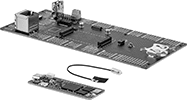 |
Dual-core development boards give you triple the processing speed of other development boards. Each core can be run individually, so these boards can be used for complex automation jobs.
Development Board With Headers—Boards with headers are good for making quick connections. Plug them in directly to breadboards, or connect them using jumper wire.
Development Board Without Headers—Boards without headers require making your own soldered connections. Use them for permanent or long-term installations.
No. of Configurable Inputs/Output | Development Board With Headers | Development Board Without Headers | ||||||||||||||
|---|---|---|---|---|---|---|---|---|---|---|---|---|---|---|---|---|
Mfr. Model No. | Operating Voltage, V DC | Electrical Connection | Total | Digital (Input/Output) | PWM (Output) | Analog (Input) | Analog (Output) | PDM (Input) | Lg. | Wd. | Features | Each | Each | |||
| Giga Wi-Fi Rev1 | 3.3 | USB-A, USB-C, Bluetooth, Wi-Fi, 3.5 mm Audio | 90 | 84/78 | 13 | 12 | 2 | — | 4" | 2 1/8" | USB HID Emulation | 1387N303 | 000000 | ——— | 0 | |
| Portenta H7 Lite | 3.3 | USB-A, USB-C, DSI, RJ45 | 82 | 78/78 | 10 | 8 | 1 | 3 | 6 7/16" | 2 13/16" | 8-bit camera interface | ——— | 0 | 1387N612 | 0000000 | |
| Portenta H7 | 3.3 | USB-A, USB-C, Bluetooth, Wi-Fi, DSI, RJ45 | 82 | 78/78 | 10 | 8 | 1 | 3 | 6 7/16" | 2 13/16" | Display port via USB-C 8-bit camera interface Antenna (U.FL) connector | ——— | 0 | 1387N611 | 000000 | |
Mini Development Boards
Arduino Boards
 |  |  |  |
Development Board | Programming Modules | Circuit Board Headers | Cords |
Development Boards | Programming Modules | Circuit Board Headers | Cords | |||||||||||||
|---|---|---|---|---|---|---|---|---|---|---|---|---|---|---|---|---|
No. of Configurable Inputs/Output | Development Board Without Headers | |||||||||||||||
Mfr. Model No. | Operating Voltage, V DC | Total | Digital (Input/Output) | PWM (Output) | Analog (Input) | Lg. | Wd. | Each | Each | Each | Each | |||||
| Pro Mini 328 5V | 5 | 22 | 22/22 | 6 | 8 | 1 1/8" | 11/16" | 4001N11 | 000000 | 4003N11 | 000000 | 4002N14 | 00000 | 4974T32 | 00000 | |
| Pro Mini 328 3.3V | 3.3 | 22 | 22/22 | 6 | 8 | 1 1/8" | 11/16" | 4001N12 | 00000 | 4003N12 | 00000 | 4002N14 | 0000 | 4974T32 | 0000 | |
Development Board Kits
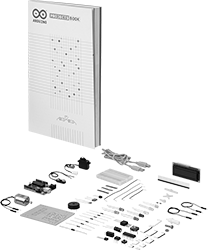 |
All the hardware and components needed to start building simple automation systems. With configurable inputs and outputs, the boards in these kits are often used to prototype electronics. Monitor both digital and analog devices, including proximity and temperature sensors, and control basic outputs, such as changing the speed of a servomotor or turning LEDs on and off. Their open-source software makes programming and troubleshooting convenient. Kits include an instructional project book, making them good for learning the basics of coding and electronics.
No. of Configurable Inputs/Output | |||||||||||
|---|---|---|---|---|---|---|---|---|---|---|---|
Mfr. Model No. | No. of Pieces | Includes | Operating Voltage, V DC | Electrical Connection | Total | Digital (Input/Output) | PWM (Output) | Analog (Input) | Each | ||
| Uno Starter Kit | 215 | One Arduino Uno Rev3 One Project Book One 4" Long USB-A to USB Micro B Cord One 36-Pin Male/Female Header One Breadboard One Wooden Base One DC Motor One Servomotor One Motor Driver One Temperature Sensor One Tilt Sensor One Optocoupler One Piezo Buzzer One LCD One 9V Battery Snap Connector Two Transistors Three Potentiometers Three Clear Films Five Capacitors Five Diodes Six Phototransistors 10 Push Buttons 29 LEDs 65 Resistors 72 Jumper Wires | 5 | USB-B | 20 | 20/20 | 6 | 6 | 1387N13 | 0000000 | |
