


Filter by
For Monitor Size
Attaching End Mounting Pattern Compatibility
Load Capacity
Base Mount Type


For Monitor Size (Diagonal)
Monitor Mounting Pattern Compatibility
Projection


Base Length
DFARS Specialty Metals
Attaching End Mount Type
Export Control Classification Number (ECCN)

Monitor Movement
Bar Monitor and Keyboard Mounts
Full Motion
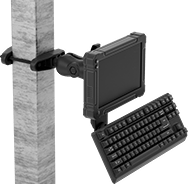 | 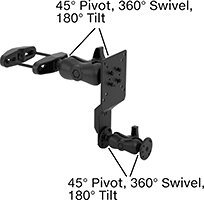 |
Clamp-On Rectangular-Bar Mount Shown Installed | Clamp-On Rectangular-Bar Mount |
Projection | Base | Mounting Pattern Compatibility | ||||||||||||
|---|---|---|---|---|---|---|---|---|---|---|---|---|---|---|
Max. Load Capacity | Display Ht. | Min. | Max. | Material | Lg. | Wd. | Monitor | Keyboard | Adjustment Movement | Features | Each | |||
Clamp-On Base | ||||||||||||||
| 3 lb. | 5 1/4" to 9 3/16" | 5 3/8" | 17 15/16" | Black Powder-Coated Steel | 5 11/16" | 1 5/8" | AMPS, VESA 75 × 75, VESA 100 × 100 | AMPS | Extend, Pivot, Swivel, Tilt, Up and Down | Swivel Plate | 6495N11 | 0000000 | ||
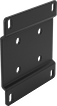 |
Lg. | Wd. | Material | Attaching End Mounting Pattern Compatibility | Each | ||
|---|---|---|---|---|---|---|
| 3 1/2" | 3 1/2" | Powder-Coated Steel | AMPS, VESA 75 × 75 | 2005N15 | 000000 |
Benchtop Monitor and Keyboard Mounts
Full Motion
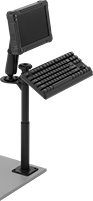 |  |
Screw-On Bench-Top Mount Shown Installed |
Set your monitor at nearly any angle. These mounts move up, down, and all around—just like your own arm. They’re easy to raise to eye level or swing around to share with a coworker. Tilt the mounting plate to reduce glare.
Swivel Plate—Quickly rotate your monitor between portrait and landscape mode.
Projection | Base | Mounting Pattern Compatibility | |||||||||||||
|---|---|---|---|---|---|---|---|---|---|---|---|---|---|---|---|
Max. Load Capacity | Display Ht. | Min. | Max. | Material | Lg. | Wd. | Monitor | Keyboard | Mounting Fasteners Included | Adjustment Movement | Features | Each | |||
Screw-On Base | |||||||||||||||
| 3 lb. | 9 3/4" to 28 1/4" | 6 5/8" | 19 3/4" | Black Powder-Coated Aluminum | 3 1/2" | 3 1/2" | VESA 75 × 75 | AMPS | Yes | Extend, Pivot, Swivel, Tilt, Up and Down | Swivel Plate | 6495N12 | 0000000 | ||
|
Lg. | Wd. | Material | Attaching End Mounting Pattern Compatibility | Each | ||
|---|---|---|---|---|---|---|
| 3 1/2" | 3 1/2" | Powder-Coated Steel | AMPS, VESA 75 × 75 | 2005N15 | 000000 |
Benchtop Monitor Mounts
Adjustable Height
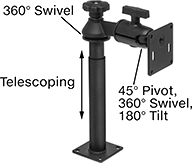 |
Screw-On Base |
Adjust your monitor to eye level for comfortable viewing. Tilt the mounting plate to reduce glare.
Swivel Plate—Quickly rotate your monitor between portrait and landscape mode.
Base | ||||||||||||||
|---|---|---|---|---|---|---|---|---|---|---|---|---|---|---|
For Monitor Size | Max. Load Cap., lb. | Display Ht. | Max. Projection | Material | Lg. | Wd. | Monitor Mounting Pattern Compatibility | Mounting Fasteners Included | Adjustment Movement | Features | Each | |||
Screw-On Base | ||||||||||||||
| 10" to 32" | 10 | 8" to 21 1/4" | 7 1/4" | Black Powder-Coated Aluminum | 3 1/2" | 3 1/2" | VESA 75 × 75 | No | Pivot, Tilt, Up and Down | Swivel Plate | 5031T133 | 0000000 | ||
Full Motion
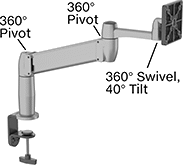 | 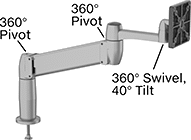 |
Clamp-On Base | Threaded-Hole Base |
Set your monitor at nearly any angle. These mounts move up, down, and all around—just like your own arm. They’re easy to raise to eye level or swing around to share with a coworker. Tilt the mounting plate to reduce glare.
Gas Spring Balance—Fully offset your monitor’s weight for smooth, effortless adjustment in any direction.
Swivel Plate—Quickly rotate your monitor between portrait and landscape mode.
Load Cap., lb. | Projection | ||||||||||||||||
|---|---|---|---|---|---|---|---|---|---|---|---|---|---|---|---|---|---|
For Monitor Size | Min. | Max. | Display Ht. | Balance Mechanism | Min. | Max. | Material | For Max. Mounting Surface Thk. | Base Dia. | Monitor Mounting Pattern Compatibility | Mounting Fasteners Included | Adjustment Movement | Features | Each | |||
Clamp-On Base | |||||||||||||||||
| 10" to 24" | 7 | 20 | 7" to 14" | Gas Spring | 4" | 22" | Aluminum | 3 5/8" | 4" | VESA 75 × 75, VESA 100 × 100 | — | Extend, Pivot, Swivel, Tilt, Up and Down | Swivel Plate | 1993A5 | 0000000 | ||
Threaded-Hole Base | |||||||||||||||||
| 10" to 24" | 7 | 20 | 7" to 14" | Gas Spring | 4" | 22" | Aluminum | 2 1/4" | 4" | VESA 75 × 75, VESA 100 × 100 | Yes | Extend, Pivot, Swivel, Tilt, Up and Down | Swivel Plate | 1993A3 | 000000 | ||
Ceiling Monitor Mounts
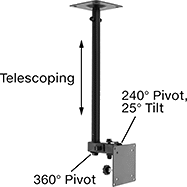 | 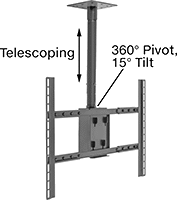 |
Style A | Style B |
Adjustable Height
| |
Style A | Style B |
Base | |||||||||||||||
|---|---|---|---|---|---|---|---|---|---|---|---|---|---|---|---|
Style | For Monitor Size | Max. Load Cap., lb. | Distance from Ceiling | Max. Projection | Material | Lg. | Wd. | Monitor Mounting Pattern Compatibility | Mounting Fasteners Included | Adjustment Movement | Features | Each | |||
Screw-On Base | |||||||||||||||
| A | 10" to 23" | 25 | 17" to 27" | 4 3/4" | Black Powder-Coated Steel | 4 11/16" | 4 11/16" | VESA 75 × 75, VESA 100 × 100 | Yes | Pivot, Tilt, Up and Down | — | 4653T11 | 000000 | ||
| A | 25" to 37" | 75 | 18" to 30" | 4 3/4" | Black Powder-Coated Steel | 5 1/2" | 5 1/2" | VESA 75 × 75, VESA 100 × 100, VESA 100 × 200, VESA 200 × 100, VESA 200 × 200 | Yes | Pivot, Tilt, Up and Down | — | 4653T12 | 000000 | ||
| B | 37" to 80" | 180 | 23" to 35" | 0" | Black Powder-Coated Steel | 7 1/2" | 7 1/2" | VESA 200 × 100 to VESA 800 × 500 | Yes | Pivot, Tilt, Up and Down | Hollow Mounting Pole | 4653T13 | 000000 | ||
Pipe and Bar Monitor Mounts
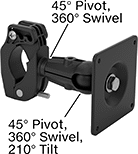 | 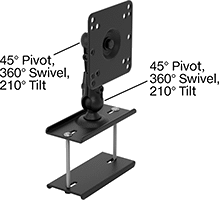 |
Style A | Style B |
Extendable
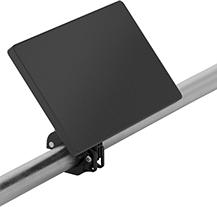 | 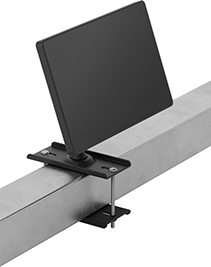 |
Pipe Mount Shown Installed | Rectangular-Bar Mount Shown Installed |
| |
Style A | Style B |
Projection | |||||||||||||
|---|---|---|---|---|---|---|---|---|---|---|---|---|---|
Style | Display Ht. | Clamping Distance | Max. Load Cap., lb. | Min. | Max. | Material | Monitor Mounting Pattern Compatibility | Adjustment Movement | Features | Each | |||
Clamp-On Base | |||||||||||||
Pipe Mount | |||||||||||||
| A | 1" to 6" | 1 1/4" to 2" | 10 | 4" | 7 3/4" | Black Powder-Coated Aluminum | VESA 75 × 75 | Extend, Pivot, Tilt | Swivel Plate | 5981N11 | 000000 | ||
Rectangular-Bar Mount | |||||||||||||
| B | 0" to 10 1/2" | 0" to 3 1/2" | 5 | 3" | 11 3/8" | Black Powder-Coated Steel | AMPS, VESA 75 × 75, VESA 100 × 100 | Extend, Pivot, Tilt | Swivel Plate | 5981N12 | 000000 | ||
Wall Monitor Mounts
 |  |
Style A | Style B |
 | 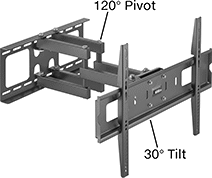 |
Style C | Style D |
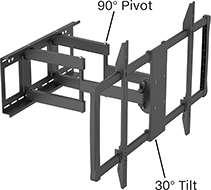 | 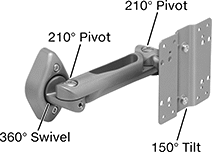 |
Style E | Style F |
Adjustable Angle
| |
Style A | Style B |
Base | ||||||||||||||
|---|---|---|---|---|---|---|---|---|---|---|---|---|---|---|
Style | For Monitor Size | Max. Load Cap., lb. | Max. Projection | Material | Lg. | Wd. | Monitor Mounting Pattern Compatibility | Mounting Fasteners Included | Adjustment Movement | Features | Each | |||
Screw-On Base | ||||||||||||||
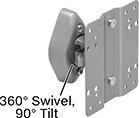
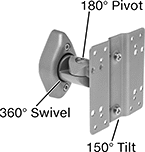
| A | 10" to 30" | 40 | 3" | Silver Powder-Coated Steel | 3 13/16" | 2 7/16" | VESA 75 × 75, VESA 100 × 100 | Yes | Swivel, Tilt | Swivel Plate | 4628T11 | 000000 | ||
| B | 10" to 30" | 40 | 4 11/16" | Silver Powder-Coated Steel | 3 13/16" | 2 7/16" | VESA 75 × 75, VESA 100 × 100 | Yes | Pivot, Swivel, Tilt | Swivel Plate | 4628T12 | 00000 | ||
Extendable
| |
Style C | Style D |
| |
Style E |
Projection | Base | ||||||||||||||
|---|---|---|---|---|---|---|---|---|---|---|---|---|---|---|---|
Style | For Monitor Size | Max. Load Cap., lb. | Min. | Max. | Material | Lg. | Wd. | Monitor Mounting Pattern Compatibility | Mounting Fasteners Included | Adjustment Movement | Certification | Each | |||
Screw-On Base | |||||||||||||||
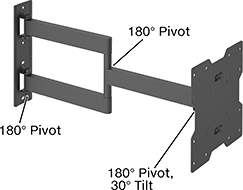
| C | 13" to 27" | 30 | 4 1/8" | 15 15/16" | Black Powder-Coated Steel | 4 5/8" | 4 5/8" | VESA 75 × 75, VESA 100 × 100 | Yes | Extend, Pivot, Tilt | — | 1133A6 | 000000 | ||
| C | 17" to 42" | 75 | 2 1/4" | 22 1/16" | Black Powder-Coated Steel | 9 5/16" | 8 3/4" | VESA 75 × 75, VESA 100 × 100, VESA 200 × 200 | Yes | Extend, Pivot, Tilt | — | 1133A4 | 00000 | ||
| D | 37" to 70" | 165 | 4 9/16" | 20 5/8" | Black Powder-Coated Steel | 31 15/16" | 8 3/4" | VESA 200 × 200, VESA 300 × 300, VESA 400 × 400, VESA 600 × 600 | Yes | Extend, Pivot, Tilt | — | 1133A5 | 000000 | ||
| E | 60" to 100" | 275 | 2 3/4" | 24 5/8" | Black Powder-Coated Steel | 37" | 15 15/16" | VESA 200 × 200, VESA 300 × 300, VESA 400 × 200, VESA 400 × 400, VESA 500 × 500, VESA 600 × 400, VESA 600 × 600, VESA 600 × 900, VESA 800 × 400, VESA 800 × 600 | Yes | Extend, Pivot, Tilt | C-UL Listed, UL Listed | 1133A112 | 000000 | ||
Full Motion
|
Style F |
Set your monitor at nearly any angle. These mounts move up, down, and all around—just like your own arm. Tilt the mounting plate to reduce glare. When you’re done, fold them flat against the wall to save space.
Swivel Plate—Quickly rotate your monitor between portrait and landscape mode.
Projection | Base | ||||||||||||||
|---|---|---|---|---|---|---|---|---|---|---|---|---|---|---|---|
Style | For Monitor Size | Max. Load Cap., lb. | Min. | Max. | Material | Lg. | Wd. | Monitor Mounting Pattern Compatibility | Mounting Fasteners Included | Adjustment Movement | Features | Each | |||
Screw-On Base | |||||||||||||||
| F | 10" to 30" | 40 | 3 5/8" | 10 11/16" | Silver Powder-Coated Steel | 3 13/16" | 2 7/16" | VESA 75 × 75, VESA 100 × 100 | Yes | Extend, Pivot, Swivel, Tilt, Up and Down | Swivel Plate | 4628T13 | 000000 | ||
Electronics Rack Monitor Mounts
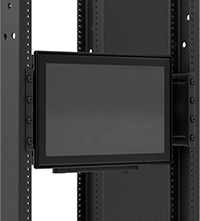 | 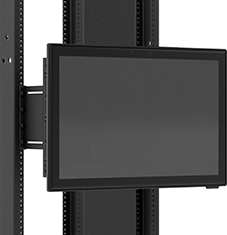 | 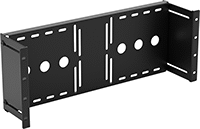 |
Shown Installed (Recessed) | Shown Installed (Raised) |
Base | ||||||||||||||
|---|---|---|---|---|---|---|---|---|---|---|---|---|---|---|
For Monitor Size (Diag.) | Max. Load Cap., lb. | Max. Projection | For Rack Wd. | For No. of Rack Units | Material | Mounting Fasteners Included | Lg. | Wd. | Monitor Mounting Pattern Compatibility | Adjustment Movement | Each | |||
Fixed | ||||||||||||||
Screw-On Base | ||||||||||||||
| 10" to 32" | 40 | 4 1/2" | 19" | 4 | Black Powder-Coated Steel | Yes | 19" | 7" | VESA 75 × 75, VESA 100 × 100, VESA 100 × 150 | Fixed | 9960N11 | 000000 | ||
Flat-Panel Mobile Monitor Stands
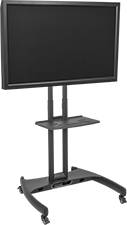 |
Attach a monitor to these stands, then route cords through the hollow mounting poles for a clean, organized appearance. They have a VESA (Video Electronics Standards Association) standard mounting hole pattern to attach a monitor.
Overall | Shelf | |||||||||||||||
|---|---|---|---|---|---|---|---|---|---|---|---|---|---|---|---|---|
For Monitor Size | Display Ht. | Max. Load Cap., lb. | Wd. | Dp. | Material | Color | Movement | Wt. Cap., lb. | Wd. | Dp. | Attaching End Mounting Pattern Compatibility | Assembly | Each | |||
Monitor Stands with Hollow Mounting Pole | ||||||||||||||||
Up and Down | ||||||||||||||||
| 32" to 60" | 46 1/2" to 62 1/2" | 100 | 32 3/4" | 28 3/4" | Powder-Coated Steel | Black | Adjustable | 25 | 19 5/8" | 12 1/2" | VESA 100 × 100 to VESA 600 × 400 | Unassembled | 2265N11 | 0000000 | ||
Partition Monitor Mounts
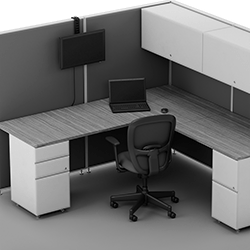 | 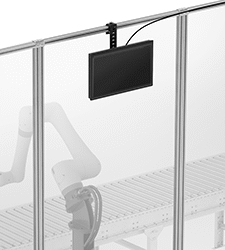 | 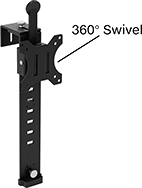 |
Mounted on Cubicle Wall | Mounted on Machine Guard |
Base | ||||||||||||||
|---|---|---|---|---|---|---|---|---|---|---|---|---|---|---|
For Monitor Size (Diag.) | Max. Load Cap., lb. | Display Ht. | Max. Projection | For Partition Thickness | Material | Lg. | Wd. | Monitor Mounting Pattern Compatibility | Adjustment Movement | Features | Each | |||
Adjustable Height | ||||||||||||||
Clamp-On Base | ||||||||||||||
| 10" to 32" | 17 1/2 | 5" to 12" | 3 1/8" | 1 1/2" to 3 1/2" | Black Powder-Coated Steel | 17 1/4" | 4 5/8" | VESA 75 × 75, VESA 100 × 100 | Swivel, Up and Down | Swivel Plate | 9969N11 | 000000 | ||
Column Monitor Mounts
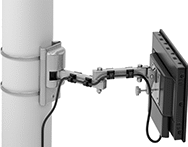 | 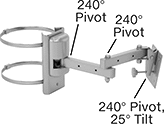 | 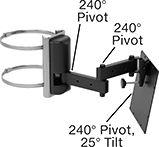 |
Shown Installed on Column | Style A | Style B |
Projection | Base | ||||||||||||||
|---|---|---|---|---|---|---|---|---|---|---|---|---|---|---|---|
Style | For Monitor Size (Diag.) | Max. Load Cap., lb. | Min. | Max. | Material | For Column Dia. | Lg. | Wd. | Monitor Mounting Pattern Compatibility | Adjustment Movement | Features | Each | |||
Extendable | |||||||||||||||
Clamp-On Base | |||||||||||||||
| A | 10" to 23" | 25 | 5 7/8" | 16 5/8" | Silver Powder-Coated Steel | 4" to 10" | 8" | 4" | VESA 75 × 75, VESA 100 × 100 | Extend, Pivot, Tilt | Cable Routing Clips | 9962N111 | 0000000 | ||
| B | 25" to 32" | 50 | 5 7/8" | 15 5/16" | Black Powder-Coated Steel | 4" to 10" | 8" | 4" | VESA 75 × 75, VESA 100 × 100, VESA 200 × 100, VESA 200 × 200 | Extend, Pivot, Tilt | Cable Routing Clips | 9962N222 | 000000 | ||
Wall-Mount Monitor Stands
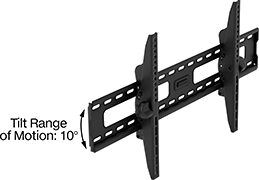 | 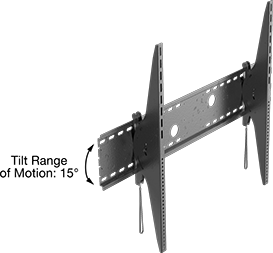 |
10° Tilt Range of Motion | 15° Tilt Range of Motion |
Overall | |||||||||||||
|---|---|---|---|---|---|---|---|---|---|---|---|---|---|
For Monitor Size (Diag.) Range | Tilt Range of Motion | Max. Load Cap., lb. | Ht. | Wd. | Material | Color | Attaching End Mounting Pattern Compatibility | Mounting Fasteners Included | Certification | Each | |||
Up and Down | |||||||||||||
| 26" to 55" | 10° | 165 | 17 5/16" | 18 1/8" | Powder-Coated Steel | Black | VESA 200 × 200, VESA 200 × 300, VESA 200 × 400, VESA 300 × 200, VESA 300 × 300, VESA 300 × 400, VESA 400 × 200, VESA 400 × 300, VESA 400 × 400 | Yes | — | 5565N111 | 000000 | ||
| 45" to 85" | 10° | 200 | 17 5/16" | 33 7/8" | Powder-Coated Steel | Black | VESA 200 × 200, VESA 200 × 300, VESA 200 × 400, VESA 300 × 200, VESA 300 × 300, VESA 300 × 400, VESA 400 × 200, VESA 400 × 300, VESA 400 × 400, VESA 500 × 300, VESA 500 × 400, VESA 600 × 300, VESA 600 × 400, VESA 800 × 300, VESA 800 × 400 | Yes | — | 5565N112 | 000000 | ||
| 60" to 100" | 15° | 350 | 32 3/4" | 44 7/8" | Powder-Coated Steel | Black | VESA 100 × 100, VESA 100 × 200, VESA 200 × 100, VESA 200 × 200, VESA 200 × 300, VESA 200 × 400, VESA 200 × 500, VESA 300 × 200, VESA 300 × 300, VESA 300 × 400, VESA 300 × 500, VESA 300 × 600, VESA 300 × 700, VESA 300 × 800, VESA 400 × 200, VESA 400 × 300, VESA 400 × 400, VESA 400 × 500, VESA 400 × 600, VESA 400 × 700, VESA 400 × 800, VESA 500 × 200, VESA 500 × 300, VESA 500 × 400, VESA 500 × 500, VESA 500 × 600, VESA 500 × 700, VESA 500 × 800, VESA 600 × 300, VESA 600 × 400, VESA 600 × 500, VESA 600 × 600, VESA 600 × 700, VESA 600 × 800, VESA 600 × 900, VESA 700 × 300, VESA 700 × 400, VESA 700 × 500, VESA 700 × 600, VESA 700 × 700, VESA 700 × 800, VESA 800 × 300, VESA 800 × 400, VESA 800 × 500, VESA 800 × 600, VESA 800 × 700, VESA 800 × 800, VESA 900 × 400, VESA 900 × 500, VESA 900 × 600, VESA 900 × 700, VESA 900 × 800, VESA 1000 × 400, VESA 1000 × 500, VESA 1000 × 600, VESA 1000 × 700, VESA 1000 × 800 | Yes | UL Listed | 5565N113 | 000000 | ||
Display Monitors
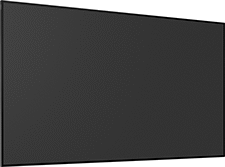 |
Present images, videos, and messages in crisp detail. These monitors are built for longer run times than household TVs, so they can stay on throughout your entire workday. To coordinate multiple displays, you can link them with splitters or sync them with software. Attach them to walls with a monitor mount.
Continuous-Use Display Monitors—Often used on production floors and in control rooms, these monitors are built for around-the-clock operation.
Mounting | |||||||||||||||
|---|---|---|---|---|---|---|---|---|---|---|---|---|---|---|---|
Diag. Screen Size | Run Time | Electrical Connection | Display Orientation | Screen Resolution | Operating System | Pattern Compatibility | Fasteners Included | Temp. Range, ° F | Enclosure Rating | Certification | Includes | Each | |||
Display Monitors | |||||||||||||||
| 43" | 16 hr. | Standard HDMI 2.0 (3 each) USB-A 2.0 (1 each) Ethernet RJ45 (1 each) Coaxial F-Type (2 each) Wi-Fi 802.11b/a/g/n/ac Bluetooth 5.3 | Landscape | 3840 × 2160 | Tizen | VESA 200 × 200 | No | 32 to 100 | — | CE Marked, UL Listed | Mounting Stand, Remote Control | 9600N11 | 0000000 | ||
| 55" | 16 hr. | Standard HDMI 2.0 (3 each) USB-A 2.0 (1 each) Ethernet RJ45 (1 each) Coaxial F-Type (2 each) Wi-Fi 802.11b/a/g/n/ac Bluetooth 5.3 | Landscape | 3840 × 2160 | Tizen | VESA 200 × 200 | No | 32 to 100 | — | CE Marked, UL Listed | Mounting Stand, Remote Control | 9600N12 | 000000 | ||
Continuous-Use Display Monitors | |||||||||||||||
| 43" | Continuous | Standard DisplayPort 1.2 (1 each) Standard HDMI 2.0 (3 each) USB-A 2.0 (2 each) Ethernet RJ45 (1 each) DB9 COM (2 each) 3.5 mm Audio Output (1 each) Wi-Fi 802.11b/a/g/n/ac Bluetooth 5.3 | Landscape, Portrait | 3840 × 2160 | Tizen 7.0 | VESA 200 × 200 | No | 32 to 100 | IP50 | CE Marked, UL Listed | Remote Control | 9600N13 | 000000 | ||
| 55" | Continuous | Standard DisplayPort 1.2 (1 each) Standard HDMI 2.0 (3 each) USB-A 2.0 (2 each) Ethernet RJ45 (1 each) DB9 COM (2 each) 3.5 mm Audio Output (1 each) Wi-Fi 802.11b/a/g/n/ac Bluetooth 5.3 | Landscape, Portrait | 3840 × 2160 | Tizen 7.0 | VESA 200 × 200 | No | 32 to 100 | IP50 | CE Marked, UL Listed | Remote Control | 9600N14 | 00000000 | ||
