
McMaster-Carr logo
    Filter by
    Body Diameter
    Tip Shape
    Manufacturer Model Number
    DFARS Specialty Metals
    U.S.–Mexico–Canada Agreement (USMCA) Qualifying
    Display Type
    Export Control Classification Number (ECCN)
    Industrial Info Snippet
    Measuring Increments
    Power Source
    Mounting Shank Diameter
    Ball Diameter
    Mounting Shank Length
    Body Material
    Dial Diameter
    Enclosure Rating
    Industrial Info Compare
    Counting Direction
    Overall Depth
    Enter e-mail addresses in the fields below
    Message
    Cancel
    Comments
    E-mail address (if you would like a response)
    41 Products

    Edge Finders

    Image of Product. Front orientation. Edge Finders. Edge Finders, Style A.
    Image of Product. Front orientation. Edge Finders. Edge Finders, Style B.
    Image of Product. Front orientation. Edge Finders. Edge Finders, Style C.
    Image of Product. Front orientation. Edge Finders. Edge Finders, Style D.
    Image of Product. Front orientation. Edge Finders. Edge Finders, Style E.

    Style

    A

    Style

    B

    Style

    C

    Style

    D

    Style

    E

    Locate edges, shoulders, center points, and lines on your workpiece.
    Style
    Tip Shape (Tip
    Dia.)
    Body
    Dia.
    Overall
    Lg.
    Material
    Each
    ABarrel (0.5")1/2"3 3/16"Steel20535A651000000
    ABarrel (10 mm)10 mm3 1/4"Steel20535A75600000
    BBarrel (0.2"), Point1/2"3 1/4"Steel20535A65600000
    CBarrel (0.2", 0.5")1/2"3 3/16"Steel20535A65200000
    DBarrel (0.2")3/8"3"Steel20535A65500000
    DBarrel (0.2")1/2"3"Steel20535A75500000
    EBarrel (10 mm)10 mm3 1/4"Steel20535A11100000

    Starrett Edge Finders

    Image of Product. Front orientation. Edge Finders. Starrett Edge Finders, Style A.
    Image of Product. Front orientation. Edge Finders. Starrett Edge Finders, Style B.

    Style

    A

    Style

    B

    Locate edges, shoulders, center points, and lines on your workpiece.
    Style
    Tip Shape (Tip
    Dia.)
    Body
    Dia.
    Overall
    Lg.
    Mfr. Model
    No.
    Material
    Each
    ABarrel (0.2")3/8"2 1/2"827ASteel20535A653000000
    ABarrel (6 mm)10 mm3 1/8"827MASteel20535A68100000
    BBarrel (0.2"), Point1/2"3 5/16"827BSteel20535A65400000

    Audible Edge Finders

    Image of Product. Front orientation. Edge Finders. Audible Edge Finders.
    These make a distinct sound when the tip runs concentric with the shank (for edge positioning; not for center points).
    Tip Shape (Tip
    Dia.)
    Body
    Dia.
    Overall
    Lg.
    Material
    Each
    Barrel (0.2")3/8"2 7/8"Steel20995A65000000
    Barrel (0.2")1/2"2 7/8"Steel20995A6600000

    Easy-View Electronic Edge Finders

    Image of Product. Front orientation. Edge Finders. Easy-View Electronic Edge Finders.
    A bulb lights up to give you 360° visibility when positioning work surfaces and tools.
    Note: These items will not work with nonconductive materials such as plastic and wood or with rotating surfaces such as spinning wheels.
    Tip
    Dia.
    Body
    Dia.
    Overall
    Lg.
    Accuracy
    Material
    Batteries
    Included
    Each
    0.2"1/2"3 15/16"±0.0005"Stainless Steel
    Yes2039A12000000

    Precision Easy-View Electronic Edge Finders

    Image of Product. Front orientation. Edge Finders. Precision Easy-View Electronic Edge Finders.
    These have a highly perceptive sensing system with a spring-loaded probe to allow for overrun without breaking. A bulb lights up to give you 360° visibility when positioning work surfaces and tools.
    Note: These items will not work with nonconductive materials such as plastic and wood or with rotating surfaces such as spinning wheels.
    Tip
    Dia.
    Body
    Dia.
    Overall
    Lg.
    Accuracy
    Material
    Batteries
    Included
    Each
    0.2"1/2"4 1/8"±0.0002"SteelYes2040A410000000
    0.4"3/4"4 1/4"±0.0002"SteelYes2040A66000000

    Machine Tool Indicators

    Find the exact edge of a workpiece without math or guesswork to quickly align your machining setup. Unlike most edge finders, these indicators don't require you to monitor the contact point's position and then add or subtract its diameter. When the display shows zero, that's your edge. These indicators move along three axes, so you can also use them to measure part dimensions, check surface flatness, and locate the centers of holes. The display swivels, eliminating the need to lean into your machine or set up mirrors to measure the back of your part.
    Insert these indicators into your CNC or manual milling machine, adjust the set screws at the top to calibrate them, and they're ready to go. To stop the indicator from breaking, the contact point has a ceramic body that fractures if it collides with your part. Just screw on a new contact point to replace it without having to re-calibrate.
    Dial Display
    Image of Product. Front orientation. Machine Tool Indicators. Dial Display.
    Measuring
    Dial
    Mounting
    Shank
    Contact Point
    Distance
    Increments
    Accuracy
    Dia.
    Reading
    Dia.
    Lg.
    Dia.
    Lg.
    Mounting Thread
    Size
    Material
    Overall
    Lg.
    Enclosure
    Rating
    Each
    0" to 0.15"0.0005"±0.0005"2.6"0-50
    3/4"2"0.2"1"M3 × 0.5 mmStainless Steel
    6.37"IP67
    2350N110000000
    0" to 0.15"0.001"±0.001"1.92"0-50
    0.39"1"0.2"1"M3 × 0.5 mmStainless Steel
    4.756"IP67
    2350N13000000
    Machine Tool Indicator Contact Points
    LCD Digital Display
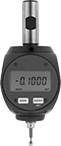
    Image of Product. Front orientation. Machine Tool Indicators. Digital Display.
    These indicators have zero-position memory, also called absolute (ABS) positioning, which saves their position even when turned off. Press the button to set them to zero and start measuring at any point. The large numbers on the display are easy to read from far away, such as when mounted at the center of a large CNC machine.
    Machine Tool Indicators
    Replacement
    Batteries
    Measuring
    Mounting
    Shank
    Contact Point
    Distance
    Increments
    Accuracy
    Dial
    Dia.
    Dia.
    Lg.
    Dia.
    Lg.
    Mounting Thread
    Size
    Material
    Overall
    Lg.
    Batteries
    Included
    Enclosure
    Rating
    Each
    Pkg.
    Qty.
    Pkg.
    0" to 0.15"0.00005"±0.0002"2.6"3/4"2"0.2"1"M3 × 0.5 mmStainless Steel
    6.37"YesIP64
    2350N1200000000017701K3400000
    Machine Tool Indicator Contact Points

    Plunger-Style Edge Finders

    Image of Product. Front orientation. Edge Finders. Plunger-Style Edge Finders.
    Locate the edge of a workpiece in your CNC machine without running the spindle. These edge finders mount in the collet or chuck of your spindle but don't spin, so you can keep the machine doors open for a clear line of sight while you position them. Compress the plunger against your workpiece and move it toward the edge. The plunger will drop and click into its full position, indicating it has reached the edge.
    Tip Shape (Tip
    Dia.)
    Body
    Dia.
    Overall
    Lg.
    Accuracy
    Material
    Each
    Barrel (0.4")3/8"3 1/8"±0.0005"Steel5549N11000000

    Height-Sensing Edge Finders

    Image of Product. Front orientation. Edge Finders. Height-Sensing Edge Finders.
    Measure and set cutting tool height. This tool has a highly perceptive sensing system with a spring-loaded probe to allow for overrun without breaking. A bulb lights up to give you 360° visibility when positioning work surfaces and tools.
    Note: This item will not work with nonconductive materials such as plastic and wood or with rotating surfaces such as spinning wheels.
    Tip
    Dia.
    Body
    Dia.
    Overall
    Lg.
    Accuracy
    Material
    Batteries
    Included
    Each
    0.31"1"2"±0.0002"SteelYes2040A720000000

    Machine Tool Indicator Contact Points

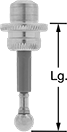
    Image of Product. Front orientation. Contains Annotated. Machine Tool Indicator Contact Points.
    Mounting Thread
    Size
    Lg.
    Ball
    Dia.
    Material
    Body
    Material
    Each
    M3 × 0.5 mm1"0.2"Stainless Steel
    Ceramic2370N11000000
    M3 × 0.5 mm2.6"0.4"Stainless Steel
    Ceramic2370N1200000

    Starrett Swiveling Machine Tool Indicator Tip Sets
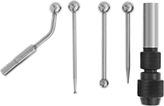
    Image of Product. Front orientation. Machine Tool Indicator Contact Points. Starrett Swiveling Machine Tool Indicator Tip Sets.
    Determine tool spindle position in relation to work surface, layout lines, holes, and slots. Also known as wiggler sets. Attachments are interchangeable.
    Includes
    Material
    Each
    0.10" Diameter Disc Contact, 0.25" Ball Contact, Chuck, Needle Point, Offset Indicator HolderSteel8632A72000000

    Vertical Benchtop Optical Comparators

    By projecting a magnified shadow or image of your part onto a screen, these optical comparators give you an easy way to measure and inspect its precise features. They work similarly to overhead projectors, but with fixed magnification to preserve proportions. Because of how easy they are to set up and use, they’re a staple in most machine shops. They shine light from above, so they’re best for inspecting flat parts, such as gaskets and O-rings. Unlike traditional optical comparators, these comparators are compact to fit easily on a benchtop.
    To use these comparators, choose profile or surface lighting. Profile lighting creates a shadow of your part, which you can use to plot points for precise measurements. To plot each point, move the stage the part rests on until the point lines up with the crosshair on the projector screen. For precision, the stage moves in increments thinner than a sheet of paper. Surface lighting makes these comparators work like an illuminated magnifier, blanketing the part with even light to reveal scratches, dents, and other surface flaws.
    Save the measurements you’ve gathered for later by exporting the data as a text file using an RS-232 cord (not included).
    Optical Comparators with Edge Detection
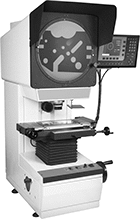
    Image of Product. Front orientation. Optical Comparators. Vertical Benchtop Optical Comparators, Optical Comparators with Edge Detection.
    Image of Specification. Graphic Display Screen. Front orientation. Contains Border. Graphic Display. Vertical Benchtop Optical Comparators.

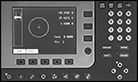
    Graphic Display Screen

    Optical comparators with edge detection increase accuracy and efficiency by reducing human error. No need to identify each edge yourself with the crosshair—these comparators register whether they are passing over your object's shadow or a gap, such as a hole or cutout. The graphic display screen shows a visual representation of the part you’re measuring, making it easy to identify and measure specific features. To make sure each part is inspected the same way, create a program that guides anyone using the comparator on what steps to follow.
    Stage
    Stage Travel
    Distance
    Overall
    Electrical
    Magnification
    Load Cap.,
    lb.
    Lg.
    Wd.
    X
    Axis
    Y
    Axis
    Stage Travel
    Resolution
    Projector
    Screen Dia.
    Display Screen
    Type
    Ht.
    Wd.
    Dp.
    USB
    Std.
    Connection
    No. of
    Blades
    Cord Lg.,
    ft.
    Each
    10X87 3/4"3 3/4"6"2"0.00002"12"Graphic44"22"31"2.0Straight Blade, USB-B356378N120000000000
    Accessories for Optical Comparators

    Horizontal Benchtop Optical Comparators

    Measure and inspect precise features by projecting a magnified shadow or image of your part onto a screen. These optical comparators work similarly to overhead projectors, but with fixed magnification to preserve proportions. Because of how easy they are to set up and use, they’re a staple in most machine shops. From o-rings to castings, they work to inspect parts with simple or complex geometries. They shine light from the side, so unlike vertical comparators, your part can be held from underneath for stability. Unlike traditional optical comparators, these comparators are compact to fit easily on a benchtop.
    To use these comparators, choose profile or surface lighting. Profile lighting creates a shadow of your part, which you can use to plot points for precise measurements. To plot each point, move the stage the parts rests on until the point lines up with the crosshair on the projector screen. For precision, the stage moves in increments thinner than a sheet of paper. Surface lighting makes these comparators work like an illuminated magnifier, blanketing the part with even light to reveal scratches, dents, and other surface flaws.
    These comparators come with a variety of features to streamline your inspection process. For a quick way to compare manufactured parts to designs, set desired dimension and tolerance limits. You can also create a program that guides anyone using the comparator on what steps to follow, so each part is inspected the same way. To save everything for later, print the data or export it as a spreadsheet or text file to a computer with a USB or RS-232 connection.
    Changing the magnification is as easy as twisting the current lens until it pops out and twisting in a new lens (sold separately).
    Optical Comparators with Edge Detection
    Image of Product. Front orientation. Optical Comparators. Horizontal Benchtop Optical Comparators, Optical Comparators with Edge Detection.
    Image of Specification. Graphic Display Screen. Front orientation. ZoomedIn view. Contains Border. Graphic Display. Horizontal Benchtop Optical Comparators.

    Graphic Display Screen

    Optical comparators with edge detection increase accuracy and efficiency by reducing human error. No need to identify each edge yourself with the crosshair—these comparators register whether they are passing over your object's shadow or a gap, such as a hole or cutout.
    Stage
    Stage Travel
    Distance
    Overall
    Electrical
    Magnification
    Load Cap.,
    lb.
    Lg.
    Wd.
    X
    Axis
    Y
    Axis
    Stage Travel
    Resolution, μm
    Projector
    Screen Dia.
    Display Screen
    Type
    Ht.
    Wd.
    Dp.
    USB
    Std.
    Connection
    No. of
    Blades
    Cord Lg.,
    ft.
    Each
    10X5518 3/4"4 3/4"10"4"116"Graphic37"22"46"2.0Straight Blade, USB-A266341N110000000000
    Accessories for Optical Comparators
    back to top