


Filter by
Adjustment Movement
Mounting Pattern Compatibility
Diagonal Screen Size
Display Height
RoHS

DFARS Specialty Metals
Projection
Export Control Classification Number (ECCN)
Ball-Grip Positioning Arms
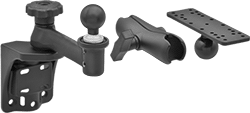 | 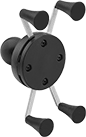 | 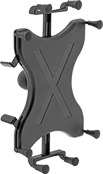 |  |
Arm Built with Rotating Complete Arm with Ball, Rigid Connector, and Universal Mounting Plate | For Tablets—Handheld Device Grips, Style E | For Tablets—Handheld Device Grips, Style F | For Tablets—Handheld Device Grips, Style G |
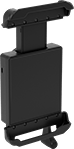
For Tablets—Handheld Device Grips
| | |
Style E | Style F | Style G |
Handheld device grips adjust for a secure hold.
Styles E and F—Styles E and F have spring-loaded fingers that you can adjust to fit devices of different sizes. Rubber caps on the fingers create a tight grip on your smartphone or tablet.
Style G—Style G do not have a ball; affix a screw-on base (sold separately) to attach to a connector. Maximum load capacity is based on the screw-on base you choose. Style G have a spring-loaded top bracket that expands, so you can insert your tablet. For a secure hold, the bracket clamps down on your device. They have a keyed lock to prevent your tablet from being removed once it’s in the holder.
Mounting | ||||||||||||||
|---|---|---|---|---|---|---|---|---|---|---|---|---|---|---|
Style | For Diag. Screen Size | Ball Dia. | Max. Load Cap., lb. | Material | Ball Material | Color | Fasteners Included | Pattern Compatibility | No. of Locks | No. of Keys Included | Each | |||
Rotate, Tilt, Side to Side, In/Out | ||||||||||||||
| E | 7" to 8" | 1" | 1 | Plastic | Rubber | Black | — | — | — | — | 5031T139 | 000000 | ||
| F | 9" to 11" | 1 1/2" | 3 | Plastic | Rubber | Black | — | — | — | — | 5031T811 | 000000 | ||
| G | 7" to 8" | — | — | Plastic | — | Black | Yes | AMPS | 1 | 2 | 5031T111 | 000000 | ||
| G | 9" to 10.5" | — | — | Plastic | — | Black | Yes | AMPS | 1 | 2 | 5031T116 | 000000 | ||
Laptop Mounts
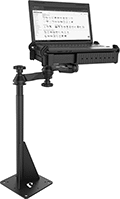 |
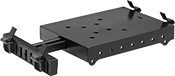
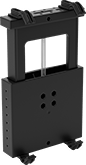
Create a secure mounting point for your laptop. These mounts are adjustable to fit a variety of laptop sizes. Position them at your desired viewing angle, then lock them in place.
Clamp-On Pipe Mount
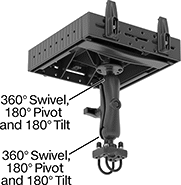 |
Attach to round bars, pipes, and railings with two adjustable U-bolts.
For Device | Projection | Base | |||||||||||||
|---|---|---|---|---|---|---|---|---|---|---|---|---|---|---|---|
Wd. | Dp. | Thk. | Max. Load Cap., lb. | Min. | Max. | Display Ht. | Material | Color | Clamping Distance | Lg. | Wd. | Each | |||
4 Grippers | |||||||||||||||
Pivot, Swivel, Tilt, Extend, Up and Down | |||||||||||||||
| 10" to 16" | 10" | 1/2" to 1 3/4" | 3 | 10" | 13 1/4" | 5 1/16" to 12 1/8" | Powder-Coated Aluminum | Black | 1" to 1 1/4" | 2 1/2" | 2 1/16" | 6615N12 | 0000000 | ||
Screw-On Floor Mount
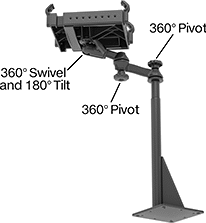 |
Fasten to flat surfaces, such as the floor of your vehicle.
For Device | Projection | Base | |||||||||||||||
|---|---|---|---|---|---|---|---|---|---|---|---|---|---|---|---|---|---|
Wd. | Dp. | Thk. | Max. Load Cap., lb. | Min. | Max. | Display Ht. | Material | Color | Mounting Fasteners Included | No. of Mounting Holes | Mounting Hole Dia. | Lg. | Wd. | Each | |||
4 Grippers | |||||||||||||||||
Pivot, Swivel, Tilt, Extend, Up and Down | |||||||||||||||||
| 10" to 16" | 10" | 1/2" to 1 3/4" | 3 | 10" | 22 1/4" | 25 1/8" to 32" | Powder-Coated Steel | Black | No | 4 | 17/32" | 8" | 8" | 6615N11 | 0000000 | ||
