


Filter by
Base Mount Type


Mounting Location
System of Measurement
For Monitor Size
Adjustment Movement


Load Capacity
Material
Monitor Mounting Pattern Compatibility


Base Length
Component
Finish
Display Height
Attaching End Mount Type
Export Control Classification Number (ECCN)

Base Diameter
Projection
DFARS Specialty Metals
RoHS
Monitor Movement
Benchtop Monitor Mounts
Adjustable Height
 |
Screw-On Base |
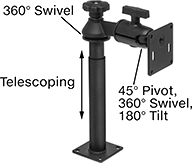
Adjust your monitor to eye level for comfortable viewing. Tilt the mounting plate to reduce glare.
Swivel Plate—Quickly rotate your monitor between portrait and landscape mode.
Base | ||||||||||||||
|---|---|---|---|---|---|---|---|---|---|---|---|---|---|---|
For Monitor Size | Max. Load Cap., lb. | Display Ht. | Max. Projection | Material | Lg. | Wd. | Monitor Mounting Pattern Compatibility | Mounting Fasteners Included | Adjustment Movement | Features | Each | |||
Screw-On Base | ||||||||||||||
| 10" to 32" | 10 | 8" to 21 1/4" | 7 1/4" | Black Powder-Coated Aluminum | 3 1/2" | 3 1/2" | VESA 75 × 75 | No | Pivot, Tilt, Up and Down | Swivel Plate | 5031T133 | 0000000 | ||
Full Motion
 |  |
Clamp-On Base | Threaded-Hole Base |
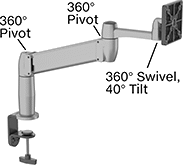
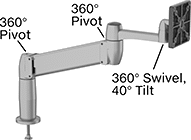
Set your monitor at nearly any angle. These mounts move up, down, and all around—just like your own arm. They’re easy to raise to eye level or swing around to share with a coworker. Tilt the mounting plate to reduce glare.
Gas Spring Balance—Fully offset your monitor’s weight for smooth, effortless adjustment in any direction.
Swivel Plate—Quickly rotate your monitor between portrait and landscape mode.
Load Cap., lb. | Projection | ||||||||||||||||
|---|---|---|---|---|---|---|---|---|---|---|---|---|---|---|---|---|---|
For Monitor Size | Min. | Max. | Display Ht. | Balance Mechanism | Min. | Max. | Material | For Max. Mounting Surface Thk. | Base Dia. | Monitor Mounting Pattern Compatibility | Mounting Fasteners Included | Adjustment Movement | Features | Each | |||
Clamp-On Base | |||||||||||||||||
| 10" to 24" | 7 | 20 | 7" to 14" | Gas Spring | 4" | 22" | Aluminum | 3 5/8" | 4" | VESA 75 × 75, VESA 100 × 100 | — | Extend, Pivot, Swivel, Tilt, Up and Down | Swivel Plate | 1993A5 | 0000000 | ||
Threaded-Hole Base | |||||||||||||||||
| 10" to 24" | 7 | 20 | 7" to 14" | Gas Spring | 4" | 22" | Aluminum | 2 1/4" | 4" | VESA 75 × 75, VESA 100 × 100 | Yes | Extend, Pivot, Swivel, Tilt, Up and Down | Swivel Plate | 1993A3 | 000000 | ||
Benchtop Monitor and Keyboard Mounts
Full Motion
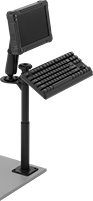 |  |
Screw-On Bench-Top Mount Shown Installed |
Set your monitor at nearly any angle. These mounts move up, down, and all around—just like your own arm. They’re easy to raise to eye level or swing around to share with a coworker. Tilt the mounting plate to reduce glare.
Swivel Plate—Quickly rotate your monitor between portrait and landscape mode.
Projection | Base | Mounting Pattern Compatibility | |||||||||||||
|---|---|---|---|---|---|---|---|---|---|---|---|---|---|---|---|
Max. Load Capacity | Display Ht. | Min. | Max. | Material | Lg. | Wd. | Monitor | Keyboard | Mounting Fasteners Included | Adjustment Movement | Features | Each | |||
Screw-On Base | |||||||||||||||
| 3 lb. | 9 3/4" to 28 1/4" | 6 5/8" | 19 3/4" | Black Powder-Coated Aluminum | 3 1/2" | 3 1/2" | VESA 75 × 75 | AMPS | Yes | Extend, Pivot, Swivel, Tilt, Up and Down | Swivel Plate | 6495N12 | 0000000 | ||
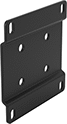 |
AMPS-to-VESA Adapter |
Lg. | Wd. | Material | Each | ||
|---|---|---|---|---|---|
| 3 1/2" | 3 1/2" | Powder-Coated Steel | 2005N15 | 000000 |
Suspension Positioning Arms for Enclosures
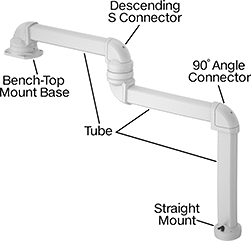 | 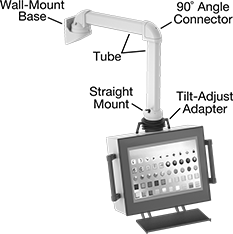 |
Example Configuration | All Components Sold Separately |
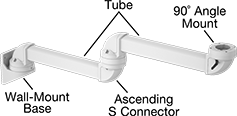 | |
Example Configuration |
Bases
 |
Bench Top |
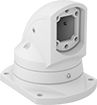
Bases mount your arm to a surface.
Bench Top—Bench-top bases mount to horizontal surfaces, such as the top of a machine.
Pivot—Create a joint that rotates back and forth.
For Tube | Mounting Plate | ||||||||||||||
|---|---|---|---|---|---|---|---|---|---|---|---|---|---|---|---|
Adjustment Movement | Max. Range of Motion | Ht. | Wd. | Ht. | Lg. | Wd. | Hole Dia. | Material | Color | Mounting Fasteners Included | Features | Each | |||
Bench Top | |||||||||||||||
| Pivot | 310° | 3 1/2" | 2 1/2" | 7 1/4" | 7 3/4" | 5 3/4" | 0.433" | Powder-Coated Aluminum | White | Yes | Brake, Cable Routing Hole, Locking Pins | 7255N11 | 0000000 | ||
