


Filter by
Adjustment Movement
Mounting Location
Diagonal Screen Size
Display Height
Export Control Classification Number (ECCN)


DFARS Specialty Metals
Projection
For Manufacturer Model
Performance
Clamping Distance
Ball-Grip Positioning Arms
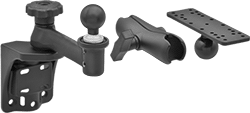 | 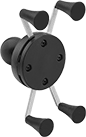 | 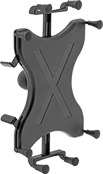 |  |
Arm Built with Rotating Complete Arm with Ball, Rigid Connector, and Universal Mounting Plate | For Tablets—Handheld Device Grips, Style E | For Tablets—Handheld Device Grips, Style F | For Irregularly-Shaped Devices—Handheld Device Grips, Style H |
For Smartphones—Handheld Device Grips
|
Style E |
Style | For Diag. Screen Size | Ball Dia. | Max. Load Cap., lb. | Material | Ball Material | Color | Each | |||
|---|---|---|---|---|---|---|---|---|---|---|
Rotate, Tilt, Side to Side, In/Out | ||||||||||
| E | 4.5" to 6.2" | 1" | 1 | Plastic | Rubber | Black | 5031T138 | 000000 | ||
For Irregularly-Shaped Devices—Handheld Device Grips
|
Style H |
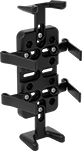
Handheld device grips adjust for a secure hold.
Style H—Style H do not have a ball; affix a screw-on base (sold separately) to attach to a connector. Maximum load capacity is based on the screw-on base you choose. Style H hold devices that don’t have a uniform shape, such as radios and GPS navigators. They have rubber fingers that adjust to fit around curves, avoid antennas, and grip irregular shapes.
For Device | Mounting | ||||||||||
|---|---|---|---|---|---|---|---|---|---|---|---|
Style | Wd. | Ht. | Dp. | Material | Color | Fasteners Included | Pattern Compatibility | Each | |||
Rotate, Tilt, Side to Side, In/Out | |||||||||||
| H | 1 1/4" to 3 1/2" | 3 5/8" to 7 1/4" | 15/16" to 1 1/2" | Plastic | Black | Yes | AMPS | 5031T101 | 000000 | ||
Tablet and Laptop Holders
 |
AMPS and VESA 75 |
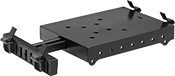
Tablet and laptop holders have spring-loaded brackets that adjust to fit most tablets and compact laptops. They have a universal AMPS mounting hole pattern. They do not have a ball; affix a screw-on base (sold separately) to attach to a connector.
6" Long—6" holders have a VESA (Video Electronics Standards Association) standard mounting hole pattern in addition to an AMPS mounting hole pattern.
Mounting | |||||||||
|---|---|---|---|---|---|---|---|---|---|
Lg. | Wd. | Material | Color | Fasteners Included | Pattern Compatibility | Each | |||
Rotate, Tilt, Side to Side, In/Out | |||||||||
| 6" | 8 9/16" to 11 1/8" | Plastic | Black | Yes | AMPS VESA 75 × 75 | 5031T569 | 000000 | ||
Phone Mounts
Clamp-On Rectangular-Bar Mount
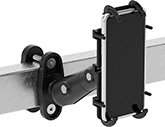 |  |
Clamp-On Rectangular-Bar Mount Shown Installed |
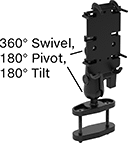
The base of these mounts fits around rectangular objects, such as square posts, T-slotted framing, and shelving units.
Projection | Base | ||||||||||||
|---|---|---|---|---|---|---|---|---|---|---|---|---|---|
For Diag. Screen Size | Max. Load Cap., lb. | Min. | Max. | Display Ht. | Material | Color | Clamping Distance | Lg. | Wd. | Each | |||
Pivot, Swivel, Tilt, Extend, Up and Down | |||||||||||||
| 5.5" to 6.9" | 1 | 6 3/8" | 13 3/4" | 0" to 11 9/16" | Plastic | Black | 0" to 2 1/2" | 4 1/4" | 1 3/4" | 5943N202 | 000000 | ||
Clamp-On Pipe Mount
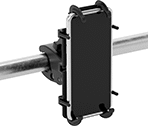 | 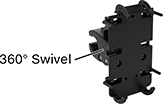 |
Clamp-On Pipe Mount Shown Installed |
Wrap the adjustable jaws around round bars, pipes, and railings. These mounts are commonly used to secure phones to cart handles.
Base | ||||||||||||
|---|---|---|---|---|---|---|---|---|---|---|---|---|
For Diag. Screen Size | Max. Load Cap. | Max. Projection | Display Ht. | Material | Color | Clamping Distance | Lg. | Wd. | Each | |||
Swivel | ||||||||||||
| 5.5" to 6.9" | Not Rated | 5" | 0" to 1 5/8" | Plastic | Black | 5/8" to 1 1/8" | 3 9/16" | 1 1/8" | 5943N15 | 000000 | ||
Magnetic Mount
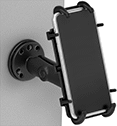 | 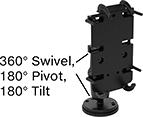 |
Magnetic Mount Shown Installed |
Snap these mounts to magnetic surfaces, such as machines and workbenches. Their hold is strong enough to secure them in any orientation, such as sideways on a post or upside down on a metal panel.
Projection | Base | |||||||||||
|---|---|---|---|---|---|---|---|---|---|---|---|---|
For Diag. Screen Size | Max. Load Cap., lb. | Min. | Max. | Display Ht. | Material | Color | Max. Pull, lbf | Dia. | Each | |||
Pivot, Swivel, Tilt, Extend, Up and Down | ||||||||||||
| 5.5" to 6.9" | 0.5 | 3 5/8" | 6 1/2" | 5/8" to 5 9/16" | Powder-Coated Aluminum | Black | 32 | 2 1/2" | 5943N201 | 0000000 | ||
Suction Mount
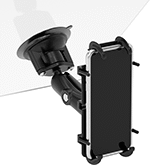 | 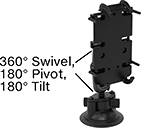 |
Suction Mount Shown Installed |
Attach to flat, smooth surfaces, such as your windshield. The base’s grip is strong enough to keep these mounts securely in place in any orientation.
Projection | |||||||||||
|---|---|---|---|---|---|---|---|---|---|---|---|
For Diag. Screen Size | Max. Load Cap., lb. | Min. | Max. | Display Ht. | Material | Color | Base Dia. | Each | |||
Pivot, Swivel, Tilt, Extend, Up and Down | |||||||||||
| 5.5" to 6.9" | 1 | 6" | 9 5/16" | 3/8" to 7 5/16" | Powder-Coated Aluminum | Black | 3 5/16" | 5943N16 | 000000 | ||
Adhesive/Screw-In Dashboard Mount
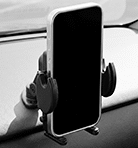 | 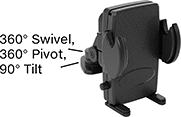 |
Adhesive/Screw-In Dashboard Mount Shown Installed |
Use the adhesive to install these mounts on smooth, nonporous surfaces without drilling, or use the included fasteners to secure them permanently to your surface.
Base | |||||||||||||
|---|---|---|---|---|---|---|---|---|---|---|---|---|---|
For Diag. Screen Size | Max. Load Cap., lb. | Max. Projection | Display Ht. | Material | Color | Adhesive Type | Mounting Fasteners Included | Lg. | Wd. | Each | |||
Pivot, Swivel, Tilt | |||||||||||||
| 4.7" to 6.9" | 2 | 4 3/4" | 0" to 3 1/2" | Plastic | Black | Instant Bond | Yes | 2" | 1 7/8" | 11144N11 | 000000 | ||
Clip-On Air Vent Mount
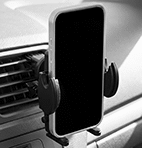 | 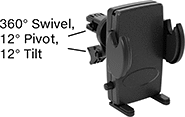 |
Clip-On Air Vent Mount Shown Installed |
Slide these mounts onto one of the fins of your vehicle’s air vent. They work with fins that run either up and down or side to side.
Base | ||||||||||||
|---|---|---|---|---|---|---|---|---|---|---|---|---|
For Diag. Screen Size | Max. Load Cap., lb. | Max. Projection | Display Ht. | Material | Color | For Max. Surface Thk. | Lg. | Wd. | Each | |||
Pivot, Swivel, Tilt | ||||||||||||
| 4.7" to 6.9" | 2 | 4" | 0" to 1 3/4" | Plastic | Black | 1/4" | 1 3/8" | 7/8" | 11144N12 | 000000 | ||
Phone Cases
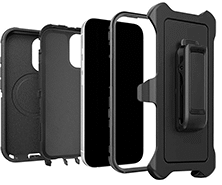 |
As tough as the conditions you work in, these cases withstand drops, grime, and heavy use. Tested to exceed military standards, they withstand repeated drops from any angle. Three layers of protection absorb shock and dissipate impacts. For a grip that won't slip, these cases have a textured surface. All support wireless charging.
Belt Clip—Doubles as a kickstand to prop your phone up.
Built-In Magnets—Enable faster wireless charging and secure mounting.
For Mfr. Model | Color | Material | Features | Mil. Spec. | Each | |||
|---|---|---|---|---|---|---|---|---|
For Apple iPhone | ||||||||
| 17 | Black | Plastic | Belt Clip, Built-In Magnets, Port Cover, Tether Hole | MIL-STD-810 | 7442N51 | 000000 | ||
| 17e, 16e, 15, 14, 13 | Black | Plastic | Belt Clip, Port Cover | MIL-STD-810 | 7442N33 | 00000 | ||
| 17 Pro | Black | Plastic | Belt Clip, Built-In Magnets, Port Cover, Tether Hole | MIL-STD-810 | 7442N53 | 00000 | ||
| 17 Pro Max | Black | Plastic | Belt Clip, Built-In Magnets, Port Cover, Tether Hole | MIL-STD-810 | 7442N54 | 00000 | ||
| 16 | Black | Plastic | Belt Clip, Built-In Magnets, Port Cover, Tether Hole | MIL-STD-810 | 7442N55 | 00000 | ||
| 16 Pro | Black | Plastic | Belt Clip, Built-In Magnets, Port Cover, Tether Hole | MIL-STD-810 | 7442N56 | 00000 | ||
| 16 Pro Max | Black | Plastic | Built-In Magnets, Port Cover, Tether Hole | MIL-STD-810 | 7442N57 | 00000 | ||
| 15 Pro | Black | Plastic | Belt Clip, Port Cover | MIL-STD-810 | 7442N47 | 00000 | ||
| 15 Pro Max | Black | Plastic | Belt Clip, Port Cover | MIL-STD-810 | 7442N48 | 00000 | ||
| 14 Pro | Black | Plastic | Belt Clip, Port Cover, Tether Hole | MIL-STD-810 | 7442N35 | 00000 | ||
| 14 Pro Max | Black | Plastic | Belt Clip, Port Cover | MIL-STD-810 | 7442N36 | 00000 | ||
| 13 Pro | Black | Plastic | Belt Clip, Port Cover | MIL-STD-810 | 7442N31 | 00000 | ||
| 12, 12 Pro | Black | Plastic | Belt Clip, Port Cover | MIL-STD-810 | 7442N18 | 00000 | ||
| 11, XR | Black | Plastic | Belt Clip, Port Cover | MIL-STD-810 | 7442N58 | 00000 | ||
| 8, 7, SE (3rd/2nd Gen) | Black | Plastic | Belt Clip, Port Cover | MIL-STD-810 | 7442N32 | 00000 | ||
For Samsung Galaxy | ||||||||
| S26 | Black | Plastic | Belt Clip, Built-In Magnets, Port Cover, Tether Hole | MIL-STD-810 | 7442N59 | 00000 | ||
| S25 | Black | Plastic | Belt Clip, Port Cover, Tether Hole | MIL-STD-810 | 7442N49 | 00000 | ||
| S24 | Black | Plastic | Belt Clip, Port Cover | MIL-STD-810 | 7442N61 | 00000 | ||
Radio Mounts
Clamp-On Rectangular-Bar Mount
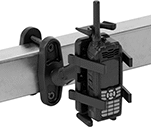 | 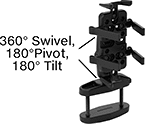 |
Shown Installed |
The base of these mounts fits around rectangular objects, such as square posts, T-slotted framing, and rails.
For Device | Projection | Base | |||||||||||||
|---|---|---|---|---|---|---|---|---|---|---|---|---|---|---|---|
Wd. | Ht. | Dp. | Max. Load Cap., lb. | Min. | Max. | Display Ht. | Material | Color | Clamping Distance | Lg. | Wd. | Each | |||
Pivot, Swivel, Tilt, Extend, Up and Down | |||||||||||||||
| 1 1/4" to 3 1/2" | 3 5/8" to 7 1/4" | 15/16" to 1 1/2" | 2 | 5 7/8" | 11 13/16" | 0" to 5 7/8" | Plastic | Black | 0" to 3" | 4 3/4" | 1 13/16" | 5943N12 | 0000000 | ||
Clamp-On Pipe Mount
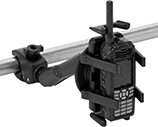 | 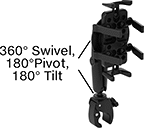 |
Shown Installed |
Wrap the adjustable jaws around round bars, pipes, and railings. These mounts are commonly used to secure radios to cart handles.
For Device | Projection | Base | |||||||||||||
|---|---|---|---|---|---|---|---|---|---|---|---|---|---|---|---|
Wd. | Ht. | Dp. | Max. Load Cap., lb. | Min. | Max. | Display Ht. | Material | Color | Clamping Distance | Lg. | Wd. | Each | |||
Pivot, Swivel, Tilt, Extend, Up and Down | |||||||||||||||
| 1 1/4" to 3 1/2" | 3 5/8" to 7 1/4" | 15/16" to 1 1/2" | 2 | 8 1/2" | 13 3/4" | 0" to 4 3/8" | Plastic | Black | 5/8" to 1 1/8" | 4 3/16" | 1 7/16" | 5943N11 | 0000000 | ||
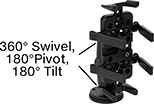
Magnetic Mount
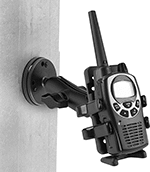 |  |
Shown Installed |
Snap these mounts to magnetic surfaces, such as machines and workbenches. Their hold is strong enough to secure them in any orientation, such as sideways on a post or upside down under a shelf.
For Device | Projection | |||||||||||||
|---|---|---|---|---|---|---|---|---|---|---|---|---|---|---|
Wd. | Ht. | Dp. | Max. Load Cap., lb. | Min. | Max. | Display Ht. | Material | Color | Magnetic Pull, lbf | Base Dia. | Each | |||
Pivot, Swivel, Tilt, Extend, Up and Down | ||||||||||||||
| 1 1/4" to 3 1/2" | 3 5/8" to 7 1/4" | 15/16" to 1 1/2" | 2 | 5 1/8" | 8 1/16" | 0" to 1 3/4" | Plastic | Black | 32 | 2 1/2" | 5943N13 | 0000000 | ||
Instrument/Mobile Device Belt Pouches
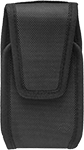 | 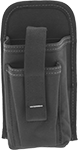 |
Polypropylene Fabric | Polyester Fabric |
These pouches are sized to fit cell phones, electric testers/meters, or other small instruments.
Electronic Device Mounts for T-Slotted Framing
For Phones
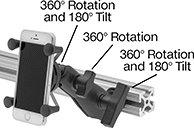 |
Tighten the grip to securely hold phones of various sizes on T-slotted rails.
For Rail Ht. | Overall | ||||||||||||||
|---|---|---|---|---|---|---|---|---|---|---|---|---|---|---|---|
Single | Double and Quad | Triple | For Device Wd. | Max. Load Cap., lb. | Projection | Ht. | Wd. | Color | Material | Mount Type | Mounting Fasteners Included | Each | |||
Adjustable | |||||||||||||||
| 1", 1 1/2", 30 mm, 40 mm, 45 mm | 2", 3", 60 mm, 80 mm, 90 mm | 3", 4 1/2", 120 mm | 1 7/8" to 3 1/4" | 1 | 7 1/2" | 3 1/4" | 3 1/4" | Black | Powder-Coated Aluminum | Slide In | Yes | 47065T371 | 000000 | ||
Phone Armbands
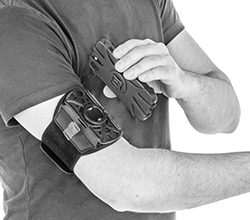 | 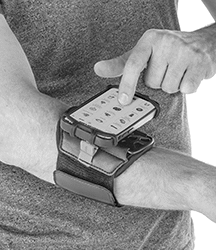 |
Shown on Bicep | Shown on Forearm |
For Max. Diag. Screen Size | Closure Method | Color | Includes | Each | ||
|---|---|---|---|---|---|---|
| 7.2" | Hook and Loop | Black | Extender Strap, Stylus Loop | 9949N11 | 000000 |
Tablet Holders
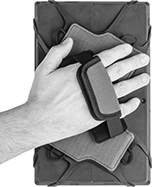 |
Walk around your facility with your tablet firmly in hand. The elastic corners on these holders grasp tablets of different sizes, with or without cases. Even with bulky gloves on, you can fit your hand into the adjustable strap for a tight grip. The hand strap also rotates 360° to position your tablet in any orientation.
For Max. Diag. Screen Size | Color | Swivel Rotation | Includes | Each | ||
|---|---|---|---|---|---|---|
| 12" | Gray | 360° | Adjustable Shoulder Strap, Stylus Loops | 9954N11 | 000000 |
