


Filter by
System of Measurement
Operating Voltage
Number of Outputs
Number of Inputs
Component
Operating System Compatibility
Input Signal Type
Mounting Location

Manufacturer Model Number
Timer Function
Certification

Control System Compatibility
Data Connection

DFARS Specialty Metals
Display Type

Enclosure Rating
Ethernet Transmission Speed
Export Control Classification Number (ECCN)

Input Control Mechanism
U.S.–Mexico–Canada Agreement (USMCA) Qualifying
Maximum Number of Expansion Modules
Maximum Number of Inputs/Outputs

About PLCs
%20--%3e%3csvg%20version='1.1'%20id='Layer_1'%20xmlns='http://www.w3.org/2000/svg'%20xmlns:xlink='http://www.w3.org/1999/xlink'%20x='0px'%20y='0px'%20viewBox='0%200%20400%20400'%20style='enable-background:new%200%200%20400%20400;'%20xml:space='preserve'%3e%3cstyle%20type='text/css'%3e%20.st0{fill:%231A70A0;}%20.st1{opacity:0.5;}%20%3c/style%3e%3cg%3e%3cg%3e%3cpath%20class='st0'%20d='M200,56.9c38.35,0,74.4,14.93,101.51,42.05c27.11,27.11,42.05,63.17,42.05,101.51s-14.93,74.4-42.05,101.51%20S238.35,344.02,200,344.02s-74.4-14.93-101.51-42.05c-27.11-27.11-42.05-63.17-42.05-101.51s14.93-74.4,42.05-101.51%20S161.65,56.9,200,56.9%20M200,12.9C96.41,12.9,12.44,96.88,12.44,200.46c0,103.59,83.97,187.56,187.56,187.56%20c103.59,0,187.56-83.97,187.56-187.56C387.56,96.88,303.59,12.9,200,12.9L200,12.9z'/%3e%3c/g%3e%3cg%3e%3cg%20class='st1'%3e%3cpath%20class='st0'%20d='M235.49,152.24h16.15l-27.46,111.87c-1.94,7.8-2.91,12.5-2.91,14.1c0,1.82,0.58,3.29,1.73,4.41%20c1.16,1.12,2.69,1.68,4.61,1.68c5.23,0,11.78-3.85,19.63-11.55l17.22,21.34c-16.95,17.33-34.87,26-53.78,26%20c-8.37,0-15.45-1.47-21.23-4.41c-5.79-2.94-10.44-7.25-13.95-12.92c-3.51-5.67-5.27-11.18-5.27-16.53c0-1.93,0.35-5.24,1.05-9.94%20c1-6.94,2.05-12.54,3.15-16.82l15.22-62.15h-32.69l7.65-30.97C190.89,163.58,214.53,158.88,235.49,152.24z%20M230.44,80.84%20c8.24,0,14.66,2.62,19.26,7.86c4.6,5.24,6.9,11.55,6.9,18.94c0,5.46-1.42,10.7-4.25,15.73c-2.83,5.03-6.88,9.07-12.12,12.12%20c-5.24,3.05-10.33,4.57-15.24,4.57c-4.6,0-9.17-1.23-13.72-3.69c-4.55-2.46-8.02-5.78-10.43-9.95%20c-2.41-4.17-3.61-8.67-3.61-13.48c0-5.35,1.52-10.64,4.57-15.89c3.05-5.24,7.03-9.25,11.96-12.04%20C218.68,82.23,224.24,80.84,230.44,80.84z'/%3e%3c/g%3e%3cg%3e%3cpath%20class='st0'%20d='M214.08,152.24h16.15l-27.46,111.87c-1.94,7.8-2.91,12.5-2.91,14.1c0,1.82,0.58,3.29,1.73,4.41%20c1.16,1.12,2.69,1.68,4.61,1.68c5.23,0,11.78-3.85,19.63-11.55l17.22,21.34c-16.95,17.33-34.87,26-53.78,26%20c-8.37,0-15.45-1.47-21.23-4.41c-5.79-2.94-10.44-7.25-13.95-12.92c-3.51-5.67-5.27-11.18-5.27-16.53c0-1.93,0.35-5.24,1.05-9.94%20c1-6.94,2.05-12.54,3.15-16.82l15.22-62.15h-32.69l7.65-30.97C169.48,163.58,193.11,158.88,214.08,152.24z%20M209.03,80.84%20c8.24,0,14.66,2.62,19.26,7.86c4.6,5.24,6.9,11.55,6.9,18.94c0,5.46-1.42,10.7-4.25,15.73c-2.83,5.03-6.88,9.07-12.12,12.12%20c-5.24,3.05-10.33,4.57-15.24,4.57c-4.6,0-9.17-1.23-13.72-3.69c-4.55-2.46-8.02-5.78-10.43-9.95%20c-2.41-4.17-3.61-8.67-3.61-13.48c0-5.35,1.52-10.64,4.57-15.89c3.05-5.24,7.03-9.25,11.96-12.04%20C197.26,82.23,202.83,80.84,209.03,80.84z'/%3e%3c/g%3e%3c/g%3e%3c/g%3e%3c/svg%3e)
Select the sensors, switches, and actuators in your setup and we'll guide you to compatible PLCs.
Compact PLCs
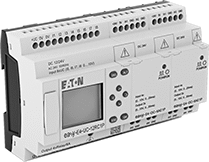 |
PLC Shown with Two Expansion Modules (Sold Separately) |
Support for up to 188 inputs and outputs—these PLCs are ideal for basic tasks where more advanced PLCs would be overkill, such as operating lighting and HVAC systems. They’re also known as smart relays. Connect these PLCs to your Ethernet network to control devices anywhere in your facility. They use an open communication protocol, so you can mix and match devices from different manufacturers. Mount them to 35 mm DIN rail in your electrical cabinet or use mounting brackets (sold separately) to secure them to a flat surface.
You’ll need a license key (sold separately) for the manufacturer’s software. Write your program in common PLC languages, such as Ladder Logic and Structured Text, then transfer your program to the PLC with an Ethernet cord. Use the software to monitor, test, and troubleshoot issues in real time. Add a memory card to back up, store, and transfer programs to multiple machines.
These PLCs have digital inputs and outputs.
PLCs with Display
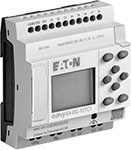 |
These PLCs have a screen and keypad that let you adjust timers and change basic settings without connecting to your computer. You can also view system errors and warnings for quick troubleshooting.
Screw Terminals—Screw terminals are the most common wire connection—insert your wires and tighten the screws to secure them.
Relay Output—PLCs with relay outputs are ideal for devices that switch a few times per minute, such as compressors.
Outputs | Inputs | Screw Terminals | |||||||||||||
|---|---|---|---|---|---|---|---|---|---|---|---|---|---|---|---|
Type (No. of) | Signal Type | Max. Current @ Voltage | Type (No. of) | Signal Type | Digital Signal | Transistor Voltage | Max. No. of Inputs/Outputs | Operating Voltage | Data Connection Type | Control Communication Protocol | Software Req. | Each | |||
Eaton Easy E4 Series | |||||||||||||||
| Relay (4) | Digital | 10 amp @ 240V AC 8 amp @ 24V DC | Transistor (8) | Digital | PNP/NPN | 100V AC to 240V AC 100V DC to 240V DC | 188 | 100 to 240V AC 100 to 240V DC | Ethernet RJ45 (1 each) microSD Card (1 each) | Modbus TCP/IP | Yes | 7244K8 | 0000000 | ||
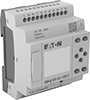 Eaton Easy E4 Series Compact PLC with Display, 4 Outputs, 100-240VAC/VDC, Screw Terminals EachIn stock  Select a compatible file type: Parasolid | |||||||||||||||
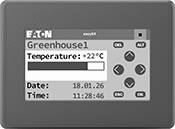 |
Shown Powered On |
Monitor status and control basic settings on these PLCs. These displays mount into a panel cutout or enclosure with the included clips. When mounted, the front is NEMA and IP rated for protection against washdowns and sprays of oil and coolant. These displays are designed to work with these PLCs right out of the box—just connect them to the PLC with an Ethernet cord (not included).
For Panel Cutout | ||||||||||
|---|---|---|---|---|---|---|---|---|---|---|
Diag. Screen Size | Screen Resolution | Data Connection Type | Operating Voltage, V DC | Lg. | Ht. | Mounting Fasteners Included | Each | |||
Front IP65, NEMA 4X | ||||||||||
| 4.3" | 480 × 272 | Ethernet RJ45 (1 each) USB-A, 2.0 (1 each) | 24 | 4.6" | 4" | Yes | 7244K47 | 0000000 | ||
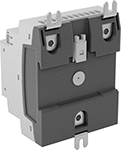 |  |
Shown Installed |
For Screw Size | Material | Mounting Fasteners Included | Pkg. Qty. | Pkg. | ||
|---|---|---|---|---|---|---|
| No. 8, M4 | Metal | No | 3 | 7244K49 | 000000 |
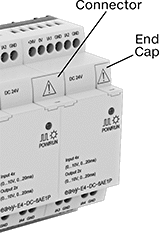 |  |
Includes | Material | Each | ||
|---|---|---|---|---|
| Three Connectors, Three End Caps | Plastic | 7244K48 | 000000 |
