


Filter by
Length
Environment
Specifications Met


DFARS Specialty Metals
RoHS

REACH
Export Control Classification Number (ECCN)
Certification
Mount Type


Freestanding Electronics Racks
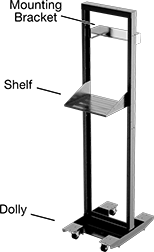 |  |
Rack Shown with Accessories |
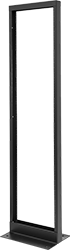
Mount servers, automation controls, and computers in these open racks, they make it easy to organize and swap out components. Less bulky than electronics cabinets, you can line up these racks to maximize limited storage space. Each rack has two pairs of grounding studs that create a path for static electricity and protect components from electric shocks.
All are compatible with standard 19" wide components. One rack unit is 1.75" high.
UL 2416—Freestanding electronics racks meet UL 2416 so they're rated for use in server rooms and other IT, AV, and telecom installations.
For No. of Rack Units | Ht. | Wd. | Dp. | Wt. Cap., lb. | Environment | Component Mount Type | Component Mounting Fasteners Included | Component Mounting Hole Thread Size | Color | Certification | Specs. Met | Each | |||
|---|---|---|---|---|---|---|---|---|---|---|---|---|---|---|---|
Painted Steel | |||||||||||||||
| 24 | 48" | 20 1/2" | 15" | 1,000 | Indoor Only | Rails | No | 10-32 | Black | UL Listed, C-UL Listed | UL 2416 | 18505T23 | 0000000 | ||
| 44 | 83" | 20 1/2" | 15" | 1,000 | Indoor Only | Rails | No | 10-32 | Black | UL Listed, C-UL Listed | UL 2416 | 18505T13 | 000000 | ||
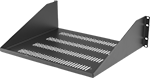 |
Attach shelves to store components that can’t mount directly to the rack.
Overall | Mounting | ||||||||||||||
|---|---|---|---|---|---|---|---|---|---|---|---|---|---|---|---|
For Rack Wd. | Finish | Material | Wd. | Dp. | Ht. | Shelf Construction | Shelf Movement | Wt. Cap., lb. | Fasteners Included | No. of Holes | Hole Dia. | Color | Each | ||
| 20 1/2" | Powder Coated | Steel | 19" | 15" | 5 1/4" | Vented | Adjustable | 200 | No | 8 | 1/4" | Black | 18505T34 | 000000 | |
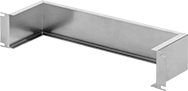 |
Use mounting brackets to secure lightweight accessories, such as routers, that can’t mount directly to the rack because they’re less than 19" wide. Unlike shelves, brackets leave the bottom of accessories exposed, which can make accessing them easier. To attach accessories, add your own mounting holes—these brackets are thin enough to drill through easily.
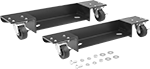 |
To move and position racks, add dollies.
Wt. Cap., lb. | Finish | Material | Features | Mounting Fasteners Included | Color | Enclosure Rating | Each | ||
|---|---|---|---|---|---|---|---|---|---|
| 1,000 | Powder Coated | Steel | Four Lockable Casters | Yes | Black | NEMA 4X | 18505T22 | 0000000 |
DIN Rails
 |  |
DIN 3 | DIN 3 Rails with Bracket |
 | 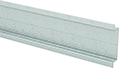 |
DIN 3 Rails with Angled Bracket | Drill-Your-Own DIN 3 Rails with Centerline |
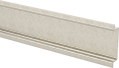 | 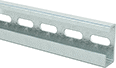 |
Drill-Your-Own DIN 3 Rails | DIN 1 |
 | |
DIN 2 |
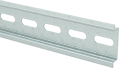
Mount terminal blocks, relays, and other devices onto flat surfaces. These rails are often used in electrical enclosures, server racks, and equipment cabinets.
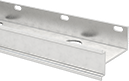
DIN Rails with Bracket—Create extra space between the rail and the mounting surface to fit bulky devices or route wires.
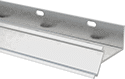
DIN Rails with Angled Bracket—Mount equipment at an angle while adding space behind it. The tilted rail makes labels and displays easier to view, especially in crowded enclosures.
Centerline—Keep mounting holes lined up as you drill along these rails.
Drill-Your-Own DIN Rails—Add mounting holes only where you need them.
304 Stainless Steel—The best choice for equipment that’s regularly washed down. These rails resist corrosion from water and mild chemicals.
Aluminum—Lightweight and corrosion resistant. These rails hold up in wet environments almost as well as stainless steel, but they’re not as strong.
Zinc-Plated Steel—Strong and durable. These rails have zinc plating to protect them from occasional exposure to moisture.
DIN Rail Trade Size—We gave each type of rail a trade size to help you quickly find compatible parts. DIN 3 is the most common type of rail—it's also called top hat or standard rail. DIN 2 is a smaller version of DIN 3, so it's also known as mini rail. DIN 1 is also known as G-section rail.
Mounting Holes, mm | ||||||||||||
|---|---|---|---|---|---|---|---|---|---|---|---|---|
Ht., mm | Lg. | Dp., mm | Overall Dp., mm | Material | Mounting Fasteners Included | Dia. | Ctr.-to-Ctr. | Specs. Met | Each | |||
DIN 3 | ||||||||||||
DIN Rails | ||||||||||||
| 35 | 2" | 7.5 | — | Zinc-Plated Steel | No | 6.3 | 25 | EN 50022, EN 60715 | 8961K84 | 00000 | ||
| 35 | 3 15/16" | 7.5 | — | Zinc-Plated Steel | No | 6.3 | 25 | EN 50022, EN 60715 | 8961K85 | 0000 | ||
| 35 | 4 7/8" | 7.5 | — | Zinc-Plated Steel | No | 6.3 | 25 | EN 50022, EN 60715 | 8961K101 | 0000 | ||
| 35 | 5 7/8" | 7.5 | — | Zinc-Plated Steel | No | 6.3 | 25 | EN 50022, EN 60715 | 8961K86 | 0000 | ||
| 35 | 6 7/8" | 7.5 | — | Zinc-Plated Steel | No | 6.3 | 25 | EN 50022, EN 60715 | 8961K102 | 0000 | ||
| 35 | 7 7/8" | 7.5 | — | Zinc-Plated Steel | No | 6.3 | 25 | EN 50022, EN 60715 | 8961K87 | 0000 | ||
| 35 | 8 7/8" | 7.5 | — | Zinc-Plated Steel | No | 6.3 | 25 | EN 50022, EN 60715 | 8961K103 | 0000 | ||
| 35 | 9 13/16" | 7.5 | — | Zinc-Plated Steel | No | 6.3 | 25 | EN 50022, EN 60715 | 8961K88 | 0000 | ||
| 35 | 10 13/16" | 7.5 | — | Zinc-Plated Steel | No | 6.3 | 25 | EN 50022, EN 60715 | 8961K104 | 0000 | ||
| 35 | 11 13/16" | 7.5 | — | Zinc-Plated Steel | No | 6.3 | 25 | EN 50022, EN 60715 | 8961K89 | 0000 | ||
| 35 | 12 3/4" | 7.5 | — | Zinc-Plated Steel | No | 6.3 | 25 | EN 50022, EN 60715 | 8961K105 | 0000 | ||
| 35 | 13 3/4" | 7.5 | — | Zinc-Plated Steel | No | 6.3 | 25 | EN 50022, EN 60715 | 8961K91 | 0000 | ||
| 35 | 15 3/4" | 7.5 | — | Zinc-Plated Steel | No | 6.3 | 25 | EN 50022, EN 60715 | 8961K92 | 0000 | ||
| 35 | 17 11/16" | 7.5 | — | Zinc-Plated Steel | No | 6.3 | 25 | EN 50022, EN 60715 | 8961K93 | 0000 | ||
| 35 | 19 11/16" | 7.5 | — | Zinc-Plated Steel | No | 6.3 | 25 | EN 50022, EN 60715 | 8961K94 | 0000 | ||
| 35 | 21 11/16" | 7.5 | — | Zinc-Plated Steel | No | 6.3 | 25 | EN 50022, EN 60715 | 8961K95 | 0000 | ||
| 35 | 23 5/8" | 7.5 | — | Zinc-Plated Steel | No | 6.3 | 25 | EN 50022, EN 60715 | 8961K96 | 0000 | ||
| 35 | 1 m | 7.5 | — | Zinc-Plated Steel | No | 6.3 | 25 | EN 50022, EN 60715 | 8961K15 | 0000 | ||
| 35 | 1 m | 10 | — | Aluminum | No | 4.7 | 35.5 | EN 50022, EN 60715 | 8961K17 | 00000 | ||
| 35 | 1 m | 15 | — | Zinc-Plated Steel | No | 6.3 | 25 | EN 50022, EN 60715 | 8961K18 | 00000 | ||
| 35 | 2 m | 7.5 | — | Zinc-Plated Steel | No | 6.3 | 25 | EN 50022, EN 60715 | 8961K16 | 00000 | ||
| 35 | 2 m | 15 | — | Zinc-Plated Steel | No | 6.3 | 25 | EN 50022, EN 60715 | 8961K19 | 00000 | ||
DIN Rails with Bracket | ||||||||||||
| 35 | 1 m | 7.5 | 58 | Aluminum | No | 5.5 | 75 | EN 50022, EN 60715 | 8961K31 | 00000 | ||
| 35 | 2 m | 7.5 | 58 | Aluminum | No | 5.5 | 75 | EN 50022, EN 60715 | 8961K49 | 00000 | ||
| 35 | 2 m | 7.5 | 120 | Aluminum | No | 5.5 | 75 | EN 50022, EN 60715 | 8961K48 | 000000 | ||
DIN Rails with Angled Bracket | ||||||||||||
| 35 | 1 m | 7.5 | 66 | Aluminum | No | 5.6 | 76 | — | 8961K68 | 00000 | ||
| 35 | 2 m | 7.5 | 66 | Aluminum | No | 5.6 | 76 | — | 8961K69 | 000000 | ||
Drill-Your-Own DIN Rails with Centerline | ||||||||||||
| 35 | 1 m | 7.5 | — | Zinc-Plated Steel | No | — | — | EN 50022, EN 60715 | 8961K45 | 0000 | ||
| 35 | 1 m | 15 | — | Zinc-Plated Steel | No | — | — | EN 50022, EN 60715 | 8961K47 | 00000 | ||
| 35 | 2 m | 7.5 | — | Zinc-Plated Steel | No | — | — | EN 50022, EN 60715 | 8961K44 | 00000 | ||
| 35 | 2 m | 15 | — | Zinc-Plated Steel | No | — | — | EN 50022, EN 60715 | 8961K46 | 00000 | ||
Drill-Your-Own DIN Rails | ||||||||||||
| 35 | 1 m | 7.5 | — | 304 Stainless Steel | No | — | — | EN 50022, EN 60715 | 8961K42 | 00000 | ||
| 35 | 2 m | 7.5 | — | 304 Stainless Steel | No | — | — | EN 50022, EN 60715 | 8961K43 | 00000 | ||
DIN 1 | ||||||||||||
| 32 | 1 m | 15 | — | Zinc-Plated Steel | No | 6.3 | 25 | EN 50022, EN 60715 | 8961K11 | 00000 | ||
| 32 | 2 m | 15 | — | Zinc-Plated Steel | No | 6.3 | 25 | EN 50022, EN 60715 | 8961K12 | 00000 | ||
DIN 2 | ||||||||||||
| 15 | 1 m | 5.5 | — | Zinc-Plated Steel | No | 4.2 | 20 | EN 50022, EN 60715 | 8961K13 | 0000 | ||
| 15 | 2 m | 5.5 | — | Zinc-Plated Steel | No | 4.2 | 20 | EN 50022, EN 60715 | 8961K14 | 00000 | ||
Wall-Mount Electronics Racks
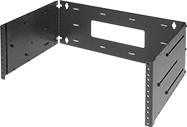 |
Mount standard 19" wide components to these racks. They have a double-hinged sidewall for rear access to components.
Ht. | Wd. | Dp. | Wt. Cap., lb. | Environment | Component Mount Type | Component Mounting Fasteners Included | Mounting Fasteners Included | Color | Each | |||
|---|---|---|---|---|---|---|---|---|---|---|---|---|
Painted Steel | ||||||||||||
| 7" | 19 1/4" | 12" to 18" | 80 | Indoor Only | Rails | Yes | Yes | Black | 18505T41 | 0000000 | ||
| 14" | 19 1/4" | 12" to 18" | 80 | Indoor Only | Rails | Yes | Yes | Black | 18505T42 | 000000 | ||
| 21" | 19 1/4" | 12" to 18" | 80 | Indoor Only | Rails | Yes | Yes | Black | 18505T43 | 000000 | ||
Electronics Cabinets
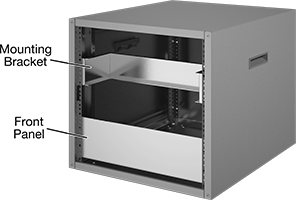 | 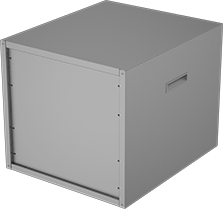 |
Cabinet Shown with Mounting Bracket and Front Panel | Cabinet Shown with Back Panel |
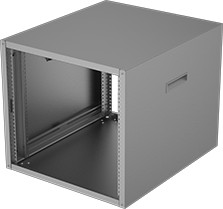 |  |
Back Panel |
Cabinets | Back Electrical Enclosure Panels | ||||||||||||
|---|---|---|---|---|---|---|---|---|---|---|---|---|---|
Ht. | Wd. | Dp. | Environment | Component Mount Type | For Component Wd. | Component Mounting Fasteners Included | Features | Each | Each | ||||
Steel | |||||||||||||
| 16" | 21" | 24 1/2" | Indoor Only | Rails | 19" | Yes | Handles Rubber Feet | 7648K61 | 0000000 | 7648K68 | 000000 | ||
| 19 1/2" | 21" | 24 1/2" | Indoor Only | Rails | 19" | Yes | Handles Rubber Feet | 7648K62 | 000000 | 7648K69 | 00000 | ||
| 30" | 21" | 24 1/2" | Indoor Only | Rails | 19" | Yes | Handles Rubber Feet | 7648K63 | 000000 | 7648K72 | 000000 | ||
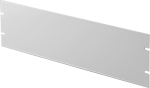 | 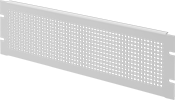 |
Solid Front Panel | Perforated Front Panel |
Mounting | ||||||||||||||
|---|---|---|---|---|---|---|---|---|---|---|---|---|---|---|
Ht. | Wd. | Mounting Hole Ctr.-to-Ctr. Ht. | Mounting Hole Ctr.-to-Ctr. Wd. | Thk. | Ga. | Panel Construction | Fasteners Included | No. of Holes | Hole Ht. | Hole Wd. | Each | |||
Front Electrical Enclosure Panels | ||||||||||||||
Aluminum | ||||||||||||||
| 5 1/4" | 19" | 2 1/4" | 18 1/4" | 1/8" | — | Solid | No | 4 | 0.25" | 3/8" | 7648K64 | 000000 | ||
| 10 1/2" | 19" | — | 18 1/4" | 1/8" | — | Solid | No | 8 | 0.25" | 3/8" | 7648K65 | 00000 | ||
Steel | ||||||||||||||
| 5 1/4" | 19" | 2 1/4" | 18 1/4" | 0.06" | 16 | Perforated | No | 4 | 0.25" | 3/8" | 7648K66 | 00000 | ||
| 10 1/2" | 19" | — | 18 1/4" | 0.06" | 16 | Perforated | No | 4 | 0.25" | 3/8" | 7648K67 | 00000 | ||
|
Use mounting brackets to secure lightweight accessories, such as routers, that can’t mount directly to cabinet rails because they’re less than 19" wide. They leave the bottom of accessories exposed, which can make accessing them easier. To attach accessories, add your own mounting holes—these brackets are thin enough to drill through easily.
Heavy Duty Electronics Cabinets
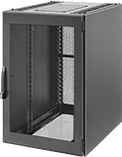 |
These cabinets accommodate up to 3,200 lbs. of equipment and have larger interiors than standard electronics cabinets. Use them to house large-size automation controls, data communication, and networking equipment. The front and rear doors are perforated for ventilation and visibility. Both doors are lockable and include two keys. They are keyed alike (all open with the same key). Cabinets have two sets of depth-adjustable mounting rails and an open bottom for cable exit as well as ventilation.
Shelves—Shelves can be mounted at any level.
Cabinets | Shelves | ||||||||||||||
|---|---|---|---|---|---|---|---|---|---|---|---|---|---|---|---|
Ht. | Wd. | Dp. | Environment | Enclosure Rating | Component Mount Type | For Component Wd. | Features | Certification | Color | Each | Each | ||||
Painted Steel | |||||||||||||||
| 47 1/4" | 31 1/2" | 39 1/2" | Indoor Only, Dusty, Oily, Wet | NEMA 12 | Rails | 19" | Four Leveling Feet Open Bottom Perforated Doors Removable Locking Sidewalls Top-Cable Access Panel | UL Listed | Black | 46365T24 | 000000000 | 46365T26 | 0000000 | ||
| 78 3/4" | 23 5/8" | 39 1/2" | Indoor Only, Dusty, Oily, Wet | NEMA 12 | Rails | 19" | Four Leveling Feet Open Bottom Perforated Doors Removable Locking Sidewalls Top-Cable Access Panel | UL Listed | Black | 46365T25 | 00000000 | 46365T26 | 000000 | ||
Electronics Rack Equipment Installation Supports
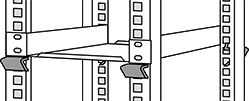
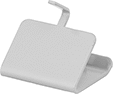
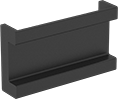
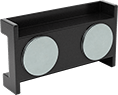
Magnetic-Back DIN Rails
 |
 |
Wt. Cap., lb. | Ht., mm | Lg., mm | Overall Lg., mm | Dp., mm | Material | Color | Flammability Rating | Each | |||
|---|---|---|---|---|---|---|---|---|---|---|---|
DIN 3 | |||||||||||
| 6 1/2 | 35 | 66 | 71 | 15 | Plastic | Black | UL 94 V-0 | 3661N11 | 000000 | ||
Adhesive-Back DIN Rails
 |
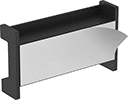 |
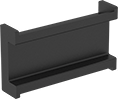
Stick these rails inside enclosures when drilling holes isn’t an option. They’re good for tight spaces where a screwdriver won’t fit, and for avoiding leaks in liquid-tight enclosures. The adhesive reaches its full weight capacity after 24 hours.
DIN Rail Trade Size—We gave each type of rail a trade size to help you quickly find compatible parts. DIN 3 is the most common type of rail—it's also called top hat or standard rail. DIN 2 is a smaller version of DIN 3, so it's also known as mini rail. DIN 1 is also known as G-section rail.
