


Filter by
Push-Button Style


Switch Action

Illumination
Push-Button Shape


Actuator Style


Switch Starting Position
Wire Connection


Specifications Met
Export Control Classification Number (ECCN)
DFARS Specialty Metals

About Electrical Switches
%20--%3e%3csvg%20version='1.1'%20id='Layer_1'%20xmlns='http://www.w3.org/2000/svg'%20xmlns:xlink='http://www.w3.org/1999/xlink'%20x='0px'%20y='0px'%20viewBox='0%200%20400%20400'%20style='enable-background:new%200%200%20400%20400;'%20xml:space='preserve'%3e%3cstyle%20type='text/css'%3e%20.st0{fill:%231A70A0;}%20.st1{opacity:0.5;}%20%3c/style%3e%3cg%3e%3cg%3e%3cpath%20class='st0'%20d='M200,56.9c38.35,0,74.4,14.93,101.51,42.05c27.11,27.11,42.05,63.17,42.05,101.51s-14.93,74.4-42.05,101.51%20S238.35,344.02,200,344.02s-74.4-14.93-101.51-42.05c-27.11-27.11-42.05-63.17-42.05-101.51s14.93-74.4,42.05-101.51%20S161.65,56.9,200,56.9%20M200,12.9C96.41,12.9,12.44,96.88,12.44,200.46c0,103.59,83.97,187.56,187.56,187.56%20c103.59,0,187.56-83.97,187.56-187.56C387.56,96.88,303.59,12.9,200,12.9L200,12.9z'/%3e%3c/g%3e%3cg%3e%3cg%20class='st1'%3e%3cpath%20class='st0'%20d='M235.49,152.24h16.15l-27.46,111.87c-1.94,7.8-2.91,12.5-2.91,14.1c0,1.82,0.58,3.29,1.73,4.41%20c1.16,1.12,2.69,1.68,4.61,1.68c5.23,0,11.78-3.85,19.63-11.55l17.22,21.34c-16.95,17.33-34.87,26-53.78,26%20c-8.37,0-15.45-1.47-21.23-4.41c-5.79-2.94-10.44-7.25-13.95-12.92c-3.51-5.67-5.27-11.18-5.27-16.53c0-1.93,0.35-5.24,1.05-9.94%20c1-6.94,2.05-12.54,3.15-16.82l15.22-62.15h-32.69l7.65-30.97C190.89,163.58,214.53,158.88,235.49,152.24z%20M230.44,80.84%20c8.24,0,14.66,2.62,19.26,7.86c4.6,5.24,6.9,11.55,6.9,18.94c0,5.46-1.42,10.7-4.25,15.73c-2.83,5.03-6.88,9.07-12.12,12.12%20c-5.24,3.05-10.33,4.57-15.24,4.57c-4.6,0-9.17-1.23-13.72-3.69c-4.55-2.46-8.02-5.78-10.43-9.95%20c-2.41-4.17-3.61-8.67-3.61-13.48c0-5.35,1.52-10.64,4.57-15.89c3.05-5.24,7.03-9.25,11.96-12.04%20C218.68,82.23,224.24,80.84,230.44,80.84z'/%3e%3c/g%3e%3cg%3e%3cpath%20class='st0'%20d='M214.08,152.24h16.15l-27.46,111.87c-1.94,7.8-2.91,12.5-2.91,14.1c0,1.82,0.58,3.29,1.73,4.41%20c1.16,1.12,2.69,1.68,4.61,1.68c5.23,0,11.78-3.85,19.63-11.55l17.22,21.34c-16.95,17.33-34.87,26-53.78,26%20c-8.37,0-15.45-1.47-21.23-4.41c-5.79-2.94-10.44-7.25-13.95-12.92c-3.51-5.67-5.27-11.18-5.27-16.53c0-1.93,0.35-5.24,1.05-9.94%20c1-6.94,2.05-12.54,3.15-16.82l15.22-62.15h-32.69l7.65-30.97C169.48,163.58,193.11,158.88,214.08,152.24z%20M209.03,80.84%20c8.24,0,14.66,2.62,19.26,7.86c4.6,5.24,6.9,11.55,6.9,18.94c0,5.46-1.42,10.7-4.25,15.73c-2.83,5.03-6.88,9.07-12.12,12.12%20c-5.24,3.05-10.33,4.57-15.24,4.57c-4.6,0-9.17-1.23-13.72-3.69c-4.55-2.46-8.02-5.78-10.43-9.95%20c-2.41-4.17-3.61-8.67-3.61-13.48c0-5.35,1.52-10.64,4.57-15.89c3.05-5.24,7.03-9.25,11.96-12.04%20C197.26,82.23,202.83,80.84,209.03,80.84z'/%3e%3c/g%3e%3c/g%3e%3c/g%3e%3c/svg%3e)
Choose a switch with the right trigger type, number of inputs, and control functions to power your equipment.
Metal 22 mm Panel-Mount Push-Button Switches
Round Push-Button with Screw-Terminal Wire Connection—Not Illuminated (600V AC/600V DC Maximum Voltage)
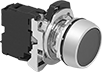 | 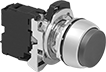 | 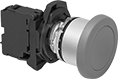 |
Flush with Screw-Terminal Wire Connection | Projecting with Screw-Terminal Wire Connection | Mushroom with Screw-Terminal Wire Connection |
 |  |  |  |
Arrow | Circle | Forward | R |
 |  |  |  |
Reverse | Start | Stop | Vertical Line |
No. of Circuits Controlled | Switch Starting Position | Switch Action | No. of Terminals | Switch Designation | Message | Switching Current @ Voltage | Dia. | For Max. No. of Contact Blocks | Enclosure Rating | Choose an Actuator Color | Each | |||
|---|---|---|---|---|---|---|---|---|---|---|---|---|---|---|
Flush Push Button | ||||||||||||||
| 1 | 1 Off | Momentary | 2 | SPST-NO | — | 6 amp @ 120V AC, 2.5 amp @ 24V DC | 1 3/16" | 6 | IP66, NEMA 4, NEMA 13 | Black, Blue, Gray, Green, Orange, White, Red, Yellow | 8382K21 | 000000 | ||
| 1 | 1 Off | Momentary | 2 | SPST-NO | Arrow | 6 amp @ 120V AC, 2.5 amp @ 24V DC | 1 3/16" | 6 | IP66, NEMA 4, NEMA 13 | Black, Blue, Green, White, Red, Yellow | 8382K111 | 00000 | ||
| 1 | 1 Off | Momentary | 2 | SPST-NO | Forward | 6 amp @ 120V AC, 2.5 amp @ 24V DC | 1 3/16" | 6 | IP66, NEMA 4, NEMA 13 | Black, Blue, Green, White, Red, Yellow | 8382K121 | 00000 | ||
| 1 | 1 Off | Momentary | 2 | SPST-NO | R | 6 amp @ 120V AC, 2.5 amp @ 24V DC | 1 3/16" | 6 | IP66, NEMA 4, NEMA 13 | Black, Blue, White | 8382K131 | 00000 | ||
| 1 | 1 Off | Momentary | 2 | SPST-NO | Reverse | 6 amp @ 120V AC, 2.5 amp @ 24V DC | 1 3/16" | 6 | IP66, NEMA 4, NEMA 13 | Black, Blue, Green, White, Red, Yellow | 8382K141 | 00000 | ||
| 1 | 1 Off | Momentary | 2 | SPST-NO | Start | 6 amp @ 120V AC, 2.5 amp @ 24V DC | 1 3/16" | 6 | IP66, NEMA 4, NEMA 13 | Green, White | 8382K151 | 00000 | ||
| 1 | 1 Off | Momentary | 2 | SPST-NO | Vertical Line | 6 amp @ 120V AC, 2.5 amp @ 24V DC | 1 3/16" | 6 | IP66, NEMA 4, NEMA 13 | Green, White | 8382K161 | 00000 | ||
| 1 | 1 Off | Maintained | 2 | SPST-NO | — | 6 amp @ 120V AC, 2.5 amp @ 24V DC | 1 3/16" | 6 | IP66, NEMA 4, NEMA 13 | Black, Green | 8382K23 | 00000 | ||
| 1 | 1 Off | Maintained | 2 | SPST-NO | — | 6 amp @ 120V AC, 2.5 amp @ 24V DC | 1 3/16" | 6 | IP66, NEMA 4, NEMA 13 | Blue, Orange, White, Red, Yellow | 8382K79 | 00000 | ||
| 1 | 1 On | Momentary | 2 | SPST-NC | — | 6 amp @ 120V AC, 2.5 amp @ 24V DC | 1 3/16" | 6 | IP66, NEMA 4, NEMA 13 | Black, Blue, Gray, Green, Orange, White, Red, Yellow | 8382K22 | 00000 | ||
| 1 | 1 On | Momentary | 2 | SPST-NC | Circle | 6 amp @ 120V AC, 2.5 amp @ 24V DC | 1 3/16" | 6 | IP66, NEMA 4, NEMA 13 | Red | 8382K755 | 00000 | ||
| 1 | 1 On | Momentary | 2 | SPST-NC | Stop | 6 amp @ 120V AC, 2.5 amp @ 24V DC | 1 3/16" | 6 | IP66, NEMA 4, NEMA 13 | Red | 8382K754 | 00000 | ||
| 1 | 1 On | Maintained | 2 | SPST-NC | — | 6 amp @ 120V AC, 2.5 amp @ 24V DC | 1 3/16" | 6 | IP66, NEMA 4, NEMA 13 | Black, Red | 8382K24 | 00000 | ||
| 2 | 1 Off and 1 On | Momentary | 4 | DPST-1NO/1NC | — | 6 amp @ 120V AC, 2.5 amp @ 24V DC | 1 3/16" | 6 | IP66, NEMA 4, NEMA 13 | Black, Blue, Gray, Green, Orange, White, Red, Yellow | 8382K81 | 00000 | ||
Projecting Push Button | ||||||||||||||
| 1 | 1 Off | Momentary | 2 | SPST-NO | — | 6 amp @ 120V AC, 2.5 amp @ 24V DC | 1 3/16" | 6 | IP66, NEMA 4, NEMA 13 | Black, Blue, Green, Orange, White, Yellow | 8382K31 | 00000 | ||
| 1 | 1 Off | Momentary | 2 | SPST-NO | Arrow | 6 amp @ 120V AC, 2.5 amp @ 24V DC | 1 3/16" | 6 | IP66, NEMA 4, NEMA 13 | Black, Blue, Green, White, Red, Yellow | 8382K171 | 00000 | ||
| 1 | 1 Off | Momentary | 2 | SPST-NO | R | 6 amp @ 120V AC, 2.5 amp @ 24V DC | 1 3/16" | 6 | IP66, NEMA 4, NEMA 13 | Black, Blue | 8382K191 | 00000 | ||
| 1 | 1 Off | Momentary | 2 | SPST-NO | Vertical Line | 6 amp @ 120V AC, 2.5 amp @ 24V DC | 1 3/16" | 6 | IP66, NEMA 4, NEMA 13 | White | 8382K771 | 00000 | ||
| 1 | 1 On | Momentary | 2 | SPST-NC | — | 6 amp @ 120V AC, 2.5 amp @ 24V DC | 1 3/16" | 6 | IP66, NEMA 4, NEMA 13 | Black, Blue, Orange, White, Red, Yellow | 8382K32 | 00000 | ||
| 1 | 1 On | Momentary | 2 | SPST-NC | Circle | 6 amp @ 120V AC, 2.5 amp @ 24V DC | 1 3/16" | 6 | IP66, NEMA 4, NEMA 13 | Black, Red | 8382K181 | 00000 | ||
| 1 | 1 On | Momentary | 2 | SPST-NC | Stop | 6 amp @ 120V AC, 2.5 amp @ 24V DC | 1 3/16" | 6 | IP66, NEMA 4, NEMA 13 | Black, Red | 8382K251 | 00000 | ||
Mushroom Push Button | ||||||||||||||
| 1 | 1 Off | Momentary | 2 | SPST-NO | — | 6 amp @ 120V AC, 2.5 amp @ 24V DC | 1 9/16" | 6 | IP65, NEMA 4, NEMA 13 | Black, Blue, Green, Red, Yellow | 8382K41 | 00000 | ||
| 1 | 1 Off | Momentary | 2 | SPST-NO | — | 6 amp @ 120V AC, 2.5 amp @ 24V DC | 2 3/8" | 6 | IP65, NEMA 4, NEMA 13 | Black, Blue, Green, Red, Yellow | 8382K82 | 00000 | ||
| 1 | 1 On | Momentary | 2 | SPST-NC | — | 6 amp @ 120V AC, 2.5 amp @ 24V DC | 1 9/16" | 6 | IP65, NEMA 4, NEMA 13 | Black, Blue, Green, Red, Yellow | 8382K42 | 00000 | ||
| 1 | 1 On | Momentary | 2 | SPST-NC | — | 6 amp @ 120V AC, 2.5 amp @ 24V DC | 2 3/8" | 6 | IP65, NEMA 4, NEMA 13 | Black, Blue, Green, Red, Yellow | 8382K84 | 00000 | ||
| 2 | 1 Off and 1 On | Momentary | 4 | DPST-1NO/1NC | — | 6 amp @ 120V AC, 2.5 amp @ 24V DC | 1 9/16" | 6 | IP65, NEMA 4, NEMA 13 | Black, Blue, Green, Red, Yellow | 8382K83 | 00000 | ||
 |
Make or break an electrical circuit. These contact blocks mount to manual switches and transmit an electrical signal when the switch actuator is engaged. You can stack multiple blocks, so a single switch can control several circuits. This is helpful in setups that require multiple systems to turn on or off at the same time. For example, the switch on a conveyor line could turn off the conveyor and turn on a diverter and alarm.
Additional contact blocks can be added to control more circuits, or replace the included contact block.
No. of Circuits Controlled | Switch Starting Position | No. of Terminals | Switch Designation | Switching Current @ Voltage | For Switch Manufacturer | Max. Voltage | Wire Connection | Enclosure Rating | Certification | Specs. Met | Each | ||
|---|---|---|---|---|---|---|---|---|---|---|---|---|---|
| 1 | 1 Off | 2 | SPST-NO | 6 amp @ 120V AC, 2.5 amp @ 24V DC | Sprecher & Schuh | 600V AC/600V DC | Screw Terminal | IP20 | CCC Marked, CE Marked, CSA Certified, UL Listed, UL Recognized Component | UL 508 | 9209K147 | 000000 | |
| 1 | 1 On | 2 | SPST-NC | 6 amp @ 120V AC, 2.5 amp @ 24V DC | Sprecher & Schuh | 600V AC/600V DC | Screw Terminal | IP20 | CCC Marked, CE Marked, CSA Certified, UL Listed, UL Recognized Component | UL 508 | 9209K116 | 00000 |
Round Push-Button with Screw-Terminal Wire Connection—Illuminated (600V AC/600V DC Maximum Voltage)
| | |
Flush with Screw-Terminal Wire Connection | Projecting with Screw-Terminal Wire Connection | Mushroom with Screw-Terminal Wire Connection |
Illuminated switches are easy to see in dim and dark areas. Note: Illuminated switches include a bulb. If wiring the switch and the bulb to the same circuit, the circuit voltage must not exceed bulb voltage.
IP65 Enclosure Rating, IP66 Enclosure Rating, and NEMA 4 Enclosure Rating—NEMA 4, IP65, and IP66 rated switches seal out water from washdowns.
NEMA 13 Enclosure Rating—NEMA 13 rated switches withstand splashing water, oil, and coolant.
No. of Circuits Controlled | Switch Starting Position | Switch Action | No. of Terminals | Switch Designation | Switching Current @ Voltage | Dia. | For Max. No. of Contact Blocks | Enclosure Rating | Choose a Bulb Voltage | Choose an Actuator Color | Each | |||
|---|---|---|---|---|---|---|---|---|---|---|---|---|---|---|
Flush Push Button | ||||||||||||||
| 1 | 1 Off | Momentary | 2 | SPST-NO | 6 amp @ 120V AC, 2.5 amp @ 24V DC | 1 3/16" | 4 | IP66, NEMA 4, NEMA 13 | 24V AC/24V DC, 120V AC, 240V AC | Amber, Blue, Green, White, Red, Yellow | 8382K54 | 000000 | ||
| 1 | 1 Off | Maintained | 2 | SPST-NO | 6 amp @ 120V AC, 2.5 amp @ 24V DC | 1 3/16" | 4 | IP66, NEMA 4, NEMA 13 | 24V AC/24V DC, 120V AC, 240V AC | Amber, Blue, Green, White, Red, Yellow | 8382K71 | 00000 | ||
| 1 | 1 On | Momentary | 2 | SPST-NC | 6 amp @ 120V AC, 2.5 amp @ 24V DC | 1 3/16" | 4 | IP66, NEMA 4, NEMA 13 | 24V AC/24V DC, 120V AC, 240V AC | Amber, Blue, Green, White, Red, Yellow | 8382K51 | 00000 | ||
| 1 | 1 On | Maintained | 2 | SPST-NC | 6 amp @ 120V AC, 2.5 amp @ 24V DC | 1 3/16" | 4 | IP66, NEMA 4, NEMA 13 | 24V AC/24V DC, 120V AC, 240V AC | Amber, Blue, Green, White, Red, Yellow | 8382K72 | 00000 | ||
| 2 | 1 Off and 1 On | Momentary | 4 | DPST-1NO/1NC | 6 amp @ 120V AC, 2.5 amp @ 24V DC | 1 3/16" | 4 | IP66, NEMA 4, NEMA 13 | 24V AC/24V DC, 120V AC, 240V AC | Amber, Blue, Green, White, Red, Yellow | 8382K522 | 00000 | ||
Projecting Push Button | ||||||||||||||
| 1 | 1 Off | Momentary | 2 | SPST-NO | 6 amp @ 120V AC, 2.5 amp @ 24V DC | 1 3/16" | 4 | IP66, NEMA 4, NEMA 13 | 24V AC/24V DC, 120V AC, 240V AC | Amber, Blue, Green, White, Red, Yellow | 8382K76 | 00000 | ||
| 1 | 1 On | Momentary | 2 | SPST-NC | 6 amp @ 120V AC, 2.5 amp @ 24V DC | 1 3/16" | 4 | IP66, NEMA 4, NEMA 13 | 24V AC/24V DC, 120V AC, 240V AC | Amber, Blue, Green, White, Red, Yellow | 8382K78 | 00000 | ||
| 2 | 1 Off and 1 On | Momentary | 4 | DPST-1NO/1NC | 6 amp @ 120V AC, 2.5 amp @ 24V DC | 1 3/16" | 4 | IP66, NEMA 4, NEMA 13 | 24V AC/24V DC, 120V AC, 240V AC | Amber, Blue, Green, White, Red, Yellow | 8382K77 | 00000 | ||
Mushroom Push Button | ||||||||||||||
| 1 | 1 Off | Momentary | 2 | SPST-NO | 6 amp @ 120V AC, 2.5 amp @ 24V DC | 1 9/16" | 4 | IP65, NEMA 4, NEMA 13 | 24V AC/24V DC, 120V AC, 240V AC | Blue, Green, White, Red, Yellow | 8382K73 | 00000 | ||
| 1 | 1 On | Momentary | 2 | SPST-NC | 6 amp @ 120V AC, 2.5 amp @ 24V DC | 1 9/16" | 4 | IP65, NEMA 4, NEMA 13 | 24V AC/24V DC, 120V AC, 240V AC | Blue, Green, White, Red, Yellow | 8382K75 | 00000 | ||
| 2 | 1 Off and 1 On | Momentary | 4 | DPST-1NO/1NC | 6 amp @ 120V AC, 2.5 amp @ 24V DC | 1 9/16" | 4 | IP65, NEMA 4, NEMA 13 | 24V AC/24V DC, 120V AC, 240V AC | Blue, Green, White, Red, Yellow | 8382K74 | 00000 | ||
|
Make or break an electrical circuit. These contact blocks mount to manual switches and transmit an electrical signal when the switch actuator is engaged. You can stack multiple blocks, so a single switch can control several circuits. This is helpful in setups that require multiple systems to turn on or off at the same time. For example, the switch on a conveyor line could turn off the conveyor and turn on a diverter and alarm.
Additional contact blocks can be added to control more circuits, or replace the included contact block.
No. of Circuits Controlled | Switch Starting Position | No. of Terminals | Switch Designation | Switching Current @ Voltage | For Switch Manufacturer | Max. Voltage | Wire Connection | Enclosure Rating | Certification | Specs. Met | Each | ||
|---|---|---|---|---|---|---|---|---|---|---|---|---|---|
| 1 | 1 Off | 2 | SPST-NO | 6 amp @ 120V AC, 2.5 amp @ 24V DC | Sprecher & Schuh | 600V AC/600V DC | Screw Terminal | IP20 | CCC Marked, CE Marked, CSA Certified, UL Listed, UL Recognized Component | UL 508 | 9209K147 | 000000 | |
| 1 | 1 On | 2 | SPST-NC | 6 amp @ 120V AC, 2.5 amp @ 24V DC | Sprecher & Schuh | 600V AC/600V DC | Screw Terminal | IP20 | CCC Marked, CE Marked, CSA Certified, UL Listed, UL Recognized Component | UL 508 | 9209K116 | 00000 |
Switch Contact Blocks
 |
Make or break an electrical circuit. These contact blocks mount to manual switches and transmit an electrical signal when the switch actuator is engaged. You can stack multiple blocks, so a single switch can control several circuits. This is helpful in setups that require multiple systems to turn on or off at the same time. For example, the switch on a conveyor line could turn off the conveyor and turn on a diverter and alarm.
No. of Circuits Controlled | Switch Starting Position | No. of Terminals | Switch Designation | Wire Connection | Enclosure Rating | For Switch Manufacturer Series | Each | |||
|---|---|---|---|---|---|---|---|---|---|---|
Schneider Electric | ||||||||||
| 1 | 1 Off | 2 | SPST-NO | Screw Terminal | IP20 | 9001K, 9001SK | 9235K97 | 000000 | ||
| 1 | 1 On | 2 | SPST-NC | Screw Terminal | IP20 | XB5 | 8008N12 | 00000 | ||
| 1 | 1 On | 2 | SPST-NC | Screw Terminal | IP20 | 9001K, 9001SK | 9235K98 | 00000 | ||
| 2 | 1 Off and 1 On | 4 | DPST-1NO/1NC | Screw Terminal | IP20 | 9001K, 9001SK | 9235K99 | 00000 | ||
c3controls | ||||||||||
| 1 | 1 Off | 2 | SPST-NO | Screw Terminal | — | FVPPM, PBO, PTR, RLPPM | 9235K382 | 00000 | ||
| 1 | 1 On | 2 | SPST-NC | Screw Terminal | — | FVPPM, PBO, PTR, RLPPM | 9235K381 | 00000 | ||
| 2 | 1 Off and 1 On | 4 | DPST-1NO/1NC | Screw Terminal | — | 22PB, 22PP | 5374T51 | 00000 | ||
| 2 | 2 Off | 4 | DPST-NO | Screw Terminal | — | 22PB, 22PP | 5374T52 | 00000 | ||
Manual Motor Starters
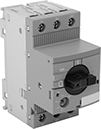 | 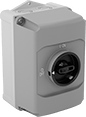 |
Enclosures with On/Off Lever |
Provide on/off control for a motor and protect it from overloads. These starters shut off the motor if current exceeds the full-load current rating. The adjustable overload relay allows you to set the exact overload current you need. All have auxiliary contacts to send a signal or connect to another device, such as an alarm or indicating light.
Note: The full-load current rating of your motor must fall within the starter’s overload current range. Match input voltage to your control circuit; motor voltage may be different. Look for the full-load current rating on the motor’s faceplate, or estimate the current rating (given the motor’s power and voltage).
Add auxiliary contact blocks to send a signal or connect to another device, such as an alarm or indicating light.
Motor Starters | Auxiliary Contact Blocks: 1 Off, 1 On | Conduit Straights | Enclosures with On/Off Lever | ||||||||||||||
|---|---|---|---|---|---|---|---|---|---|---|---|---|---|---|---|---|---|
Overload Current, amp | Switching Voltage, V AC | Electrical Phase (Horsepower @ Switching Voltage) | No. of Poles | Ht. | Wd. | Dp. | Wire Connection | UL File No. | Each | Each | Each | Each | |||||
| 1 to 1.6 | 600 | Single (1/10 hp @ 240V AC) Three (3/4 hp @ 480V AC) Three (3/4 hp @ 600V AC) | 3 | 3.5" | 1.77" | 3.2" | Screw-Clamp Terminal | E345003 | 6559K117 | 0000000 | 6559K116 | 000000 | 7537K2 | 000000 | 6559K115 | 0000000 | |
| 1.6 to 2.5 | 600 | Single (1/6 hp @ 240V AC) Three (1/2 hp @ 240V AC) Three (1 hp @ 480V AC) Three (1 1/2 hp @ 600V AC) | 3 | 3.5" | 1.77" | 3.2" | Screw-Clamp Terminal | E345003 | 6559K118 | 000000 | 6559K116 | 00000 | 7537K2 | 00000 | 6559K115 | 000000 | |
| 2.5 to 4 | 600 | Single (1/8 hp @ 120V AC) Single (1/3 hp @ 240V AC) Three (1 hp @ 240V AC) Three (2 hp @ 480V AC) Three (3 hp @ 600V AC) | 3 | 3.5" | 1.77" | 3.2" | Screw-Clamp Terminal | E345003 | 6559K119 | 000000 | 6559K116 | 00000 | 7537K2 | 00000 | 6559K115 | 000000 | |
| 4 to 6.3 | 600 | Single (1/4 hp @ 120V AC) Single (1/2 hp @ 240V AC) Three (1 1/2 hp @ 240V AC) Three (3 hp @ 480V AC) Three (5 hp @ 600V AC) | 3 | 3.5" | 1.77" | 3.2" | Screw-Clamp Terminal | E345003 | 6559K12 | 000000 | 6559K116 | 00000 | 7537K2 | 00000 | 6559K115 | 000000 | |
| 6.3 to 10 | 600 | Single (1/2 hp @ 120V AC) Single (1 1/2 hp @ 240V AC) Three (3 hp @ 240V AC) Three (5 hp @ 480V AC) Three (7 1/2 hp @ 600V AC) | 3 | 3.5" | 1.77" | 3.2" | Screw-Clamp Terminal | E345003 | 6559K121 | 000000 | 6559K116 | 00000 | 7537K2 | 00000 | 6559K115 | 000000 | |
| 8 to 12 | 600 | Single (1/2 hp @ 120V AC) Single (2 hp @ 240V AC) Three (3 hp @ 240V AC) Three (7 1/2 hp @ 480V AC) Three (10 hp @ 600V AC) | 3 | 3.85" | 1.77" | 3.19" | Screw-Clamp Terminal | E345003 | 6559K122 | 000000 | 6559K116 | 00000 | 7537K2 | 00000 | 6559K115 | 000000 | |
| 10 to 16 | 600 | Single (1 hp @ 120V AC) Single (2 hp @ 240V AC) Three (5 hp @ 240V AC) Three (10 hp @ 480V AC) Three (10 hp @ 600V AC) | 3 | 3.85" | 1.77" | 3.19" | Screw-Clamp Terminal | E345003 | 6559K123 | 000000 | 6559K116 | 00000 | 7537K2 | 00000 | 6559K115 | 000000 | |
| 16 to 20 | 600 | Single (1 1/2 hp @ 120V AC) Single (3 hp @ 240V AC) Three (5 hp @ 240V AC) Three (10 hp @ 480V AC) Three (15 hp @ 600V AC) | 3 | 3.85" | 1.77" | — | Screw-Clamp Terminal | E345003 | 6559K124 | 000000 | 6559K116 | 00000 | 7537K2 | 00000 | 6559K115 | 000000 | |
| 20 to 25 | 600 | Single (2 hp @ 120V AC) Single (3 hp @ 240V AC) Three (7 1/2 hp @ 240V AC) Three (15 hp @ 480V AC) Three (20 hp @ 600V AC) | 3 | 3.85" | 1.77" | 3.19" | Screw-Clamp Terminal | E345003 | 6559K125 | 000000 | 6559K116 | 00000 | 7537K2 | 00000 | 6559K115 | 000000 | |
Wireless Self-Powered 22 mm Panel-Mount Push-Button Switches
 |
Mount these switches in panel cutouts where changing a battery or routing wires might be difficult—they power themselves when you push the button. These switches wirelessly send a signal to a receiver (sold separately) up to 330 feet away. Since they operate equipment without requiring wires back to your control panel, they’re often used for retrofit or temporary installations. The switches come in distinct colors to help operators quickly identify them.
Switches include enough contact blocks to control the number of circuits listed.
No. of Circuits Controlled | Max. Transmission Distance, ft. | Transmission Freq., MHz | Switch Action | Dia. | For Max. Panel Thk. | Dp. Behind Panel | For Max. No. of Contact Blocks | Enclosure Rating | Choose an Actuator Color | Each | |||
|---|---|---|---|---|---|---|---|---|---|---|---|---|---|
Plastic Actuator Base—Not Illuminated | |||||||||||||
Flush | |||||||||||||
| 1 | 330 | 2,405 | Momentary | 1 1/8" | 1/4" | 1 5/8" | 3 | IP66, IP67, IP69K | Black, Green, Red | 6897N17 | 0000000 | ||
 |
Additional contact blocks can be added to control more circuits or replace the included contact block. Connect up to 32 contact blocks to one receiver.
 |
No. of Circuits Controlled | Switch Starting Position | No. of Terminals | Switch Designation | Switching Current @Voltage | Input Voltage | Max. Voltage | Mounting Location | For DIN Rail Size, mm | Ht. | Wd. | Dp. | Enclosure Rating | Each | |||
|---|---|---|---|---|---|---|---|---|---|---|---|---|---|---|---|---|
Screw-Terminal Wire Connection | ||||||||||||||||
| 2 | 2 Off or 2 On | 6 | DPDT | 5 mA @ 250V AC, 5 mA @ 250V DC | 24V AC to 240V AC/24V DC to 240V DC | 250V AC/250V DC | DIN Rail | 35 | 4 1/4" | 2 13/16" | 1 7/16" | IP20 | 6897N16 | 0000000 | ||
Cable-Pull-Actuator Emergency Stop Switches
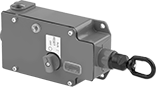 | 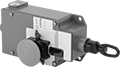 |
1 Direction with Power Indicator and Tension Indicator (IP67, NEMA 4, NEMA 13) | 1 Direction with Emergency Stop Button, Power Indicator and Tension Indicator (IP67, NEMA 4, NEMA 13) |
Immediately cut power by pulling a cable. These switches are often used to turn off production lines and material handling systems in an emergency. All have positive-force, snap-open contacts that open a circuit when actuated, even if a spring fails or the contacts stick. The contacts will remain open until you tension the cable and reset the switch.
Emergency Stop Button—Switches with an emergency stop button can be shut off either by their button or cable. They’re often installed where equipment may block access to the cable.
Power Indicator—Switches with a power indicator illuminate when the cable has been pulled.
Tension Indicator—Switches with a tension indicator let you visually confirm that tension is set correctly in the system.
Mounting | |||||||||||||||
|---|---|---|---|---|---|---|---|---|---|---|---|---|---|---|---|
For Max. Cable Lg., ft. | No. of Circuits Controlled | Switch Starting Position | No. of Terminals | Switch Designation | Switching Current @ Voltage | Max. Voltage | Actuation Force, lbf | Conduit Trade Size | Fasteners Included | Hole Dia. | No. of Holes | Each | |||
Screw-Terminal Wire Connection | |||||||||||||||
1 Direction with Power Indicator and Tension Indicator (IP67, NEMA 4, NEMA 13) | |||||||||||||||
| 250 | 1 | 1 Off or 1 On | 3 | SPDT | 6 amp @ 120V AC 2.8 amp @ 24V DC | 300V AC 250V DC | 40 | 1/2 | No | 1/4" | 4 | 65975K75 | 0000000 | ||
1 Direction with Emergency Stop Button, Power Indicator and Tension Indicator (IP67, NEMA 4, NEMA 13) | |||||||||||||||
| 250 | 1 | 1 Off or 1 On | 3 | SPDT | 6 amp @ 120V AC 2.8 amp @ 24V DC | 300V AC 250V DC | 40 | 1/2 | No | 1/4" | 4 | 65975K11 | 000000 | ||
Cable-Pull-Actuator Emergency Stop Switches with Restart Switch
1 Direction
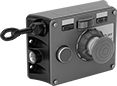 | 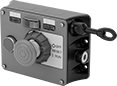 |
Left Side Cable Location | Right Side Cable Location |
Mounting | |||||||||||||||||
|---|---|---|---|---|---|---|---|---|---|---|---|---|---|---|---|---|---|
Cable Location | For Max. Cable Lg., ft. | No. of Circuits Controlled | Switch Starting Position | No. of Terminals | Switch Designation | Switching Current @ Voltage | Max. Voltage | Actuation Force, lbf | Conduit Trade Size | Bulb Voltage | Fasteners Included | No. of Holes | Hole Dia. | Each | |||
Screw-Terminal Wire Connection | |||||||||||||||||
With Emergency Stop Button, Power Indicator, Restart Button, Tension Indicator (IP54, NEMA 1) | |||||||||||||||||
| Left Side | 325 | 2 | 2 Off or 2 On | 6 | DPDT | 6 amp @ 120V AC 2.8 amp @ 24V DC | 240V AC 24V DC | 11 | 1/2 | 24V DC | No | 4 | 1/4" | 5746N301 | 000000000 | ||
| Left Side | 325 | 2 | 2 Off or 2 On | 6 | DPDT | 6 amp @ 120V AC 2.8 amp @ 24V DC | 240V AC 24V DC | 11 | 1/2 | 120V AC | No | 4 | 1/4" | 5746N201 | 00000000 | ||
| Right Side | 325 | 2 | 2 Off or 2 On | 6 | DPDT | 6 amp @ 120V AC 2.8 amp @ 24V DC | 240V AC 24V DC | 11 | 1/2 | 24V DC | No | 4 | 1/4" | 5746N11 | 00000000 | ||
| Right Side | 325 | 2 | 2 Off or 2 On | 6 | DPDT | 6 amp @ 120V AC 2.8 amp @ 24V DC | 240V AC 24V DC | 11 | 1/2 | 120V AC | No | 4 | 1/4" | 5746N202 | 00000000 | ||
2 Directions
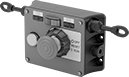 |
Two-direction switches support twice the total cable distance of one-direction switches. With pulls on each side, you can route cable in two opposite directions. These switches are often placed at the midpoint of conveyors and other long runs of equipment.
Mounting | |||||||||||||||||
|---|---|---|---|---|---|---|---|---|---|---|---|---|---|---|---|---|---|
Cable Location | For Max. Cable Lg., ft. | No. of Circuits Controlled | Switch Starting Position | No. of Terminals | Switch Designation | Switching Current @ Voltage | Max. Voltage | Actuation Force, lbf | Conduit Trade Size | Bulb Voltage | Fasteners Included | No. of Holes | Hole Dia. | Each | |||
Screw-Terminal Wire Connection | |||||||||||||||||
With Emergency Stop Button, Power Indicator, Restart Button, Tension Indicator (IP54, NEMA 1) | |||||||||||||||||
| Left Side, Right Side | 325 | 2 | 2 Off or 2 On | 6 | DPDT | 6 amp @ 120V AC 2.8 amp @ 24V DC | 240V AC 24V DC | 11 | 1/2 | 24V DC | No | 4 | 1/4" | 5746N12 | 000000000 | ||
| Left Side, Right Side | 325 | 2 | 2 Off or 2 On | 6 | DPDT | 6 amp @ 120V AC 2.8 amp @ 24V DC | 240V AC 24V DC | 11 | 1/2 | 120V AC | No | 4 | 1/4" | 5746N204 | 00000000 | ||
